


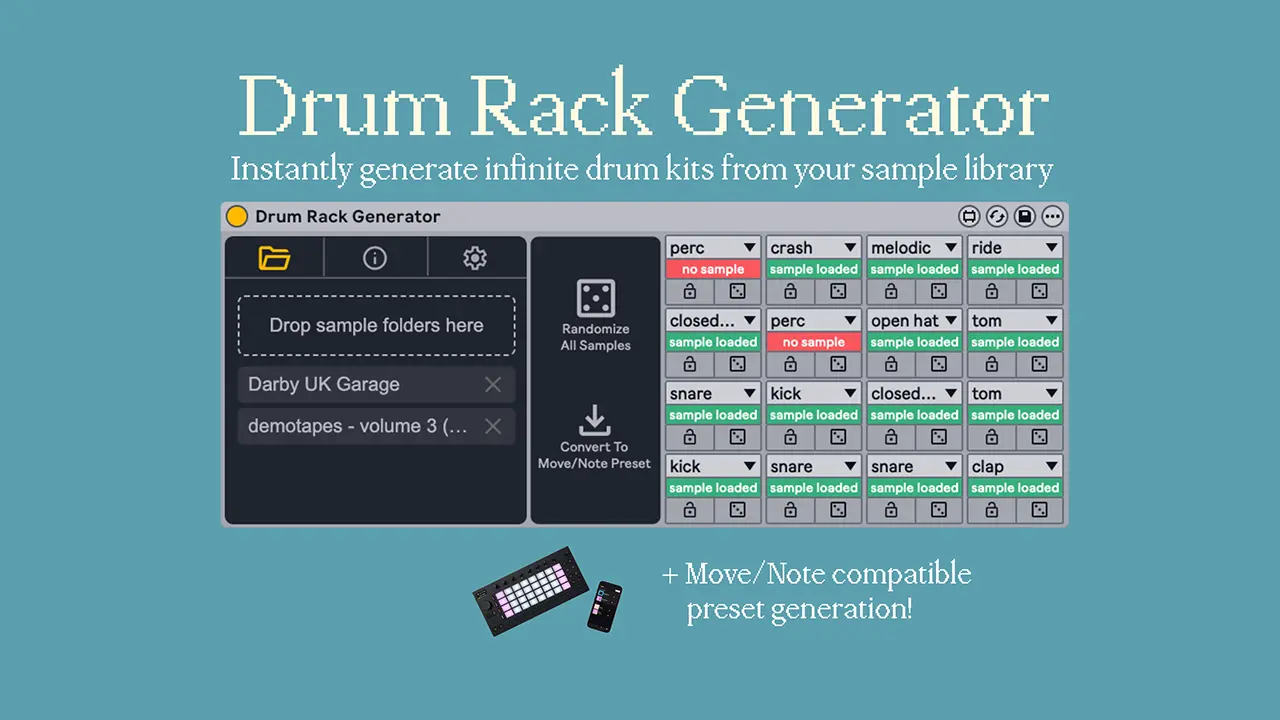
- Product: Drum Rack Generator
- Developer: windward
- Version: 1.1.1
- Format: Max for Live Device (.amxd)
- Requirements: Ableton Live 12.4 or later
- Source: windwardmusic.gumroad.com/l/drumrackgenerator
Drum Rack Generator is a Max for Live device that builds 4×4 Ableton Drum Racks from dragged-in sample folders instead of pad-by-pad manual loading. Categorization runs on filename keyword matching plus sample-length checks, sorting hits into editable pad categories before one click fills all sixteen pads. It sits at the kit-assembly stage, before arranging or mixing, drawing from an unlimited pool of loaded packs. Per-pad lock and reroll narrow results without rebuilding the whole rack. The search for a way to batch-build Ableton drum kits from sample packs lands here.
Key Takeaway
Drum Rack Generator activates once a producer has a folder of unsorted one-shots and wants a playable kit without manual pad assignment. It displaces manual drum-rack building inside Live, not sample editing or synthesis. Categorization depends on filename conventions, so inconsistently named packs need manual category correction. Producers who already keep hand-curated, fixed kits per project can skip it.
Filename and Length, Not Waveform Analysis
Every sample dragged into the device gets sorted by matching keywords in its filename against a category list, then checked against its length to catch cases the filename alone doesn’t resolve — a short transient reads differently than a sustained one even under an ambiguous name. There’s no limit on how many packs or individual samples feed this pool, so a full multi-pack library sorts in one drag rather than folder by folder.
Category rules are fully editable. A producer can retune which keywords route to which pad category, or build entirely new categories for sample sets that don’t follow standard kick/snare/hat naming.
The matching runs on filename text and duration, not on the audio content itself. A snare hit saved under a nonstandard name with no length cue to disambiguate lands in the wrong category until a reroll or a manual keyword edit corrects it.
Reroll One Pad, Lock the Rest
Generation fills a full 4×4 rack across C1–D#2 in one click, pulling from whatever categorized pool exists across every loaded pack. Rerolling touches one pad without disturbing the other fifteen, which turns “find a better kick” into a single click instead of a full regenerate.
Locking a pad pins its current sample so a full-rack reroll skips over it. Combined with single-pad reroll, a producer can build a kit in passes — lock what’s working, keep rerolling what isn’t — rather than accepting or rejecting the whole rack at once.
The grid is fixed at 4×4, sixteen pads. There’s no listed path to an 8×8 layout or to stacking multiple velocity-layered samples on a single pad.
One-Way Export to Move and Note
A single button converts a completed Drum Rack into an Ableton Move or Note-compatible preset, ready to export onto the hardware. This puts kit-building inside Live’s larger sample-management tools while still ending on a device Move or Note users can play without a computer.
The conversion runs one direction. Nothing in the feature set describes pulling an existing Move or Note preset back into Drum Rack Generator for further categorization or rerolling — the rack gets built and refined in Live first, then sent out once.
Building a Kit Without Touching the Laptop
Push controls extend the core rack-building actions — category selection, pad rerolling, navigating results — onto the hardware directly, so a kit can get built and refined without touching mouse or keyboard.
This puts the device in reach of a hands-on, screen-off workflow: loop through packs, reroll pads, lock the ones that land, all from Push. The listed scope stops at rack-building interactions; nothing indicates Push control extends to the Move/Note export step, which stays a button inside the Live device.
The Library Reloads. The Kit Doesn’t.
Saving a Drum Rack Generator preset stores the loaded sample packs and the categorization settings applied to them — which packs were dragged in, and which keyword rules sorted them. It does not store which specific sample landed on which of the sixteen pads.
Reopening a saved preset restores that source library and its category rules, then a fresh generate pass fills the pads again, which can produce a different arrangement than the session that was saved. A producer reusing the same sample pack across multiple projects gets the same organized pool each time, not the same kick on the same pad every time.
Locking pads before saving is the only way to carry a specific pad assignment forward into a reopened preset — everything else regenerates.
Built to Reshuffle, Not to Remember
Reopening a saved preset restores the loaded packs and category rules, then a fresh generate pass fills all sixteen pads over again — the library persists, the arrangement doesn’t.
FAQs
-
Does Drum Rack Generator work with older versions of Ableton Live?
Drum Rack Generator requires Ableton Live 12.4 or later, since it depends on a Live API update introduced in that version. Earlier installs, 12.3 and below, don’t expose the API calls the device uses to build and populate Drum Rack pads. Producers on older Live versions need to update before the device will load inside a Max for Live rack.
-
Can the automatic sample categorization be changed for a specific sample pack?
Categorization settings are fully editable inside the device, letting a user adjust which filename keywords map to which pad category or build new categories from scratch. Default matching relies on keyword text plus a sample-length check, which can misfile inconsistently named one-shots until the rules are adjusted. Edited category sets apply to any pack dragged into that project’s rack going forward.
-
Does Drum Rack Generator convert kits into Ableton Move or Note presets automatically?
A one-click conversion button turns a built Drum Rack into an Ableton Move or Note-compatible preset ready for export. The conversion runs one direction, from a Live-built rack outward to Move/Note format, with no listed path for pulling an existing Move or Note preset back into the device. Producers building for hardware playback arrange inside Live first, then convert once the rack is finished.
-
Does saving a device preset store the exact drum kit that was generated?
Saved Drum Rack Generator presets store the loaded sample packs and the categorization settings applied to them, not the specific sample landed on each of the sixteen pads. Reopening a preset restores that source library and its category rules, then a new generate pass fills the pads again, which can produce a different arrangement than the original session. Locking individual pads before saving keeps those specific choices out of the reroll pool.
-
Can Push hardware fully replace the computer for building a kit?
Push controls cover the core rack-building actions — category selection, pad rerolling, navigating generated results — directly from the hardware. The feature list doesn’t extend Push control to the Move/Note export step, which stays a button inside the Live device itself. A full hands-off session still ends with one conversion click back at the computer.

windward Drum Rack Generator
Drum Rack Generator is a Max for Live device that builds 4x4 Ableton Drum Racks from dragged-in sample folders instead of pad-by-pad manual loading. Categorization runs on filename keyword matching plus sample-length checks, sorting hits into editable pad categories before one click fills all sixteen pads. It sits at the kit-assembly stage, before arranging or mixing, drawing from an unlimited pool of loaded packs. Per-pad lock and reroll narrow results without rebuilding the whole rack. The search for a way to batch-build Ableton drum kits from sample packs lands here.
Price: 15
Price Currency: USD
Operating System: Windows 10, macOS 11
Application Category: Multimedia
4