


- Publisher: YRAKI
- Product: LayerLab
- Release: ARCADiA
- Version: 1.2
- Format: Max for Live Device (.amxd)
- Requirements: Ableton Live 12 or higher
In the world of sound design, the most iconic sounds are rarely born from a single source. They are crafted, fused, and layered from multiple elements to create something entirely new and unique. This process, however, can be tedious and time-consuming. Dragging, dropping, aligning, and tweaking countless samples often pulls you out of the creative zone. What if you could harness the power of complex layering in an instrument that was immediate, inspiring, and endlessly surprising?
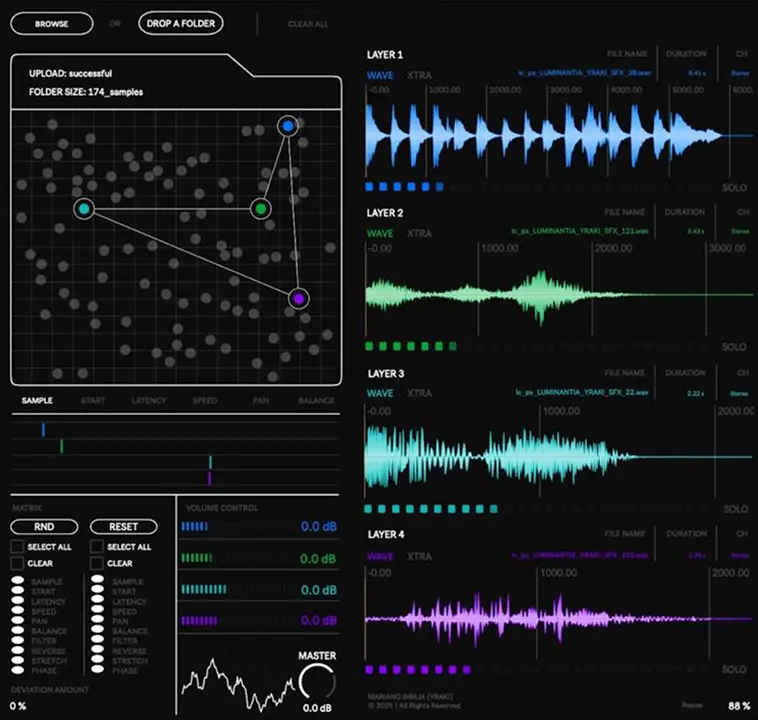
Meet YRAKI LayerLab, a revolutionary Max for Live instrument dedicated to the art of one-shot sound generation through stochastic sample layering. It’s a sound designer’s dream, built to be your personal factory for creating unique drum hits, foley effects, synth stabs, and textural impacts. Simply point it to a folder of your favorite sounds, trigger a single MIDI note, and listen as LayerLab instantly generates a rich, complex, and completely new sound.
The Art of Controlled Chaos
The core of LayerLab is its powerful four-slot layering engine. Every time you send it a MIDI note, the instrument intelligently pulls samples from your chosen folder and distributes them across its four independent layers. But this is not a purely random process; it’s a system of controlled chaos where you set the boundaries and LayerLab explores the possibilities within them.
For each of the four layers, you have deep control over how the sample is played back:
- Sample Selection & Position: Define which samples get chosen and from what point they begin playing. Instantly generate variations by starting a familiar sound from an unexpected place.
- Playback Latency: Introduce subtle (or extreme) timing variations between the layers. Create flam-like effects, pre-shifted transients, or loose, organic textures with ease.
- Speed & Pitch: Choose between two distinct playback modes. Use the classic “Tape” style, where playback speed directly affects pitch for authentic vinyl stops and speed-ramping effects. Alternatively, select the “Time Stretch” mode to alter the sample’s duration while preserving its original pitch, perfect for creating rhythmic variations without melodic changes.
- Panning & Dynamic Balance: Sculpt the stereo image by placing each layer precisely in the mix. Crucially, the “Dynamic Balance” control adjusts each layer’s volume relative to the others, allowing you to create a perfectly blended composite sound without ever touching a traditional gain fader.
Fine-Tune Your Creations with Surgical Precision
Once you have your foundational layers, the XTRA window gives you another level of surgical sound-shaping tools. For each layer, you can independently adjust:
- Playback Direction: Instantly reverse a layer to create classic backmasking effects or unsettling textures.
- Filtering: Shape the tonal character of each component with dedicated Low-Pass and High-Pass filters, allowing you to seamlessly blend disparate sounds by carving out frequency space.
- Time Stretch Options: Dive deeper into the time-stretching algorithm to refine the texture and artifacts of your sound.
- Phase Inversion: Flip the phase of the left or right channel to manipulate stereo width and correct for potential phasing issues between layers.
The Randomization Matrix: Your Idea Engine
The true power of LayerLab is unlocked within its randomization matrix. This isn’t a simple “dice roll” that changes everything at once. It’s a sophisticated control center that lets you choose exactly what you want to randomize and by how much.
Select which parameters to affect—from sample selection and pitch to filtering and panning—and set deviation amounts for controlled, musical variation. This allows you to generate subtle, evolving iterations of a sound or completely transform it into something unrecognizable with a single click. It’s an endless source of inspiration, serving up “happy accidents” on demand and breaking you out of creative ruts.
New in v1.2: Global ADSR for Total Control
The latest version of LayerLab introduces a global ADSR envelope on the main output, adding a critical layer of performance and shaping capabilities. This allows you to sculpt the overall amplitude of the generated sound with precision. By setting a zero attack, full sustain, and zero release, LayerLab effectively transforms into a gate, where the sound plays for the exact duration of the MIDI note you hold down. This is perfect for creating playable, percussive kits or transforming complex textures into rhythmic, staccato patterns.
A Workflow for Decisive Creators
LayerLab is designed with a specific, powerful workflow in mind: it does not store presets. This is a deliberate feature, not a limitation. It encourages you to act like a sound designer in a high-end studio: create, capture, and commit. When you generate a sound you love, record it to audio immediately. This workflow keeps you moving forward, building a truly unique and personal library of one-shot samples that are 100% yours.
Stop searching through the same old sample packs. Start building your own sonic identity. Load a folder, let LayerLab work its magic, and capture the results. Your next signature sound is just one click away, free download LayerLab now!
