


- Product: Tactical Nuke
- Developer: 3 Sigma Audio
- Version: 1.1.0
- Format: VST3, AAX, AU
- Requirements: Windows 7 or later, macOS 10.8 or later
- Source: 3sigmaaudio.com/items/tactical-nuke/
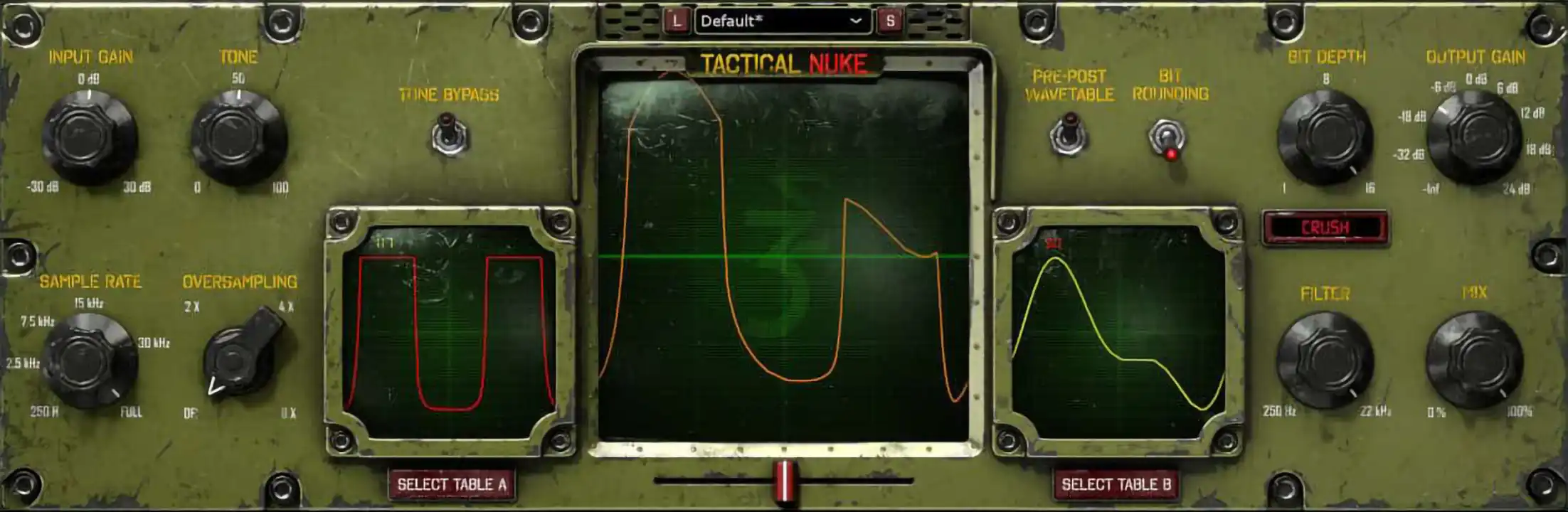
Distortion plugins rarely commit to both ends of the spectrum at once. Tactical Nuke does, which is why it’s the focus of this review: 512 stock wavetables, three-way bit manipulation, and a preamp/tone stage spanning mild analog grit to full digital breakdown. Two of those tables blend at once, with custom import for outside sources, and oversampling up to 8x keeps aliasing in check for cleaner high-gain tones. At $35, it works as a one-shot insert for guitar tracks, drum busses, and sound-design layers rather than a mix-bus coloring tool.
Key Takeaway
Tactical Nuke pairs 512-table wavetable waveshaping with three-way bit manipulation, covering ground from mild analog grit to full digital breakdown in one $35 plugin. Producers chasing broadband, hi-fi saturation instead of destructive character will find the wavetable and bit-crushing stages built for extremity, not subtlety.
One Waveshaper, Two Tables Active
The wavetable engine treats a stored audio clip as a waveshaper, running incoming signal through whichever of the 512 built-in tables is selected. Two tables can sit active at once, with a blend control moving continuously between them rather than switching in steps. The resulting harmonic content tracks the shape of the table itself, so a jagged, noisy table produces buzzier top end than a smooth sine-derived one.
Importing outside audio as a custom table opens the engine to material the stock set doesn’t cover — a drum transient, a vocal chop, a field recording — each imposing its own harmonic fingerprint on whatever passes through. Dialing in a usable table takes longer than picking a preset, since an imported clip’s length and shape directly determine how aggressive or musical the result reads at different input levels. A metal guitar bus and a synth lead calling for the same aggressive breakup would still land on different tables, since a harmonic profile that reads as cutting on a guitar can read as brittle on a sustained pad.
Only two tables run simultaneously, so building a slowly evolving morph across three or more sources means switching presets or automating table selection rather than crossfading a longer chain in one pass.
Tone Ahead of the Preamp, Not After
The preamp stage runs an analog-style saturation modeled after guitar amp and pedal circuits, with the input gain knob moving from a light density increase up through the kind of hard breakup associated with an overdriven pedal. Push it past the midpoint and the top end starts compressing into itself, characteristic of analog-style clipping rather than the harder edges further down the signal chain. A tracking vocal or bass DI benefits from stopping here, before the wavetable or bit stages introduce more digital-sounding artifacts.
A bypassable tone control sits ahead of the preamp stage rather than after it, shaping the frequency content that actually hits the distortion circuit instead of just EQing the output. Rolling it toward the low end before hitting the preamp thickens the breakup character; rolling it toward the high end sharpens the attack that gets clipped. Bypassing it returns the preamp to a flatter input, useful for comparing the tone-shaped and unshaped versions of the same setting without resetting the gain.
The tone control only affects material before the preamp stage, so it has no effect on tonal balance once a signal has already passed into the wavetable or bit-manipulation stages further down the chain — shaping the output at that point requires the separate output filter instead.
Bit Buttons Reach What the Knob Can’t
Sample reduction works independently of the bit-depth controls, dropping the effective sample rate of the incoming signal down as far as 250Hz to generate the stair-stepped aliasing and metallic artifacts associated with lo-fi sampling hardware. At the extreme end, pitched material loses its fundamental entirely and reads as noise-adjacent texture rather than a recognizable note, which suits transition risers and impact layers more than tonal instruments.
Bit crushing works the more familiar axis, stepping bit depth down from 16 bits to a single bit and adding quantization noise as the resolution drops. The masking knob applies a bitwise mask using a single integer tied to the knob’s position, cutting out specific bit patterns rather than uniformly lowering resolution — the resulting distortion has a more clipped, gated character than straight bit crushing at an equivalent setting.
Bit buttons hand over the same masking function bit by bit, letting an engineer toggle individual bits on or off instead of relying on one knob’s integer sweep. Programming a specific pattern this way is slower than turning a knob, but it produces combinations the masking knob can’t reach on its own, since the knob only steps through the integers a rotary control can address in order.
Stacking sample reduction with aggressive bit crushing pushes the output well past anything read as “distortion” in a conventional sense — a mix engineer chasing tape-style saturation has no real use for this section, while a sound designer building impact hits or a metal engineer sculpting an already-scooped guitar tone gets the more direct payoff.
No Notch Filtering Built In
Oversampling runs from 2x up to 8x, recalculating the signal at a higher internal rate before the wavetable and bit stages introduce their aliasing, then downsampling back afterward. Set high, it keeps sharp digital destruction from folding unwanted frequencies back into the audible range; set low or off, some of that aliasing survives and adds an extra layer of grit some engineers want deliberately. Running 8x oversampling on every instance in a session with a dozen guitar tracks adds real CPU load, which is the tradeoff for the cleaner top end.
The output filter sits after everything else in the chain — a two-pole, slightly resonant low-pass stage built specifically to tame the harshness that heavy distortion, sample reduction, and bit crushing generate together. Sweeping it down pulls the harshest aliasing artifacts out of the top end without undoing the distortion itself, since it’s shaping frequency content rather than the waveshaping or bit-depth processing that created it.
The filter only has one low-pass shape, so surgical notch or multiband cleanup on a specific resonant frequency still needs a separate EQ after Tactical Nuke — useful for taming overall harshness across the board, not for pulling out one specific ringing frequency.
FAQs
-
Is Tactical Nuke built for subtle saturation or heavier distortion effects?
Tactical Nuke’s preamp and tone stage cover mild analog-style warmth on their own, without touching the wavetable or bit-manipulation sections further down the chain. Pushing signal into the wavetable waveshaper or bit-crushing controls moves well past subtle coloring, into aliasing, gating, and digital breakdown territory. A mix bus wanting gentle tape-style glue would stop at the preamp stage instead.
-
Does Tactical Nuke support the VST2 plugin format?
Tactical Nuke ships only in VST3, AU, and AAX formats, with no VST2 build available. Steinberg discontinued VST2 licensing for newer developers, and 3 Sigma Audio is not permitted to distribute a VST2 version under that restriction. A studio running an older host that only reads VST2 plugins needs a VST3-compatible DAW version or a wrapper to load Tactical Nuke.
-
Can I import custom wavetables into Tactical Nuke, or am I limited to the 512 stock tables?
Custom wavetable import is built into Tactical Nuke alongside its 512 stock tables, so any audio clip can serve as a waveshaper. Only two tables run active and blended at once, whether stock or imported, so layering three or more sources means switching presets instead of crossfading a longer chain in real time. A drum transient or a vocal chop both work as import sources.
-
Does Tactical Nuke come with preset content, and who made it?
Seventy-four presets built by Mick Gordon — the composer behind the Doom and Killer Instinct scores — shipped with Tactical Nuke as of the 1.0.1 update. The preset count has stayed at 74 since that release, with no additional preset packs announced afterward. A producer building a large custom preset library from scratch will need to design most tones by hand rather than relying on expansion packs.
-
What DAWs and operating systems does Tactical Nuke support?
Tactical Nuke runs on Windows 7 and later and macOS 10.8 and later, in VST3, AU, and AAX formats. The developer lists Pro Tools 11+, Logic, Cubase, Studio One, Reaper, and FL Studio as supported hosts, with Ableton listed for the Windows version 10 and above. A Mac-based Ableton user should confirm AU compatibility before buying, since the developer’s compatibility list doesn’t cover that combination.
3 Sigma Audio Tactical Nuke
Distortion plugins rarely commit to both ends of the spectrum at once. Tactical Nuke does, which is why it's the focus of this review: 512 stock wavetables, three-way bit manipulation, and a preamp/tone stage spanning mild analog grit to full digital breakdown. Two of those tables blend at once, with custom import for outside sources, and oversampling up to 8x keeps aliasing in check for cleaner high-gain tones. At $35, it works as a one-shot insert for guitar tracks, drum busses, and sound-design layers rather than a mix-bus coloring tool.
Price: 35
Price Currency: USD
Operating System: Windows 7, macOS 10.8
Application Category: Multimedia
4.1