


- Product: Contura
- Developer: Ekho
- Version: 1.0.0
- Format: VST
- Requirements: Windows 10 or later
- Source: ekhosound.com/products/contura
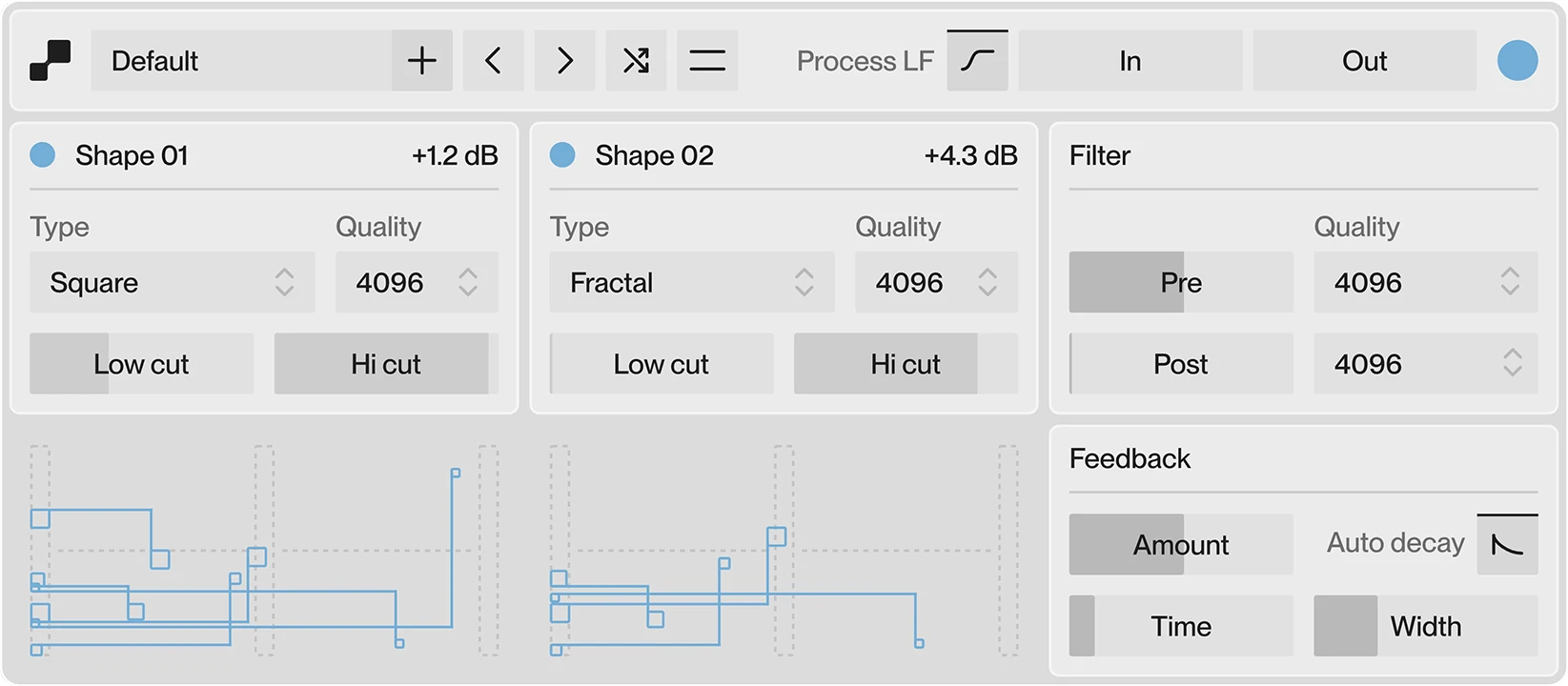
Contura is a spectral audio processor that generates new harmonic content by analyzing the input signal in the frequency domain, identifying the most prominent frequency peaks, and synthesizing harmonics from those peaks using one of ten shaping algorithms. Two independent shape generators run in parallel — each carrying its own analysis, shaping mode, and gain — with pre- and post-processing spectral filters flanking the generation stage and a feedback loop feeding the processed output back through a controllable delay line. The primary differentiator is that harmonic generation is peak-tracked in real time: the harmonics follow the input’s dominant spectral events rather than applying fixed-ratio overtones across the full frequency range.
Key Takeaway
Contura activates in sessions where the goal is spectral transformation rather than saturation or enhancement — material that needs new frequency content synthesized from its existing peaks, not just harmonic excitement layered over a fixed frequency range. The feedback path turns it into a self-feeding spectral generator capable of sustaining and smearing sound independently of the source. The pre-filter threshold gate means it does not add harmonics to low-level noise or release tails; material that requires harmonic generation on quiet passages will need gain staging before the input. Producers after a conventional tube or tape harmonic exciter — fixed harmonic ratios, single-stage processing — route around it.
Dual Shape Generators and Peak-Tracking Analysis
Contura runs two independent shape generators, each analyzing the input signal’s most prominent frequency peaks before generating harmonics. This is not a full-spectrum saturation stage — the analysis selects peaks, and harmonics are produced only for those peaks, leaving non-prominent frequencies largely unaffected. On a dense mix bus, that means the loudest spectral events get harmonic extension while quieter material passes without added complexity; on a sparse source like a solo lead or isolated synthesizer, the effect concentrates on the exact pitches present in the signal.
Shape 1 and Shape 2 carry independent mode selections and gain controls, so two different harmonic algorithms can run simultaneously on the same analysis. Stacking a denser algorithm on Shape 1 at low gain with a sparser algorithm on Shape 2 at higher gain produces harmonic relationships that neither algorithm generates alone. This parallel structure is the primary reason for having two generators rather than a single multi-mode stage — the interaction between their outputs produces timbral combinations outside the range of any single shaping algorithm.
Ten Shaping Modes — Timbral Range Across the Algorithm Set
The ten shaping modes produce algorithmically distinct harmonic characters. Some add overtones in strictly ordered harmonic series above the detected peaks; others generate subharmonic content below the fundamental; others fold, smear, or scatter harmonics non-linearly. The mode selection is the primary tonal decision in Contura — it determines the spectral relationship between the input’s dominant peaks and the synthesized content that gets added around them.
Changing modes mid-patch produces audible spectral jumps rather than smooth transitions, because the harmonic structure being generated shifts abruptly. For sound design applications where that jump is the intended event, this is a direct tool; for continuous tonal shaping where mode transitions need to feel smooth, mode switching requires automation envelope treatment in the host. Each mode interacts differently with the feedback loop, which alters how successive passes of the signal build in harmonic density.
Pre- and Post-Spectral Filters, FFT Quality Settings
The signal chain runs: input gain → pre-filter → harmonic generation → post-filter → feedback → output gain. The pre-filter removes frequency content below a set threshold before the analysis stage — this gates which frequencies participate in the peak detection and therefore in harmonic synthesis. Raising the pre-filter threshold removes low-level content from the analysis pool, preventing harmonics from being generated based on noise floor events or dense low-frequency mud.
The post-filter applies after generation, shaping the frequency profile of the synthesized output before it reaches the feedback path or the output stage. Both filters carry independent FFT quality settings: 256 (very low) through 4096 (very high), with higher FFT sizes producing smoother frequency-domain filtering at the cost of increased latency. At 4096, the filter becomes a precise spectral scalpel; at 256, it shapes broadly with minimal processing overhead. The quality setting is a workflow decision — sound design passes at maximum quality for resolution, real-time tracking or live use at medium quality to maintain latency tolerance.
Feedback Loop — Delay Time, Stereo Offset, Auto-Fade
The feedback section feeds the plugin’s output back into its own input through a short delay line. Delay time, feedback amount, and a stereo offset between left and right delay times are independently controlled. The stereo offset widens the spatial distribution of the feedback — the left and right channels accumulate harmonic content at different rates, which moves the stereo image over time as the feedback builds. At long delay times with high feedback amounts, successive passes through the generation stage produce dense accumulations of harmonic content that bear minimal relationship to the original source.
An Auto-Fade function drops the feedback amount to zero when no input signal is present, preventing runaway feedback accumulation in gaps between material. Without it, a high-feedback setting on a reverberant tail or sustained pad leaves harmonic content building in the silence after the source has stopped. Auto-Fade is a stability mechanism — sessions with material that cuts cleanly benefit from it; sessions built on continuous sustained sources where feedback continuity is the goal switch it off.
The feedback loop is the control that determines whether Contura behaves as a spectral enhancer or as a generative transformation tool. Low feedback amounts confine it to additive harmonic shaping. High amounts push the output toward self-sustaining spectral mutation.
Smart Randomization, Per-Parameter Locking, Resizable Interface
The randomization system uses a smart algorithm that constrains random values to ranges producing usable results rather than uniform random distribution across each parameter’s full range. Right-clicking the randomize button opens section selection — individual sections of the signal chain can be included or excluded from each randomization event. A locked parameter bypasses both randomization and preset recall; any control that is producing a specific intended result can be frozen while the rest of the patch updates around it.
The interface is freely resizable and retains its last-used size between sessions. Light and dark themes are selectable, and spectral visualization can be toggled off independently of processing — on lower-specification systems, disabling the visualization reduces rendering overhead without affecting the audio path. These are operational details rather than sonic capabilities, but in a plugin whose CPU behavior under full dual-generator, high-FFT, high-feedback conditions can be significant, the ability to selectively remove rendering load matters.
No CLAP, No Modulation Routing, No AAX
Contura ships in VST3 and AU formats only — no CLAP format and no AAX, removing it from Pro Tools sessions without a VST-to-AAX wrapper. There is no internal modulation routing: LFO, envelope follower, or step sequencer cannot be assigned to parameters within the plugin; modulation requires the host’s own automation lanes. The ten shaping mode algorithms produce deterministic spectral outputs for a given mode selection — the plugin does not include a spectral morphing engine that interpolates continuously between mode characters. Producers expecting mode-to-mode timbral interpolation or internal per-parameter modulation as part of the core design are working outside Contura’s architecture.
FAQs
-
What is the practical difference between using one shape generator versus both?
Shape 1 and Shape 2 run independent analyses, independent mode selections, and independent gain controls — using both produces the additive interaction between two distinct harmonic structures synthesized from the same source peaks. A single generator produces the harmonic character of its selected mode; both generators together produce a composite character that neither mode generates independently, including harmonic content at frequencies that result from the amplitude relationship between the two generators’ outputs. The sonic difference between one and two active generators is consistently larger than the difference between adjacent mode selections on a single generator.
-
Does the pre-filter gate affect the dry signal or only the analysis input?
The pre-filter sits in the processing chain before harmonic generation — it removes frequency content below the set threshold from the signal that the shape generators analyze and process, not from the dry path. If the plugin is running in a wet/dry parallel configuration, the dry signal is unaffected by the pre-filter’s gating behavior. At very high pre-filter thresholds, the plugin generates no harmonics during low-amplitude passages, which can create audible gating artifacts at the onset of harmonic generation; gain staging before the input handles this.
-
How does the stereo offset in the feedback path affect mono compatibility?
The stereo offset introduces different delay times on the left and right feedback channels, producing a widened stereo image in the feedback accumulation. When the stereo output is summed to mono, the left and right feedback paths arrive at different phases and partially cancel, reducing the apparent level and density of the feedback content in mono relative to stereo. Sessions targeting mono or near-mono playback conditions — AM radio, single-driver devices — need to check feedback-heavy patches specifically in mono, as the collapse can remove a significant portion of what the feedback was contributing.
-
Can the feedback loop be used without the harmonic generators active?
The feedback path processes whatever comes through the signal chain — if the shape generators are set to zero gain or their output is minimized, the feedback loop still operates on the filtered input signal, producing frequency-domain delay feedback without harmonic synthesis. At high feedback amounts in this configuration, Contura becomes a spectral delay accumulator, building resonant spectral patterns from the input’s own frequency content. The pre- and post-filters then act as spectral EQ on the feedback accumulation, controlling which frequency bands build over successive passes.
-
Is there a free trial available?
Ekho offers a free trial download for Contura through the product page at ekhosound.com. The trial allows full evaluation before purchase; licensing details and trial duration are documented on the Ekho support page. No review scores are currently posted on KVR or Plugin Boutique, as the plugin was released in early June 2026 and the evaluation period is short.
Ekho Contura
Contura is a spectral audio processor that generates new harmonic content by analyzing the input signal in the frequency domain, identifying the most prominent frequency peaks, and synthesizing harmonics from those peaks using one of ten shaping algorithms. Two independent shape generators run in parallel — each carrying its own analysis, shaping mode, and gain — with pre- and post-processing spectral filters flanking the generation stage and a feedback loop feeding the processed output back through a controllable delay line. The primary differentiator is that harmonic generation is peak-tracked in real time: the harmonics follow the input's dominant spectral events rather than applying fixed-ratio overtones across the full frequency range.
Price: 29.99
Price Currency: EUR
Operating System: Windows 10
Application Category: Multimedia
3.9