


- Product: VEA (Voice Enhancement Assistant)
- Publisher: iZotope
- Version: 1.1.0
- Format: AU/VST3/AAX
- Requirements: Windows 10 or later, macOS 13.7 or later (Apple Silicon or Intel Core processor)
- Source: https://www.izotope.com/en/products/vea
iZotope VEA serves as an affordable entry point into vocal processing but falls short of competing solutions in performance. At $29, it may appeal to beginners, but users with challenging audio would benefit from investing in superior alternatives. VEA works best as a polishing tool for already decent recordings.
The $29 Vocal Assistant
As a content creator, I know the struggle of trying to achieve professional-sounding vocals without a degree in audio engineering. The promise of a simple, AI-powered tool that can instantly clean up and enhance your voice is incredibly appealing. So, when iZotope—a name synonymous with industry-leading audio repair—released the VEA (Voice Enhancement Assistant), I was eager to see if it could deliver on that promise.
My goal here is to give you my honest, first-hand account of how VEA performs in real-world scenarios and help you understand if its simplicity and brand name justify a place in your toolkit.
Key Takeaway
iZotope VEA is an extremely affordable and simple-to-use vocal enhancement plugin, but its performance falls short of key competitors. While it can add a touch of polish to already well-recorded audio, its lack of de-reverb and limited restoration capabilities make it a less effective solution for challenging recordings common in home studios.

How It Works: The Three-Knob Approach
VEA’s main selling point is its simplicity. It boils down complex audio processing into three intuitive controls, leveraging technology from iZotope’s flagship products like RX, Ozone, and Nectar.
- Clean: This knob handles noise reduction. In my tests on recordings with HVAC noise and background chatter, it was effective at reducing consistent, low-level sounds but struggled with intermittent or more complex noise.
- Shape: This is an AI-tailored EQ that analyzes your voice and applies a corrective tonal curve. It also includes Audiolens technology for matching reference tracks, though I found its effectiveness varied significantly depending on the quality of the source audio.
- Boost: This control combines compression and limiting to even out dynamics and increase loudness. It works well for adding a final touch of polish, but can introduce artifacts if pushed too hard.
The Elephant in the Room: Limitations and Competition
While VEA is easy to use, my testing revealed several significant limitations that are crucial to understand.
The Lack of De-reverb
The most critical omission is the complete absence of any de-reverb processing. For the target audience of podcasters and content creators often recording in untreated rooms, room reflections and echo are a primary issue. A tool designed to enhance voice that cannot address this common problem is at a major disadvantage.
Performance Compared to Competitors
In direct A/B tests, and in line with other professional reviews, VEA consistently underperformed against similarly-priced or slightly more expensive competitors.
- Supertone Clear offered superior noise reduction and included the de-reverb functionality that VEA lacks.
- Accentize dxRevive provided more transparent processing with better management of audio artifacts.
The Need for Good Source Audio
This is not a “magic bullet” restoration tool. I found that VEA requires already decent source audio to achieve meaningful improvements. On recordings with significant issues, it struggled to make a positive impact. It’s better described as a “polishing” tool than a “repair” tool.
Pros and Cons
| Pros | Cons |
| Extremely affordable entry point at $29. | Limited effectiveness on challenging or noisy source material. |
| Simple three-control interface is ideal for beginners. | No de-reverb processing, a major limitation for home studio recordings. |
| Built with proven technology from iZotope’s flagship products. | Performance is consistently rated as inferior to key competitors. |
| Includes seven voice presets for different content types. | Marketing demonstrations have been noted to use unmatched gain levels, potentially misleading users. |
Who Should Actually Buy This?
Given its limitations, my recommendation for VEA is very specific. I would suggest this plugin for:
- Beginner Content Creators with an already decent recording setup who need a minor, final polish.
- Casual Podcasters who understand the plugin’s limitations and are looking for an affordable, simple enhancement tool.
- Budget-Conscious Users who want to own a plugin with the iZotope brand name at an entry-level price.
I would not recommend this for anyone dealing with challenging audio, such as recordings with significant background noise, room echo, or other serious issues.
Frequently Asked Questions (FAQ)
-
Can VEA fix my reverby room recordings?
No. In my analysis, VEA’s biggest weakness is that it lacks any de-reverb processing, making it unsuitable for reducing room echo.
-
Is VEA suitable for professional podcast editing?
For professional applications, its effectiveness is limited. Competitors like Supertone Clear and Accentize dxRevive offer superior restoration capabilities that are better suited for professional work.
-
How does VEA compare to the full version of iZotope RX?
VEA is a highly simplified tool for basic enhancement. The full version of RX is a comprehensive, professional-grade suite with dozens of surgical tools designed to fix a wide range of challenging audio problems.
Final Verdict
iZotope VEA is an interesting, if flawed, entry into the simplified vocal processing market. Its $29 price point is undeniably attractive, and its three-knob interface is as simple as it gets. However, its performance falls significantly short of competing solutions, and the lack of a de-reverb feature is a critical omission for its target audience.
While it can add a bit of shine to an already good recording, it is not the powerful restoration tool that the iZotope name might suggest. For users facing real-world audio challenges, I would recommend investing in a more capable alternative.
iZotope VEA

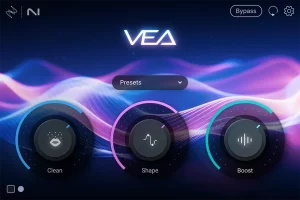
An AI-driven vocal processing plugin designed to simplify professional voice treatment for content creators using three intuitive controls: Clean, Shape, and Boost.
Price: 29
Price Currency: USD
Operating System: Windows 10, macOS 13.7
Application Category: Multimedia
3.6