


- Product: magic.CURVE
- Developer: Music By Mattie
- Version: 1.0.2
- Format: VST3, AAX, AU
- Requirements: Windows 10 or later, macOS 11 or later
- Source: musicbymattie.com/magic-curve
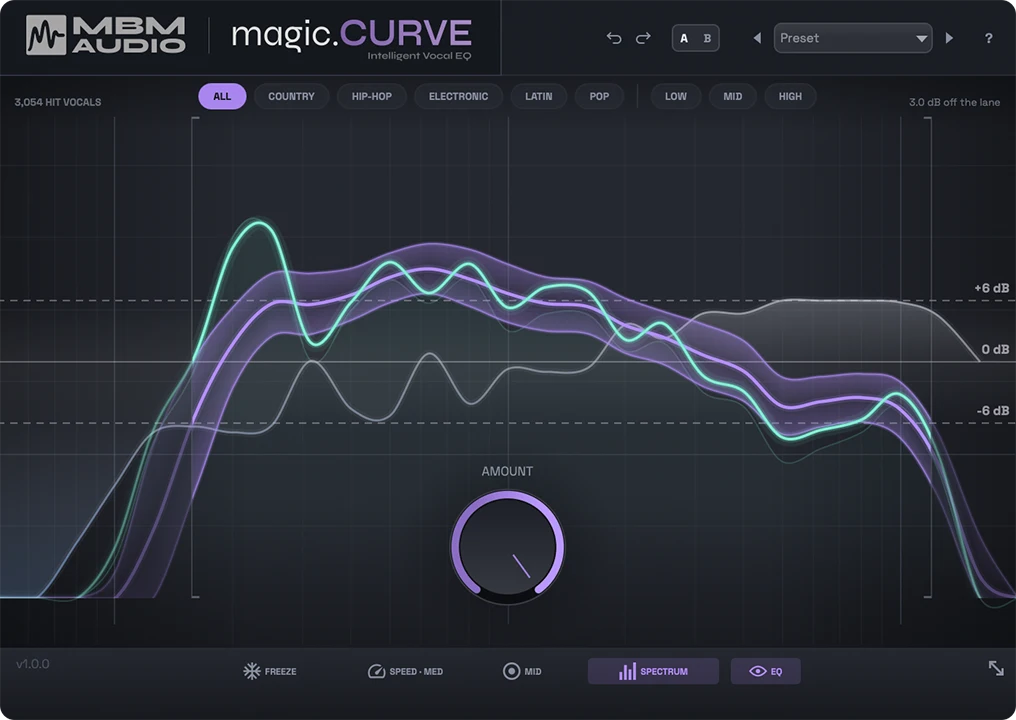
magic.CURVE is an automatic vocal EQ plugin that analyzes a vocal’s long-term spectrum live and applies corrective EQ pulling its tonal balance toward a measured target band, not a hand-drawn preset curve. The target comes from 3,054 separated, bias-corrected Billboard vocal stems spanning 1990 to 2025, split into nine lanes across six genres and three voice registers. One AMOUNT knob sets how far the correction moves toward that target, capped by adjustable depth limits. It answers the search for a vocal EQ built from measured hit data, not ear-tuned presets.
Key Takeaway
Activates when a vocal’s overall tone needs to sit closer to commercial references before mixing continues. It displaces manual by-ear EQ moves and A/B-ing against reference tracks, not compression or leveling. Correction targets long-term tonal balance only; it doesn’t de-ess, remove room sound, or fix pitch. Engineers riding a vocal’s level need a separate tool alongside it.
SPEED Runs From Eight Seconds to 1.5
The plugin reads a vocal’s long-term spectrum rather than reacting to individual transients, comparing that running average against the purple “hit pocket” band for the selected target and nudging the vocal’s tonal balance toward it. Correction is tilt-first — it moves the broad shape of the spectrum toward the target confidently while treating narrow, detailed peaks and dips more gently, rather than flattening the vocal to match the target curve exactly.
SPEED sets how fast that running average adapts: roughly eight seconds at Slow, four seconds at the Medium default, and about 1.5 seconds at Fast. A slower setting produces a calmer, more stable average across a whole take, while Fast reacts closer to phrase by phrase; FREEZE stops the averaging entirely, holding whatever correction curve is currently active so a match found on one strong phrase doesn’t keep shifting as quieter or different-toned material plays.
Because the analysis runs on a long-term average rather than instantaneous level, a vocal that changes character dramatically within a single take — a verse sung soft against a shouted chorus — gets one blended correction curve rather than two separate ones, unless FREEZE or a preset swap is used deliberately between sections. Engineers tracking a vocal with wildly different registers in one pass plan for that split manually.
One Knob, Two Draggable Ceilings
AMOUNT is the plugin’s single primary control, running from 0%, where the vocal passes untouched, to 100%, where the correction pushes as far toward the target as the depth limits allow — it doesn’t uncap the correction at high settings, only intensifies how much of the available range gets used. The default sits at 50%, framed as a starting point rather than a value to return to.
Two draggable lines set the ceiling on how far AMOUNT can push in either direction, defaulting to plus and minus 6 dB and adjustable up to 9 dB each way. Dragging the boost line down to 0 dB turns the correction cut-only, removing only what sits above the target band; dragging the cut line to 0 dB does the reverse, adding only what sits below it.
The eight built-in presets aren’t separate processing modes — Dull/Dark Mic, Harsh/Bright, Boomy/Muddy, Thin/Small, Air Only, and Warmth Only are specific combinations of these same depth-limit and frequency-range settings, not a different correction algorithm underneath. An engineer who understands the depth limits directly can build the same result as any preset without opening the preset menu at all.
Auto-Follow Until You Drag It
Low Edge marks both an always-on high-pass and the bottom boundary of where correction begins, auto-following the vocal’s own low-frequency content by default rather than sitting at a fixed frequency. Dragging it manually overrides that auto-tracking, double-clicking returns it to Auto, and dragging it to the floor bypasses the high-pass entirely. High Edge marks the top boundary of the correction range, adjustable from roughly 12 kHz out toward 20 kHz to include or exclude the very top of the spectrum.
Narrowing that range has a specific use: pushing Low Edge up past where High Edge sits isolates correction to only the band above that point. That’s the exact mechanism behind the Air Only preset — not a special top-end-only algorithm, just the same two edge markers moved close together at the top of the spectrum.
Because Low Edge auto-follows the vocal by default, a vocal with an unusually low or high fundamental shifts where correction starts without the engineer setting anything manually. Producers who need an identical, fixed correction window across multiple singers set Low Edge manually instead of leaving it on Auto.
Genre or Register, Never Both at Once
Six genre lanes and three voice-register lanes draw from the same 3,054-vocal dataset, but a genre lane targets the tonal style typical of that kind of record, while a voice-register lane — Low, Mid, or High — targets a singer’s relative range regardless of genre. Only one lane can be active at a time; selecting a voice register clears whichever genre was selected, and the reverse.
All Hits, the broadest genre lane, averages across the full 3,054-vocal dataset rather than any single style, making it the least genre-specific of the six and the default the documentation points to when a style isn’t decided yet. Voice-register lanes are described as working best on sung material specifically, not rapped or spoken vocal takes, since the register measurement assumes sustained pitched content.
A hip-hop vocal that’s mostly rapped fits a genre lane more reliably than a voice-register lane, given the register lanes’ dependence on sung pitch content. A sung pop or R&B vocal can reasonably use either a genre lane or a voice-register lane, depending on whether style or the singer’s own range matters more to the mix.
Dynamics Are magic.RIDE’s Job
Correction is limited to tonal balance specifically — the plugin doesn’t compress or level dynamics, doesn’t de-ess, doesn’t remove reverb or room tone, and doesn’t correct pitch. Leveling a vocal’s dynamics runs through a separate, purpose-built plugin from the same developer, magic.RIDE, rather than through any control inside magic.CURVE itself.
A sibilant vocal that also sits tonally under the hit pocket gets its tonal balance corrected while the sibilance itself passes through untouched, since de-essing isn’t part of what the correction curve targets. MID processing, when enabled on a stereo track, restricts correction to the center image only and leaves the sides untouched, keeping a doubled or widened vocal’s stereo spread intact while still correcting the lead’s tone.
magic.RIDE is sold and installed as its own separate plugin rather than a mode inside magic.CURVE, so covering both tonal correction and level-riding on one vocal means two separate purchases and two inserts in the chain, not one plugin with a second mode. Nothing in magic.CURVE’s own controls — AMOUNT, the depth limits, Low Edge, or High Edge — touches level or dynamics at all.
FAQs
-
How is magic.CURVE different from a standard parametric EQ?
A standard parametric EQ requires choosing bands, frequencies, and gain amounts by ear, one at a time. magic.CURVE instead compares a vocal’s live spectrum against a measured target band and applies the correction automatically, adjusted through a single AMOUNT knob rather than individual band controls. The applied correction is still visible on-screen as a standard EQ curve, just generated automatically instead of hand-drawn.
-
Does the correction target change based on the genre I pick, or is it always the same curve?
Each genre lane carries its own measured target band, so switching from Pop to Hip-Hop changes where the purple hit-pocket band sits and what the correction pulls toward. All Hits averages across the full 3,054-vocal dataset rather than any single style, making it the least genre-specific of the six lanes. Voice-register lanes work independently of genre and target a singer’s range instead.
-
Can magic.CURVE fix a vocal’s sibilance or harsh esses?
Correction targets overall tonal balance, not the specific frequency-and-timing behavior that de-essing requires, so magic.CURVE doesn’t remove sibilance directly. The Harsh/Bright preset can reduce general 2-5 kHz harshness across the whole vocal, which sits near where sibilance often lives, but that’s a broad tonal cut, not a dedicated de-esser reacting to individual esses. A separate de-essing plugin still handles that job specifically.
-
How long is the $39 founding price available?
The founding price runs through July 14, a 34% discount off the regular $59 price. After that date, the price returns to $59 with no change to what’s included — the purchase is a one-time payment with lifetime updates either way. The 30-day money-back guarantee applies at both price points equally.
-
Does using magic.CURVE mean I don’t need to compress or level my vocal separately?
Correction in magic.CURVE is limited to tonal balance and doesn’t touch dynamics, so a vocal still needs separate leveling or compression regardless of how it’s set. The developer’s companion plugin, magic.RIDE, handles level-riding specifically and installs as its own separate plugin rather than a mode inside magic.CURVE. Using both means two inserts in the vocal chain, not one combined processor.
Music By Mattie magic.CURVE
magic.CURVE is an automatic vocal EQ plugin that analyzes a vocal's long-term spectrum live and applies corrective EQ pulling its tonal balance toward a measured target band, not a hand-drawn preset curve. The target comes from 3,054 separated, bias-corrected Billboard vocal stems spanning 1990 to 2025, split into nine lanes across six genres and three voice registers. One AMOUNT knob sets how far the correction moves toward that target, capped by adjustable depth limits. It answers the search for a vocal EQ built from measured hit data, not ear-tuned presets.
Price: 39
Price Currency: USD
Operating System: Windows 10 macOS 11
Application Category: Multimedia
3.8