


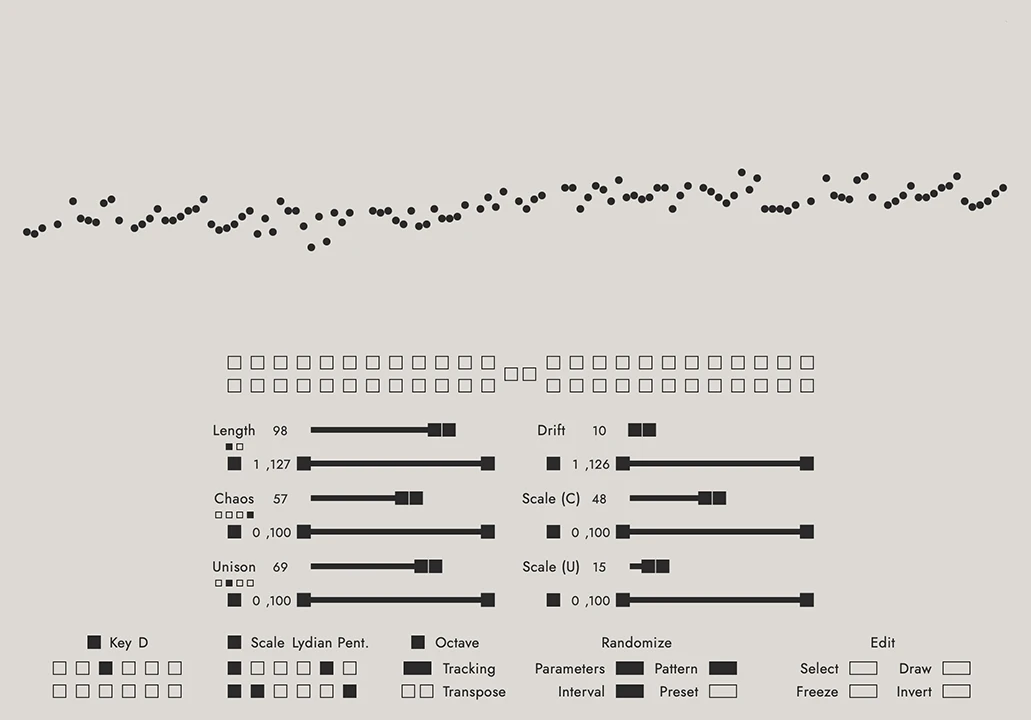
- Product: Open Keys
- Developer: Jacob Braun
- Version: 1.2
- Format: VST3
- Requirements: Windows 10 or later
- Source: openkeysplugin.com
Open Keys is a probabilistic MIDI mapper for VST3 and AU hosts that remaps an incoming MIDI note to a new output note through a rules engine, rather than generating sound itself. Key and Scale set the available pitch pool, while five percentage controls — Drift, Chaos, Scale Chaos, Unison, and Scale Unison — govern whether and how far each note deviates from its original pitch. It sits upstream of a synth, remapping notes before they trigger sound. It answers the search for controlled randomness on a keyboard.
Key Takeaway
Activates when a keyboard part needs unpredictable note choices without full atonal randomness — the probability controls keep deviation bounded, not unconstrained. It displaces manual scale-locking or a fixed arpeggiator pattern, not sound design. Every note change is probabilistic, so the same key press won’t always produce the same note twice. Producers who need deterministic, repeatable pitch mapping skip it.
Chaos Decides Whether, Drift Decides How Far
Chaos sets the probability that any given note gets replaced at all — at 0% every note holds its original pitch, and at 100% the engine attempts a replacement on every trigger. Drift doesn’t cause a note to change on its own; it only defines the radius, in semitones, of the pool a replacement can be pulled from once Chaos has already decided a change happens.
Scale Chaos runs as a second, independent probability layer on top of Chaos, controlling how strictly a replacement note gets forced into the selected Key/Scale rather than allowed to land chromatically. At 0% Scale Chaos, a Chaos-triggered replacement can land anywhere in the Drift pool regardless of key; at 100%, the replacement is constrained to notes that actually belong to the scale.
Because Chaos and Scale Chaos are independent percentages rather than a single “amount of randomness” dial, dialing in a specific musical result — mostly-diatonic drift with occasional chromatic surprises, for instance — takes tuning two separate probabilities against each other. Producers who want a single randomness knob settle on a Chaos/Scale Chaos pairing once and save it as a preset rather than adjusting one slider live.
Copying a Neighbor’s Pitch or Its Motion
Unison lets a note abandon its own independent Chaos/Drift calculation and instead copy from another step in the repetition cycle, at a probability set by the Unison percentage. Unison Mode 1 copies the exact pitch of the source step, while Modes 2 and 3 copy that step’s interval movement instead — the same distance and direction for Mode 2, inverted for Mode 3.
Scale Unison then applies a second constraint specifically to notes generated through Unison, forcing a copied result back into the selected Key/Scale even if the source step’s pitch technically sat outside it. This runs independently of Scale Chaos, so a pattern’s Unison-generated notes and its Chaos-generated notes can be constrained to the scale at different rates.
Unison Mode 4 randomly alternates between Modes 1 through 3 on each individual trigger rather than locking to one copying behavior for the whole pattern, so a pattern set to Mode 4 won’t repeat the same copying logic between one playthrough and the next. Producers building a fixed, repeatable parallel-harmony line pick Mode 2 specifically rather than Mode 4.
When Twelve Doesn’t Divide the Length
Length sets how many notes make up one repetition cycle before the pattern repeats across the rest of the keyboard, from 1 to 127 steps. Octave Tracking, when enabled, shifts each successive repetition of that cycle up one octave rather than repeating it at the same pitch register every time.
Length Mode 1 locks octave tracking to a fixed 12-semitone window regardless of the Length value, so a Length that isn’t a multiple of 12 causes the repeating cycle to overlap and drift against that fixed grid. Length Mode 2 instead adapts the octave window to match Length directly, extending the cycle continuously so a Length above 12 doesn’t produce overlapping pitches the way Mode 1 does at the same setting.
A Length that’s a multiple of 12 behaves identically in either mode, so the choice only matters once Length stops dividing evenly into an octave. Producers working in unusual step counts — 5, 7, 11 — pick a Length Mode deliberately rather than leaving it on the default and assuming the two behave the same.
Right-Click Means Something Different by Mode
Select isolates a range of notes in the visualizer for further editing, and Freeze locks that selected range so only the notes outside it continue responding to the probability engine — the two Freeze sub-buttons swap which side, selected or unselected, stays frozen. Right-clicking a selection in the visualizer opens actions like New Pattern From Selection or Reset Unfrozen Notes, context menu entries that only surface once a selection exists.
Draw Mode 1 edits one note’s pitch at a time, selectable by mouse, by playing the note on a connected keyboard, or by shift-clicking a sub-button — and in this mode, right-clicking a note silences it outright rather than opening a menu. Draw Mode 2 switches to continuous mouse-drawn note entry instead of one note at a time.
Resetting unfrozen notes back to default only works through that right-click menu on the current selection, not a single global button, so restoring several separately-frozen sections takes one pass per section. Producers doing targeted manual correction on a mostly-generative pattern use this layer; producers who want the engine fully probabilistic end-to-end skip Draw and Freeze entirely.
No Audio Path Without the Second Track
Open Keys generates no sound of its own — the plugin controls existing virtual instruments or hardware synths rather than producing audio — so most hosts need a two-track routing setup instead of a single-instance insert. Logic Pro is the one host where Open Keys drops directly into a dedicated MIDI FX slot; every other DAW covered in the manual routes it as a separate track.
Ableton Live specifically blocks third-party plugins from acting as dedicated MIDI effects, so using Open Keys there requires two MIDI tracks, with the instrument track’s MIDI-From dropdown set to Post FX on the Open Keys track. FL Studio instead matches Open Keys to its target instrument through numbered MIDI Ports in each plugin’s Wrapper Settings, and Cubase routes through a three-track structure — audio, MIDI, and instrument — that can be saved as a track preset to avoid rebuilding it each session.
None of these routings are optional workarounds for an edge case — they’re the only way to hear Open Keys’ output at all outside Logic Pro, since the plugin has no audio output stage to fall back on if the MIDI routing isn’t wired correctly. Producers working primarily in Logic get this for free; producers in Ableton, FL Studio, or Cubase build the routing once per project template and reuse it.
FAQs
-
Does Open Keys generate any sound on its own?
Open Keys processes MIDI notes only; it has no internal sound engine and produces no audio by itself. Every note it outputs still needs to reach a virtual instrument or hardware synth to actually be heard. In Logic Pro it loads directly into a MIDI FX slot; in other DAWs it needs its own track routed into the target instrument’s input.
-
How is the Chaos control different from the Drift control?
Chaos sets the probability that a note changes at all, running from 0%, where nothing changes, to 100%, where the engine always attempts a replacement. Drift doesn’t trigger anything by itself; it only defines how many semitones away a replacement note is allowed to land once Chaos has already decided a change happens. The two work together rather than as a single randomness amount.
-
Does Open Keys work with a MIDI keyboard controller directly, or only pre-recorded MIDI?
Open Keys processes MIDI as it arrives, so notes played live on a connected keyboard controller get remapped in real time, the same as notes from a recorded MIDI clip. The Draw controls also let a specific note be selected by playing it on a keyboard rather than clicking it in the visualizer. Live playing and programmed MIDI both pass through the identical rules engine.
-
How many devices can one Open Keys license be used on?
A single purchase includes two device licenses, and both can be freely transferred to a different machine at any time. This covers a common studio-plus-laptop setup without requiring a second purchase. Producers running the plugin on three or more machines simultaneously would need an additional license beyond the two included.
-
What’s the difference between Randomize Pattern and Shift Pattern?
Randomize Pattern generates new notes using each parameter’s current settings, applying the full probability engine to the existing pattern. Shift Pattern instead moves the existing notes without re-running that probability calculation. Shift-clicking the Randomize Pattern button swaps it to Shift Pattern behavior, and that default can be reversed in the Open Keys menu under Swap Randomize Pattern.

Open Keys
Open Keys is a probabilistic MIDI mapper for VST3 and AU hosts that remaps an incoming MIDI note to a new output note through a rules engine, rather than generating sound itself. Key and Scale set the available pitch pool, while five percentage controls — Drift, Chaos, Scale Chaos, Unison, and Scale Unison — govern whether and how far each note deviates from its original pitch. It sits upstream of a synth, remapping notes before they trigger sound. It answers the search for controlled randomness on a keyboard.
Price: 50
Price Currency: USD
Operating System: Windows 10
Application Category: Multimedia
3.5