


- Product: PSP auralControl
- Developer: PSPaudioware
- Version: 1.3.0
- Format: VST3, AAX
- Requirements: Windows 7 or later
- Source: pspaudioware.com/products/psp-auralcontrol
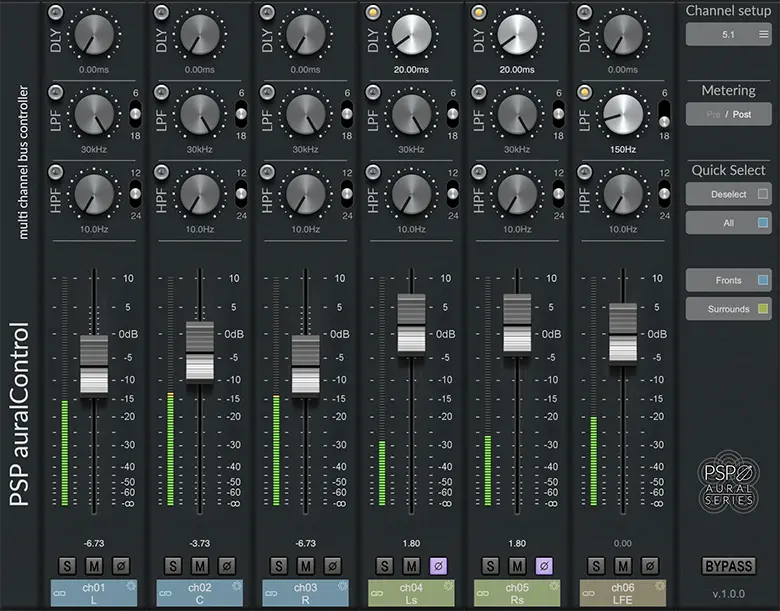
PSP auralControl is a multichannel utility plugin giving individual control over level, polarity, bandwidth, and timing for each channel in a surround or immersive audio set, supporting predefined formats from stereo and mid-side up to 7.1.4. It sits on individual stems, buses, or sends within a multichannel session, functioning as a per-channel mixer rather than a creative processor. Its differentiator is consolidation: rebalancing, filtering, delay, and channel-group automation for an entire multichannel set live in one plugin instance rather than requiring separate routing, gain, and filter plugins per channel. For anyone needing direct, per-channel control inside a surround or Atmos session without building custom routing first, this is that control.
Key Takeaway
Activates whenever a multichannel stem, bus, or reverb send needs individual channel adjustment — rebalancing an uneven live stem, rolling off LFE content, or setting different pre-delays per channel group. Displaces the manual routing and per-channel plugin chains that achieving the same result would otherwise require. Doesn’t apply dynamics processing, EQ beyond basic high-pass and low-pass filtering, or any creative coloration to a channel; producers needing compression, limiting, or tonal shaping on multichannel material need a separate processor alongside auralControl rather than from it.
Per-Channel Control Across Predefined Multichannel Formats
auralControl exposes a fader, peak meter, polarity switch, and high-pass/low-pass filter pair on every channel in a selected multichannel format, with formats running from two-channel stereo and mid-side up through 5.1, 7.1, and 7.1.4 layouts. The plugin automatically recognizes which channel format is present on the track it’s instantiated on, with a manual override available in the channel setup menu for sessions where automatic detection doesn’t match the intended layout. Mute and solo are available per channel independently, which lets an engineer isolate a single channel group — auditioning just the side channels on a multichannel reverb send, for instance — without building a separate solo bus or temporary routing to hear that channel group in isolation.
This means a single plugin instance replaces what would otherwise require either per-channel plugin instances stacked across a multichannel track, or a manually built routing structure splitting each channel out to its own processing chain. The tradeoff is scope: auralControl’s filtering is limited to basic high-pass and low-pass cuts, not parametric EQ, so a channel needing more than a frequency-range trim — a notch, a shelf, a multiband adjustment — still needs a separate EQ plugin downstream or upstream of auralControl in the same chain.
Channel Grouping and Reversed-Link Automation
Channels can be controlled individually, in predefined groups matching standard format conventions (fronts, rears, sides, tops), or in custom user-defined groupings, with parameter changes and automation recorded at whichever level — individual or group — is currently selected. Reversed linking lets two channels or groups move in opposite directions from a single control gesture, so bringing front levels up while simultaneously pulling rear levels down happens as one automated move rather than two separately automated, individually timed fader rides.
This grouping structure changes how level-riding automation gets built for a multichannel mix: instead of writing separate automation lanes per channel and manually keeping their relative balance consistent across a mix pass, a producer can automate one group fader and have every channel in that group move together, with reversed-link groups handling front/rear or other inverse relationships in the same automated gesture. The practical limit is that custom groupings need to be set up before automation work begins — restructuring which channels belong to which group partway through a mix means re-recording any automation written under the old grouping.
Delay Section and the Multichannel Reverb Use Case
Each channel or channel group has an independently adjustable delay time, which on a multichannel reverb send lets different channel groups receive different pre-delay values rather than one uniform delay applied across the whole return. Combining this with the per-channel high-pass and low-pass filters — rolling off LFE content entirely, narrowing the frequency range reaching TOP channels to higher frequencies only, while leaving FRONT and REAR channels comparatively full-range — produces a multichannel reverb character shaped by channel-specific frequency and timing decisions rather than a single reverb algorithm’s fixed multichannel behavior.
This workflow specifically targets a use case auralControl wasn’t originally built as a reverb itself for: pairing it with a separate multi-mono reverb processor on the same send, where auralControl’s per-channel filtering and delay shape how that reverb’s output differs across channel groups. The dependency is real — auralControl provides the per-channel shaping tools, but the reverb character itself still comes from whatever reverb plugin sits alongside it in the chain, so the technique requires two plugin instances working together rather than auralControl alone producing the effect.
Format Range and Where the Ceiling Sits Today
The current format list tops out at 7.1.4, covering the additional height-channel layer common to Dolby Atmos bed configurations beyond the 7.1.2 ceiling auralControl shipped with at its original release. This means a session built around a 7.1.4 Atmos bed has direct per-channel access to the additional top-layer channels through auralControl’s predefined format selection, rather than needing the plugin’s format support to be manually extended or worked around for the extra channel pair.
Formats below 7.1.4 — stereo, mid-side, 5.1, 7.1 — remain available in the same format selector, so the plugin scales down to simpler sessions without requiring a different version or instance type for non-immersive multichannel work. A session using a channel count or layout outside the predefined list, rather than one of the named industry-standard formats, isn’t directly selectable; the format menu covers established conventions rather than arbitrary custom channel counts.
One Mixer for Every Channel, Not One Processor for Every Problem
auralControl’s case rests on consolidating routing and per-channel control into one instance, not on replacing the EQ, compression, or reverb plugins a multichannel chain still needs alongside it.
FAQs
-
Does auralControl include EQ or compression for multichannel material?
No — auralControl provides basic high-pass and low-pass filtering per channel along with level, polarity, and delay controls, but no parametric EQ and no dynamics processing. A channel needing compression, limiting, or more detailed tonal shaping requires a separate plugin alongside auralControl in the same chain. auralControl’s scope is channel-level mixing and basic filtering, not tonal or dynamic shaping.
-
How does reversed linking work when channels are grouped together?
Reversed linking ties two channels or groups to a single control gesture where they move in opposite directions — raising one group’s level while simultaneously lowering another’s, from one automated fader move rather than two independently timed ones. This is set up through the grouping configuration before automation is recorded, since changing which channels belong to a reversed-link group after automation has already been written means re-recording that automation under the new grouping. The relative direction (which group rises and which falls) depends on how the reversed link is configured rather than following a fixed default.
-
What multichannel formats does auralControl currently support?
The format list runs from two-channel stereo and mid-side up through 5.1, 7.1, and 7.1.4, with 7.1.4 covering the height-channel layer common to Dolby Atmos bed configurations. auralControl automatically detects which format is present on instantiation, with a manual override available if the automatic detection doesn’t match the intended session layout. Channel counts or layouts outside this predefined list aren’t directly selectable through the format menu.
-
Can auralControl be used to build a custom multichannel reverb effect?
auralControl itself doesn’t generate reverb — it provides per-channel delay and filtering that can be paired with a separate multi-mono reverb plugin on the same send, shaping how that reverb’s output differs across channel groups. Setting different pre-delays per group alongside narrowing or rolling off frequency content on specific channels (such as limiting TOP channels to higher frequencies or cutting LFE entirely) changes the reverb’s perceived multichannel character. The reverb’s actual algorithm and tone still come from the separate reverb plugin in the chain, not from auralControl.
-
Is auralControl limited to Pro Tools, or does it work in other DAWs?
auralControl currently supports AAX, VST3, and AudioUnit formats, covering Pro Tools as well as VST3- and AU-compatible DAWs on Windows and macOS. The plugin requires the latest iLok License Manager application installed, though an iLok hardware dongle is not required to run it. This format support reflects the current release; the plugin’s AAX-only Pro Tools support at original launch has since been expanded.

PSPaudioware PSP auralControl

PSP auralControl is a multichannel utility plugin giving individual control over level, polarity, bandwidth, and timing for each channel in a surround or immersive audio set, supporting predefined formats from stereo and mid-side up to 7.1.4. It sits on individual stems, buses, or sends within a multichannel session, functioning as a per-channel mixer rather than a creative processor. Its differentiator is consolidation: rebalancing, filtering, delay, and channel-group automation for an entire multichannel set live in one plugin instance rather than requiring separate routing, gain, and filter plugins per channel. For anyone needing direct, per-channel control inside a surround or Atmos session without building custom routing first, this is that control.
Price: 99
Price Currency: USD
Operating System: Windows 7
Application Category: Multimedia
4.5