


- Product: PSP Levelizer
- Developer: PSPaudioware
- Version: 1.0.0
- Format: VST, VST3, AAX
- Requirements: Windows 7 or later
- Source: pspaudioware.com/products/psp-levelizer
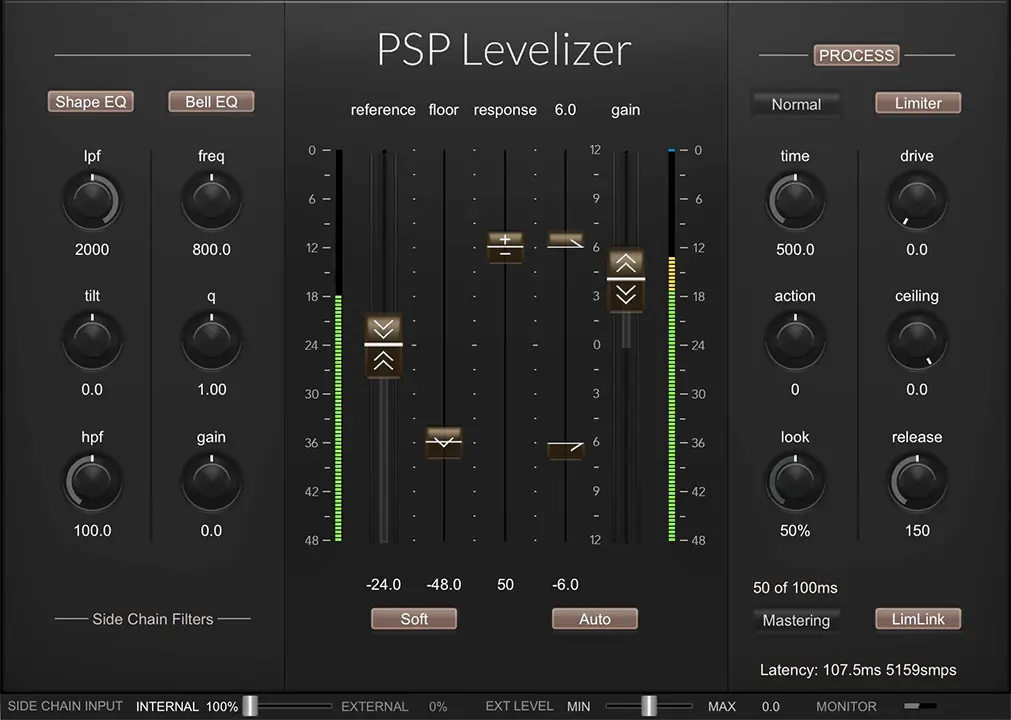
PSP Levelizer is an auto-fader processor that moves a gain stage continuously in response to either the input signal’s own level or an external sidechain source, targeting a user-defined reference level. Three reaction modes (Sharp, Normal, Smooth) set the character of fader movement; four lookahead ranges (Direct, Live at 10ms, Mix at 30ms, Mastering at 100ms, Extended at 250ms) determine how far ahead the detector reads before applying gain change. A sidechain EQ section — Shape EQ with LPF, HPF, and Tilt, plus a parametric Bell EQ — focuses the detector on specific frequency content rather than broadband level. The output stage runs a brick wall limiter modeled after opto-limiter release behavior. The primary differentiator is the bidirectional Response control: positive settings level the track toward the reference, negative settings make the track gain-ride against an external pilot signal, enabling mix-reactive ducking and follow behaviors without a separate compressor or sidechain routing scheme.
Key Takeaway
PSP Levelizer operates in sessions where the dynamic profile of a track needs to follow a reference rather than be compressed to a threshold — a vocal that rises during loud mix sections, a narrator that must stay consistent against a music bed, a bass line whose dynamics need to track against the kick rather than be independently compressed. The Floor parameter gates the fader action: the auto-fader returns to unity whenever input falls below the floor, which limits the tool’s use on continuously active material where gain riding must extend across near-silence. Engineers expecting attack and release controls calibrated in milliseconds like a conventional compressor encounter different parameters here — Time and Action set the fader response character, not the signal detection envelope directly. Compressor-style transient shaping is available in Sharp mode but is a secondary use case, not the core design target.
Bidirectional Response — Level Control and Pilot Following
The Response control runs from negative to positive values through a center zero point. Above zero, the auto-fader moves to push the output toward the reference level: louder input closes the fader, quieter input opens it, producing a leveling effect. Below zero, the auto-fader moves against the sidechain signal rather than the track’s own level — it follows the pilot source, riding the processed track upward when the pilot is louder and pulling it down when the pilot is quieter. At zero the auto-fader is defeated and the plugin runs as a static gain stage with the limiter optionally active.
The negative Response range covers the mix-reactive leveling use case: routing the full mix output to the sidechain and setting Response below zero causes the vocal track’s gain to rise during loud chorus sections and reduce during quiet verses, maintaining a perceptually consistent relationship between the vocal and the mix behind it. This is not a compressor sidechain ducking behavior — the processed track does not go quieter when the pilot signal gets louder; it gets louder. The direction of gain change is opposite to conventional sidechain compression.
Range handles set absolute upper and lower limits on how far the auto-fader moves. The Soft button engages soft-knee limiting at these boundaries, which slows the fader approach as it nears each limit rather than stopping abruptly. Sessions where abrupt fader stops produce audible artifacts — pumping stops, click at the gain ceiling — engage Soft mode; sessions where a hard gain ceiling is required for broadcast or delivery compliance run with Soft off.
Three Reaction Modes — Sharp, Normal, Smooth
Sharp mode produces the fastest fader response to input level changes. On transient signals — kick drum, snare, consonant-heavy vocal — Sharp mode follows attack quickly enough to produce compressor-adjacent gain reduction on peaks, making it viable as a limiter-like transient controller without engaging the output limiter stage. The fader acts on the detected level rather than the signal peak directly, which means the transient response in Sharp mode depends on the combined Time setting, lookahead range, and the sidechain EQ’s frequency shaping — not on a fixed attack time alone.
Normal mode produces a balanced response appropriate as a first setting for most leveling tasks. On material without extreme transient content — sustained vocals, bass guitars, string pads, dialogue — Normal mode reaches a useful operating point without over-smoothing the dynamics or chasing rapid level changes aggressively. Smooth mode introduces a deliberately slow, late response to rising levels, suitable for sources where the leveling action needs to feel gradual rather than reactive: ambient pads, ensemble strings, background music beds where abrupt gain moves are audible as processing artifacts.
The Action control sets the asymmetry between how the fader rises and falls. Clockwise rotation extends the rise reaction time; counterclockwise extends the fall reaction time. A longer fall time produces a character where the fader opens slowly after a loud section passes, which preserves the sense of dynamics on releases without allowing the track to spike during rapid dynamic changes. On vocal material this asymmetry produces a natural riding behavior — the fader suppresses loud sections quickly and releases the gain slowly, which avoids the gutted-release character of fast-attack, fast-release compression.
Four Lookahead Ranges and the Direct-Mode Manual Offset
The lookahead system runs across five settings: Direct (no lookahead, zero latency), Live (10ms), Mix (30ms), Mastering (100ms), and Extended (250ms). The Look knob adjusts the percentage of the selected range’s maximum lookahead used — at 50% in Mix mode, the effective lookahead is 15ms. The manual displays the calculated ms value in real time; the display turns red when the Look knob’s percentage would require more than the selected range’s maximum, signaling that either the range needs to increase or the Look setting needs to reduce.
Higher lookahead values allow the fader to begin moving before the detected level event arrives at the output, producing transparent gain changes on abrupt transients without audible attack clicks. The tradeoff is plugin latency equal to the active lookahead value — Mix mode at full lookahead adds 30ms of latency to the signal path, which the DAW’s PDC system compensates on most hosts. The manual documents that some hosts refuse to compensate for latency above 100ms; sessions using Mastering or Extended modes on unsupported hosts require manual track offset to correct the timing.
Direct mode bypasses lookahead entirely with zero latency. The manual notes a practical workaround for virtual lookahead in Direct mode: copying the processed track, nudging the copy backward in time, and routing it as the sidechain input provides effective pre-reading without plugin latency. This is an offline render technique rather than a live monitoring solution.
Shape EQ, Bell EQ, and Sidechain Monitoring
The sidechain EQ runs two independent sections before the detector stage. The Shape EQ engages a shelved filter set: LPF, Tilt, and HPF. The Tilt filter applies a see-saw frequency balance across the detection signal — the manual documents that settings from +10 to +15 dB work best when the track is controlled by a broadband signal, such as a full mix piloting a vocal or a drum group controlling individual drum elements. At high Tilt values the detector emphasizes midrange and high-frequency content in the pilot signal, which weights the fader response toward the presence and clarity of the mix rather than its low-frequency energy.
The Bell EQ adds a parametric peak filter at a user-defined frequency with adjustable Q and gain. On a vocal being controlled by an external music bed, a Bell EQ peak at 2–4 kHz with positive gain focuses the detector on vocal-range energy in the pilot signal, preventing sub-bass transients in the music bed from triggering fader movement that is irrelevant to perceived vocal-to-mix balance. The sidechain monitor mode covers the entire plugin GUI in an amber shell and routes the sidechain signal to the output, allowing the shaped detection signal to be heard directly before committing to EQ settings.
The sidechain bar includes an internal/external blend slider that mixes the processed track’s own signal with the external sidechain input at any ratio. Sessions routing a partially internal sidechain — where both the track’s own level and an external reference contribute to the detection — adjust this slider to calibrate how much each source influences the fader movement.
Output Limiter — Opto-Character Release, LimLink Stereo Linking
The output limiter runs after the auto-fader stage. Its release behavior models an opto-limiter topology: rapid initial release followed by a slow late release phase. On audio passing through the limiter, this produces a release character where the initial gain recovery is quick — avoiding the pumped, held-down sound of slow-release limiting — followed by a gradual settling that avoids the snap-back artifact of fully fast release. The attack response is described as providing exact peak handling rather than program-dependent attack.
Drive sets the limiter’s input gain, boosting the signal entering the limiting stage independently of the main auto-fader gain. Ceiling sets the absolute output level, below which no sample passes regardless of drive or input level. LimLink engages stereo channel linking, applying equal gain reduction to both channels simultaneously — stereo material requiring consistent stereo width through the limiter stage uses LimLink; material where independent per-channel limiting is preferred (dual-mono, M/S processing) runs with LimLink disengaged.
The limiter is an optional stage — sessions using the Levelizer solely as an auto-fader or gain rider disengage the limiter and route directly to the output. Its presence as a downstream output stage makes it useful for broadcast or streaming delivery chains where the auto-fader leveling stage and the peak ceiling are required in the same insert slot.
When the Session Needs Band-Specific Gain Riding
PSP Levelizer ships in VST, VST3, AU, and AAX formats — no CLAP format is available. There is no mid/side processing mode: the auto-fader and limiter apply to the full stereo signal, not to independent mid and side components. The sidechain detection stage is broadband before any EQ shaping — there is no multiband or frequency-selective gain riding where different frequency ranges receive independent fader treatment. A session requiring the vocal’s low-mid range to be leveled against a different reference than its high-frequency content works outside the Levelizer’s detector architecture and requires a multiband dynamics processor or separate processing chains per band. The Extended lookahead range (250ms) is host-dependent and may not be available on all DAW platforms; PSP documents that some hosts refuse to compensate for latency at or above 100ms, making Mastering and Extended modes unreliable without manual track offset on unsupported platforms.
FAQs
-
What is the practical difference between the Levelizer and a conventional compressor on a vocal?
A compressor applies gain reduction when signal exceeds a threshold, responding to momentary peak or RMS level independently of what else is happening in the session. The Levelizer’s auto-fader moves toward a reference level continuously, and in negative Response mode it follows an external pilot signal — it can ride a vocal upward during a loud chorus because the mix is getting louder, not because the vocal’s own level exceeded a threshold. The distinction is that the fader’s direction and amount are calibrated against the reference or the pilot rather than derived solely from the processed track’s own dynamics.
-
How does the Floor parameter affect the auto-fader behavior on quiet passages?
The Floor sets a level threshold below which the auto-fader returns to its default position rather than continuing to apply gain riding. On material with clear pauses or near-silence — spoken dialogue, a cappella vocal phrases with space between them — Floor prevents the auto-fader from opening gain to maximum during silence, which would produce noise amplification or room tone pumping on recovery. On continuously active material where the signal rarely drops below the floor, the Floor has minimal effect; on material with frequent dynamics below the floor value, the fader regularly resets, which can produce audible gain discontinuities at the transition between floor-governed and active-riding states.
-
Can the Levelizer be used in Direct mode without any latency for live or real-time tracking?
Direct mode reports zero latency to the host, making it compatible with live monitoring and real-time tracking applications. Without lookahead the fader cannot pre-empt incoming level changes — it responds after the detection stage analyzes the incoming signal, which introduces a small inherent reaction delay determined by the Time setting. The manual documents a virtual lookahead workaround for offline use in Direct mode: routing a time-offset copy of the track as the sidechain input provides effective pre-reading without plugin latency. This approach does not apply to live tracking scenarios where no pre-recorded copy is available.
-
What does the Tilt filter in the Shape EQ section do to the detection signal?
Tilt applies a shelved frequency balance across the sidechain detection signal — raising the Tilt control boosts upper frequencies in the detection path while simultaneously attenuating lower frequencies, shifting what the detector treats as loud. At +10 to +15 dB, the manual documents the setting as effective when the detector is driven by a broadband control signal such as a full mix or a drum group, because it weights the detection toward midrange and high-frequency energy rather than allowing sub-bass transients in the control signal to dominate the fader’s gain decisions.
-
Does the limiter affect the auto-fader gain, or does it operate independently downstream?
The limiter sits after the auto-fader stage in the signal chain and operates independently — it receives the auto-fader’s output and applies brick-wall limiting only when the signal exceeds the Ceiling setting. The auto-fader’s gain riding runs regardless of whether the limiter is engaged, and the limiter’s Drive and Ceiling controls operate on the post-fader signal rather than feeding back into the fader’s gain calculation. Disengaging the limiter removes it from the signal path entirely; the auto-fader output passes to the plugin’s output without any subsequent peak limiting.

PSPaudioware PSP Levelizer
PSP Levelizer is an auto-fader processor that moves a gain stage continuously in response to either the input signal's own level or an external sidechain source, targeting a user-defined reference level. Three reaction modes (Sharp, Normal, Smooth) set the character of fader movement; four lookahead ranges (Direct, Live at 10ms, Mix at 30ms, Mastering at 100ms, Extended at 250ms) determine how far ahead the detector reads before applying gain change. A sidechain EQ section — Shape EQ with LPF, HPF, and Tilt, plus a parametric Bell EQ — focuses the detector on specific frequency content rather than broadband level. The output stage runs a brick wall limiter modeled after opto-limiter release behavior. The primary differentiator is the bidirectional Response control: positive settings level the track toward the reference, negative settings make the track gain-ride against an external pilot signal, enabling mix-reactive ducking and follow behaviors without a separate compressor or sidechain routing scheme.
Price: 49
Price Currency: USD
Operating System: Windows 7
Application Category: Multimedia
4.1