


- Product: P22 Rail
- Developer: Pulsar Modular
- Version: 1.0.0
- Format: VST3, AU, AAX
- Requirements: Windows 10 or later, macOS 10.14 or later
- Source: pulsarmodular.com/product/p22-rail
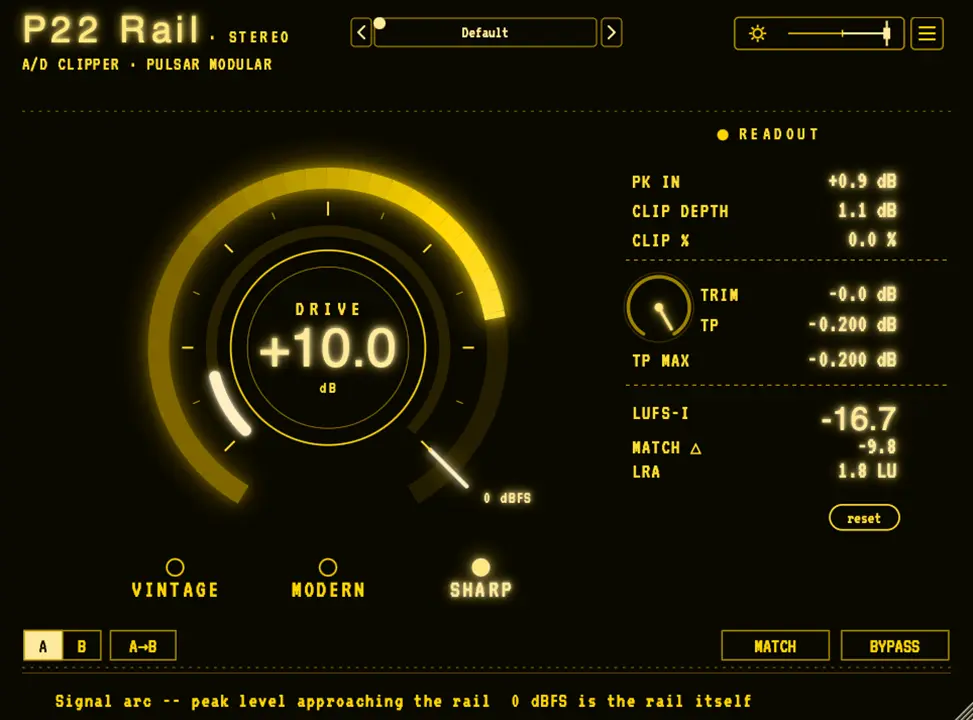
P22 Rail is a time-domain A/D clipper with a stabilizing engine ahead of the rail, built to follow P21 Atlas in the mastering chain or to function as a standalone final-stage character clipper on stems, groups, and master buses. The stabilizing engine — sharing its architecture with Atlas — rides peaks down before they reach the clipping point, so the clipper acts on what the engine couldn’t catch rather than flattening every peak that crosses the rail. Three flavors (Modern, Sharp, Vintage) determine tonal character; Drive determines how deep the program enters the clipper. Two editions cover the same engine: Rail Stereo for mono and stereo buses, Rail Immersive for mono through 9.1.6. Its differentiator is the pre-clip stabilizing layer: where a standard time-domain clipper clips every peak that crosses the rail uniformly, Rail prepares peaks before they clip, keeping transient impact intact. For anyone searching for a characterful A/D-style clipper that holds transient integrity at commercial loudness levels, this is that clipper.
Key Takeaway
Activates at the end of a mastering or bus chain where commercial loudness and deliberate clipper character are both required — a stage after Atlas for mix-bus preparation, a standalone final push on a stem or group, or the last stage before delivery where loudness and tone need to land together. Displaces additional attack/release/threshold management by reducing the decision set to three controls: flavor, drive, trim. Doesn’t guarantee true-peak compliance at delivery — inter-sample peaks above the ceiling can survive the clipping stage, and the manual explicitly states to place a dedicated true-peak limiter after Rail when delivery compliance is required.
The Stabilizing Engine and What It Does to Peaks
Ahead of Rail’s clipping point sits a stabilizing engine that rides peaks down as they approach the rail, so the clipper shapes only what the engine didn’t catch rather than clipping every peak that crosses 0 dBFS. This separates Rail from a standard time-domain clipper at the mechanism level: a clipper without a stabilizing stage applies the same curve to every crossing peak, which uniformly reduces the leading edge of transients along with the peak itself. Rail’s engine prepares the approach, leaving the leading edge of a transient at the level the recording placed it while the sustained portion gets shaped against the rail.
Three consequences follow from this architecture. Transients keep their impact rather than getting their leading edge shaved by the clipper curve. The flavor’s character stays consistent as the program changes — the same setting that works in a verse continues working in a chorus because the engine carries the same stabilizing behavior across varying material density. And the program holds together as Drive increases, gaining loudness and density without the coherence breakdown that flattening every peak would produce. The engine and flavor work together: the engine determines how peaks arrive at the clipper, the flavor determines what the clipper does to them.
Three Flavors and How Drive Interacts With Each
Modern is the transparent option — minimal coloration, consistent peak engagement, and the least drive tolerance of the three before the clipping becomes audible. Its character depends on staying within the range where it reads as clean; past that range transparency gives way to perceptible clipping rather than smooth saturation, which is a design property rather than a limitation. Sharp adds edge and presence through a more decisive bend into the clipping curve, producing transient focus and forward energy that increases with Drive in a way Modern’s uniformity doesn’t. Vintage runs an asymmetric saturation curve that generates warmth and harmonic richness over a wider zone before the rail, tolerating the most drive of the three before the character becomes too thick.
Flavor selection precedes Drive adjustment in the recommended workflow because Drive depth is meaningless without a committed flavor — a setting dialed in on Modern that reaches 2–3dB of clip depth will sound different and require adjustment when switched to Vintage, since Vintage’s wider approach zone and asymmetric curve respond differently to the same input level. The arrow keys cycle through flavors while Drive stays fixed, which lets an engineer compare all three at matched drive depth before committing. The MATCH button captures a loudness-compensated snapshot for level-matched A/B comparison, removing the louder-sounds-better bias from flavor evaluation.
CLIP DEPTH as the Primary Working Metric
Rail’s readout panel exposes six simultaneous values — PK IN, CLIP DEPTH, CLIP %, TP, LUFS-I, LRA — plus MATCH △ and DRIFT △ for comparison tracking. Of these, CLIP DEPTH is the primary number for setting Drive: it shows how far peaks are going past the rail in dB, with the manual identifying 2–3dB as the musical working range and flagging anything beyond 3dB as a prompt to ease off. CLIP %, by contrast, counts only what fraction of program material touches the clipper at all — it stays around 1% or below even when Drive is substantial, because the clipper catches only peak tips while the rest of the program passes below the rail untouched. Reading CLIP % as a sign that Rail is idle when CLIP DEPTH shows healthy engagement misreads what each metric actually measures.
DRIFT △ tracks how far the MATCH comparison snapshot has moved from the current loudness state since it was captured. A snapshot taken at one Drive setting grows stale as Drive changes or as the program’s dynamic behavior shifts across a session, and DRIFT △ provides a live number for that staleness rather than requiring the engineer to remember when MATCH was last pressed. This matters specifically for long mastering sessions where Drive gets fine-tuned incrementally — a stale MATCH snapshot makes the A/B comparison inaccurate without making it obviously wrong.
Immersive Edition: One Program Across All Channels
Rail Immersive clips every main channel of a multichannel bus as one program, preserving the spatial relationship between channels as Drive increases rather than allowing the loudest channels to clip more heavily than others. The LFE channel is passed through time-aligned with the mains but never clipped — its content and level remain exactly as the upstream mix established them, with LFE PEAK in the readout panel serving as a level monitor for a channel Rail doesn’t process. CLIP BAL shows how clipping distributes across front, surround, and height channel groups, giving a real-time diagnostic for whether the clipper is landing proportionally across the soundfield or concentrating in one group.
The two-edition split is a purchase decision, not a functional mode switch inside one plugin: Rail Stereo processes mono and stereo buses and passes multichannel audio through unchanged with most hosts, while Rail Immersive adds full multichannel capability from the same engine. A Stereo license upgrades to Immersive at any time via the product page, with deauthorization of the Stereo license and activation of the Immersive license required before the plugin expands its format support. Engineers who start sessions on stereo buses and move to immersive delivery at a later stage don’t need to start over — the upgrade path preserves the existing license rather than requiring a separate purchase.
Stabilizing Before Clipping, Then Clipping With Character — But Not Guaranteeing the Ceiling
Rail prepares peaks with its Atlas-derived stabilizing engine before the clipper curve shapes them, which preserves transient impact at loudness levels that flatten it elsewhere — and still requires a true-peak limiter at the end of the chain for any delivery that enforces an inter-sample ceiling.
FAQs
-
Does Rail replace a true-peak limiter for streaming delivery?
No — Rail is a characterful clipper rather than a true-peak safety device. Inter-sample peaks above the ceiling can pass through the clipping stage and appear in the delivered file above the nominal level. The manual explicitly states to place a dedicated true-peak limiter after Rail when delivery compliance is required. TP MAX in the readout panel shows the highest true-peak recorded since the last reset, which lets an engineer monitor delivery level but doesn’t make Rail itself a guarantee.
-
What’s the practical difference between the Stereo and Immersive editions?
Rail Stereo processes mono and stereo buses; on most hosts it passes multichannel audio through unchanged rather than processing it. Rail Immersive processes every supported channel format from mono through 9.1.6, treating all main channels as one program to preserve spatial relationships as Drive increases. The engine and flavors are identical across both editions. A Stereo license upgrades to Immersive at any time via the product page, requiring deauthorization of the Stereo license and activation of the new Immersive code before the expanded format support is available.
-
Why does CLIP % stay so low even when Drive is pushed substantially?
CLIP % counts only the fraction of the program that crosses the rail — since the clipper acts only on peak tips while the rest of the material passes below it, the percentage stays around 1% or below even at healthy Drive settings. This is the normal working state, not an indication that Rail is doing nothing. CLIP DEPTH is the correct metric for judging Drive intensity — it shows how far the peaks are going past the rail in dB, with 2–3dB being the musical working range regardless of what CLIP % reads.
-
What does the MATCH button actually do to the output signal?
MATCH captures a loudness snapshot of the difference between Rail’s processed output and the dry input at the moment it’s pressed, then applies a compensating attenuation to the louder path so that BYPASS comparisons happen at matched level. It doesn’t move TRIM or change any working settings — the delivery readings remain accurate to Rail’s actual output. DRIFT △ tracks how stale the snapshot becomes as the program plays and Drive changes; when staleness makes the comparison inaccurate, pressing MATCH off and on takes a fresh snapshot. Bouncing or rendering requires disengaging MATCH first, since its comparison attenuation is applied to the output while the button is engaged.
-
How does Rail pair with P21 Atlas specifically?
Atlas stabilizes the program and leaves headroom intact; Rail takes that stabilized headroom and drives it into the clipper for the final commercial loudness push. In this chain, Atlas handles peak management and program coherence while Rail handles character and final density. Rail works equally on its own without Atlas upstream — Drive reaches the clipper independently regardless of what precedes it — but the combination allows each stage to do a more focused job: Atlas stabilizing, Rail driving. A stem or group below 0dBFS can be raised toward the rail with Atlas’s TRIM and then driven into Rail’s clipper before Rail’s TRIM seats it back at its original mix level.

Pulsar Modular P22 Rail
P22 Rail is a time-domain A/D clipper with a stabilizing engine ahead of the rail, built to follow P21 Atlas in the mastering chain or to function as a standalone final-stage character clipper on stems, groups, and master buses. The stabilizing engine — sharing its architecture with Atlas — rides peaks down before they reach the clipping point, so the clipper acts on what the engine couldn't catch rather than flattening every peak that crosses the rail. Three flavors (Modern, Sharp, Vintage) determine tonal character; Drive determines how deep the program enters the clipper. Two editions cover the same engine: Rail Stereo for mono and stereo buses, Rail Immersive for mono through 9.1.6. Its differentiator is the pre-clip stabilizing layer: where a standard time-domain clipper clips every peak that crosses the rail uniformly, Rail prepares peaks before they clip, keeping transient impact intact. For anyone searching for a characterful A/D-style clipper that holds transient integrity at commercial loudness levels, this is that clipper.
Price: 191
Price Currency: USD
Operating System: Windows 10, macOS 10.14
Application Category: Multimedia
4.6