


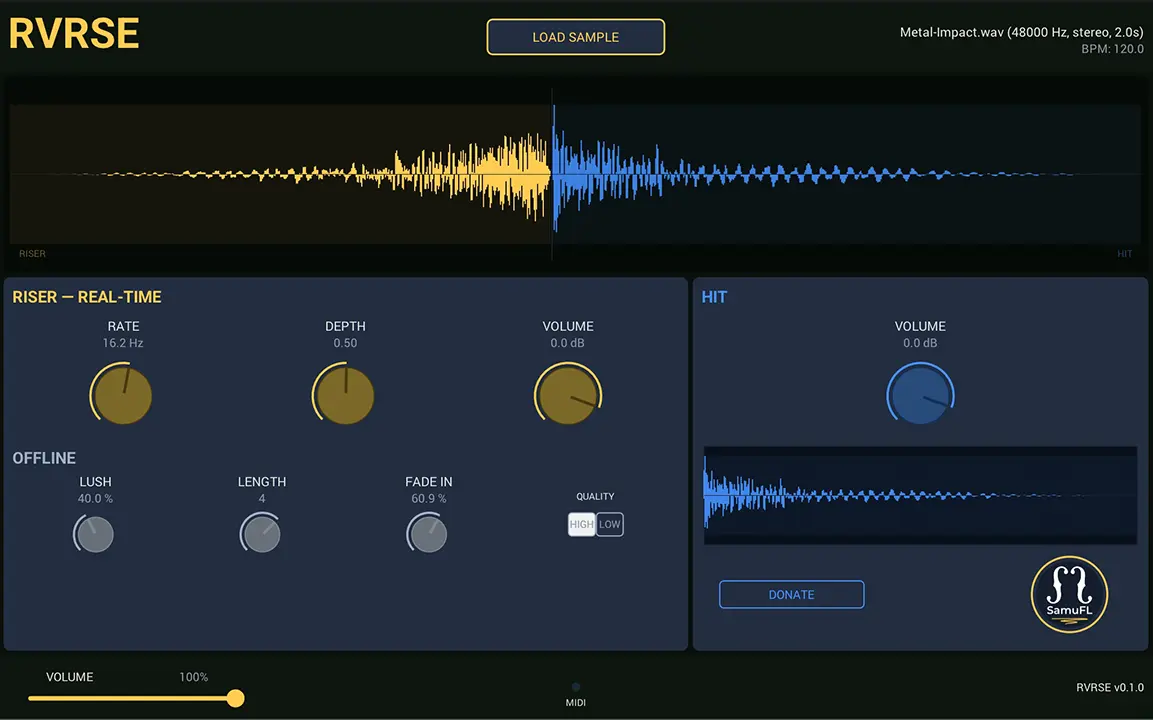
- Product: RVRSE
- Developer: Samuel Ferraz-Leite
- Version: 1.1.0
- Format: VST3, AU, CLAP
- Requirements: Windows 10 or later, macOS 11 Big Sur or later
- Source: samufl.com/tools/rvrse
RVRSE converts any loaded one-shot into a tempo-synced reverse reverb riser without leaving your DAW. Drop a hit sample onto the plugin, play a MIDI note, and the riser builds from silence to the downbeat where the original sample fires. Riser length runs from a quarter beat to sixteen bars; the Lush knob controls reverb density through Airwindows MatrixVerb; Fade In, Riser Volume, and Hit Volume are independent. The stutter gate adds rhythmic gating to the riser voice. Export to 24-bit WAV without a separate bounce step.
Key Takeaway
RVRSE does one thing — reverse reverb risers from any source material — and handles the tempo math, time-stretching, and reverb pipeline automatically. No preset system and no polyphony limit the workflow for anything beyond single-note builds, but for straight transition work, the toolchain is complete at zero cost.
Opening Frame
Building a reverse reverb riser manually means copying the sample, applying reverb, rendering the tail, reversing it, trimming the end to the downbeat, then nudging the start point until the math lands right in context. RVRSE runs that sequence in one offline pass the moment a sample loads. The riser starts at zero and peaks exactly where you drop the anchor — four beats by default, adjustable from a quarter note to sixteen bars.
The riser is derived directly from the loaded hit: reverb applied first, then reversed, then time-stretched to fill the target length using signalsmith-stretch’s spectral engine. That derivation means the timbral arc of the build always matches the impact — a pad note builds like a pad, a snare hit builds like a snare.
The Riser Pipeline in Practice
The Lush control blends the Airwindows MatrixVerb from fully dry at zero to a 50/100 dry/wet mix at maximum, so the riser retains some transient identity even at higher reverb depths. Below that, the offline rebuild runs the full chain — resample to DAW output rate, apply reverb, reverse, spectral time-stretch — only when Lush, Riser Length, or the source sample changes. BPM-only changes skip reverb and restart at the stretch stage, keeping parameter response fast during active tempo editing.
The Riser Release control, added in v1.1.0, runs a linear decay on the riser voice after the beat anchor without touching the dry hit. It’s persisted across sessions and commits on gesture end rather than incrementally, so partial handle moves don’t trigger redundant offline rebuilds. Combined with the separate Riser Volume and Hit Volume knobs, the transition shape is controllable without rebalancing from scratch on every source change.
Source Flexibility and Trim
RVRSE accepts WAV and AIFF up to 30 seconds, mono or stereo, via file dialog or drag-and-drop onto the plugin header, footer, or either waveform. Compressed and non-PCM formats produce a clear error instead of entering the pipeline. Mono sources duplicate to both channels; stereo sources stay stereo through the full offline chain.
The lower waveform exposes front and back trim handles for non-destructive source trimming before the pipeline runs. Dragging a handle previews the excluded region in dimmed audio; releasing commits the trim and triggers one offline rebuild. Double-clicking a handle resets that edge; trim state persists across DAW sessions alongside the loaded sample path.
Stutter Gate and Automation
The stutter gate runs per-sample on the audio thread, independent of the offline pipeline. Rate runs from 0 to 30 Hz; Depth runs from 0 to 1. Both respond to MIDI CC1 (mod wheel) and CC11 (expression) simultaneously alongside DAW automation lanes, so hardware controller and DAW can drive the same parameter without conflict.
Every parameter with an automation lane — Lush, Riser Length, Fade In, Riser Volume, Hit Volume, Stutter Rate, Stutter Depth, Master Volume — uses the DAW’s generic editor. Riser Release is persisted but intentionally non-automatable; trim is edited on the waveform, not via automation.
Export and DAW Integration
The header Export button writes the current riser+hit sequence to a stereo 24-bit WAV through the native save dialog. Export uses the committed offline render, ignores Master Volume, and stays available during playback. It locks out while a replacement render is pending — dropping a new sample and immediately exporting routes to the pending render, not the old one.
RVRSE runs in any VST3 or AU compatible DAW; tested hosts include Cubase, Studio One, and Reaper. The plugin loads as an instrument on a MIDI track with no sidechain or audio input path.
Single-voice only — overlapping note-ons cut the previous voice, so polyphonic triggering rewrites the riser from the beginning on each new note.
RVRSE is free with no download gate. The version above is pulled from the developer’s public Payhip page — pay what you like, including zero. The source code, build scripts, and unit tests are on GitHub under the MIT license.
Pros & Cons
Pros:
- The riser derives directly from the loaded hit, so timbral match between build and impact is automatic rather than approximate
- Spectral time-stretching handles quarter-note to sixteen-bar stretch ratios without transient smearing at the riser end
- Trim, sample path, and Riser Release all persist across DAW sessions — nothing resets on project reload
Cons:
- Single-voice only — a new note-on restarts the riser from zero rather than stacking a second voice, which cuts out any overlapping build technique
- No preset system means every session begins from a fresh sample load; channel strip recall works, but named presets don’t exist yet
Editor’s Note: The thing that stays with me is how narrow the scope actually is, and how rarely that’s the honest call. RVRSE doesn’t try to be a general-purpose transition tool — it’s specifically for a sample-derived reverse reverb riser and nothing else. For that use case, paying zero makes the cost conversation nonexistent, which is a different situation than most free plugins that leave you wondering what’s missing at the free tier.
FAQs
-
What sample formats does RVRSE accept?
WAV and AIFF files up to 30 seconds, mono or stereo. Mono sources duplicate to both channels; compressed and non-PCM formats produce a clear error and don’t enter the pipeline. Sample rate mismatch is handled internally — the plugin resamples to the DAW’s output rate before processing.
-
Does the riser always match the source sample’s pitch?
The riser is the loaded hit processed through reverb, then reversed, then time-stretched to the configured length. Derivation from the same source means the timbral arc builds toward the exact frequency content of the hit. Playing a different MIDI note does not shift the pitch in v1.1.0; pitch transposition is on the roadmap for a future version.
-
Can I use RVRSE in Pro Tools?
AAX is not supported and isn’t on the roadmap — Avid SDK and iLok distribution requirements aren’t sustainable for a free, single-maintainer project. RVRSE runs in any VST3 or AU compatible host; a standalone version is available on both macOS and Windows for use outside a DAW context.
-
Is the exported WAV identical to what plays back through the plugin?
The exported WAV captures the committed offline render at 24-bit stereo and ignores Master Volume. It does not include the real-time stutter effect — Stutter Rate and Stutter Depth are audio-thread parameters that run during live playback but aren’t written into the export buffer. For a stutter-included export, record the plugin output to a DAW track instead.
-
What’s the difference between Riser Length and Riser Release?
Riser Length sets the duration from note-on to the beat anchor where the dry hit fires — seven steps from a quarter beat to sixteen bars, each change triggering an offline rebuild. Riser Release is a 0–500 ms linear decay on the riser voice after that anchor, extending the riser beneath the hit without affecting hit level or timing.
Samuel Ferraz-Leite RVRSE
RVRSE by Samuel Ferraz-Leite is a free, MIT-licensed reverse reverb riser plugin available in VST3, AU, and standalone formats for macOS and Windows. Workflow Efficiency scores 4.25: the load-play-get pipeline is fast, with BPM changes skipping reverb rebuild. Sonic Capability scores 3.75: the signalsmith-stretch spectral engine avoids transient smearing, with Lush capped at 50/100 dry/wet. Session Consistency scores 3.5: sample path and trim persist, but Windows ships unsigned and stutter is excluded from WAV exports. Value at Price Point scores 5.0: zero cost, fully open source, no feature gating. Long-Session Usability scores 3.75: lock-free audio thread design, generation-based pipeline abort, single-voice only.
Price Currency: USD
Operating System: Windows 10, macOS 11
Application Category: Multimedia
4