


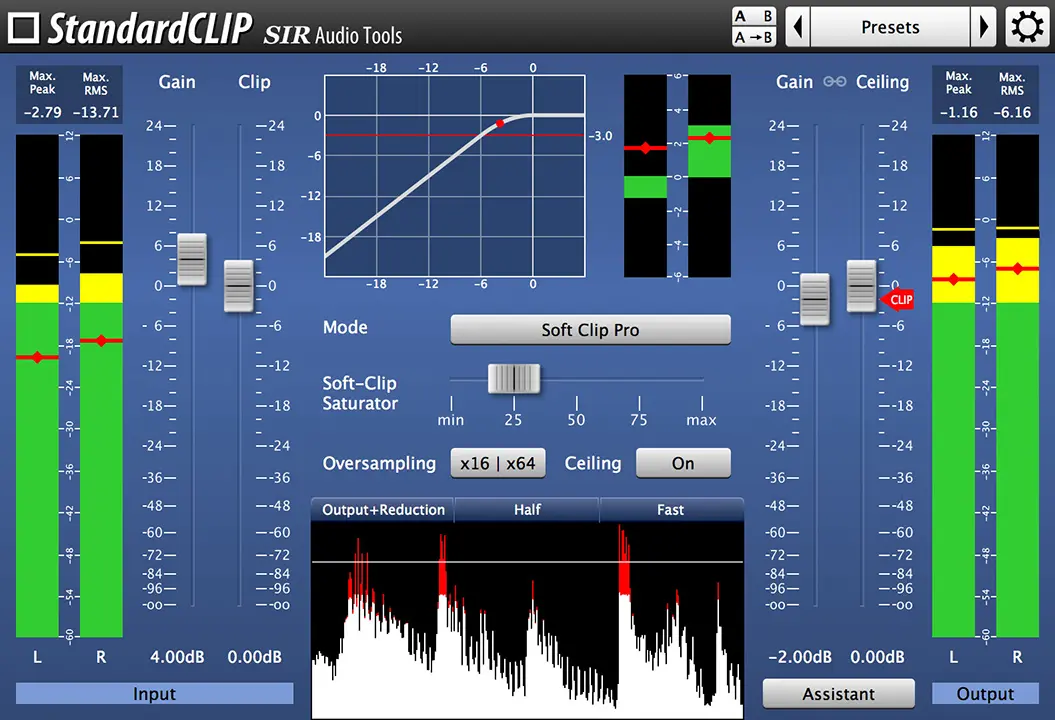
- Product: StandardCLIP
- Developer: SIR Audio Tools
- Type: Clipping and harmonic saturation plugin
- Version: 1.5.058
- Format: VST, VST3, AU, AAX
- Requirements: Windows 7 or later, macOS 10.19 or later
Over the years, our now-iconic clipper has earned its well-deserved recognition among many big names in the music industry and has been used as a secret weapon in the tracks for various major artists. Get StandardCLIP now and use it to increase the volume of your mix or to add unique harmonics to your signal. The plugin offers high quality oversampling up to the factor 256 and provides a large variety of options.
StandardCLIP is a new advanced clipping-plugin. You can use StandardCLIP in two ways:
- as a dynamic tool in your master effects chain to increase the volume
- as a harmonic generator to add odd harmonics to your signal
You can adjust the way the clipping is done easily, like a hard-limiting brick wall or smooth soft-saturated.
Since clipping is a non-linear process, clipping adds always new harmonics to the signal, and if it’s done without oversampling, harmonics above the Nyquist-frequency will be folded back in the frequency spectrum and that’s called aliasing. Oversampling reduces aliasing. StandardCLIP offers high quality oversampling up to the factor 256. It also offers very versatile oversampling options: You can choose between minimum phase mode (without additional latency) and linear phase mode (adds latency to the signal, but preserves phase-shift), and change the filter quality and cut-off frequency of the filter which is used for the oversampling process.
StandardCLIP Version History
- v1.5.057/058
- Enhanced license key handling for system restores from backup
- v1.5.052/053
- Better platform compatibility
- v1.5.048/049
- Fixed incorrect visualization in output + reduction display
- v1.5.044/047
- Graphics issues resolved on certain platforms
- DAW compatibility improvements
- v1.5.028/034
- Installer improvements
- v1.5.017/018
- New setup program introduced
- Native Apple Silicon (arm64) support added
- VST3 support implemented
- v1.4.022/024
- Fixed potential display issues
- Version for older macOS 10.6/10.7 provided
- v1.4.018/019
- Rare audio glitch under specific circumstances resolved
- v1.4.016
- Activation issue fixes (Mac only)
- Improved presets menu
- v1.4.008/009
- Fixed hidden assistant panel at non-100% zoom levels
- v1.4.004/005
- New Output Gain Assistant feature added
- Latency compensation fixed when plugin bypassed in hosts like Cubase
- v1.3.002/003
- Maximum Peak & RMS displays with reset functionality
- RMS Full Scale Sine (+3dB) option added
- Half-waveform view mode introduced
- New Ratio 2:1 clip mode
- v1.2.028/029
- Active Channels setting restoration fix
- v1.2.026
- WaveLab offline-rendering detection workaround reintroduced (Windows only)
- v1.2.024/025
- Performance improvements for certain hosts
- Cubase modal behavior fix for clip rendering
- Design changes and preset menu improvements
- v1.2.014/015
- Input/output meter scale range adjustment options added
- Gain difference meter scale customization added
- Silence bypass auto-activation below -190 dB
- Fader scale adjusted
- v1.1.008/009
- Multiple clipping modes introduced: Soft Clip Classic, Soft Clip Pro, Hard Clip
- Adjustable clipping level (previous version used 0dB fixed)
- Logarithmic function plot added
- Gain Difference Meter implemented
- Higher oversampling factors available (x64, x128, x256)
- Offline oversampling option added with DAW support
- v1.0.035/036
- Release version