


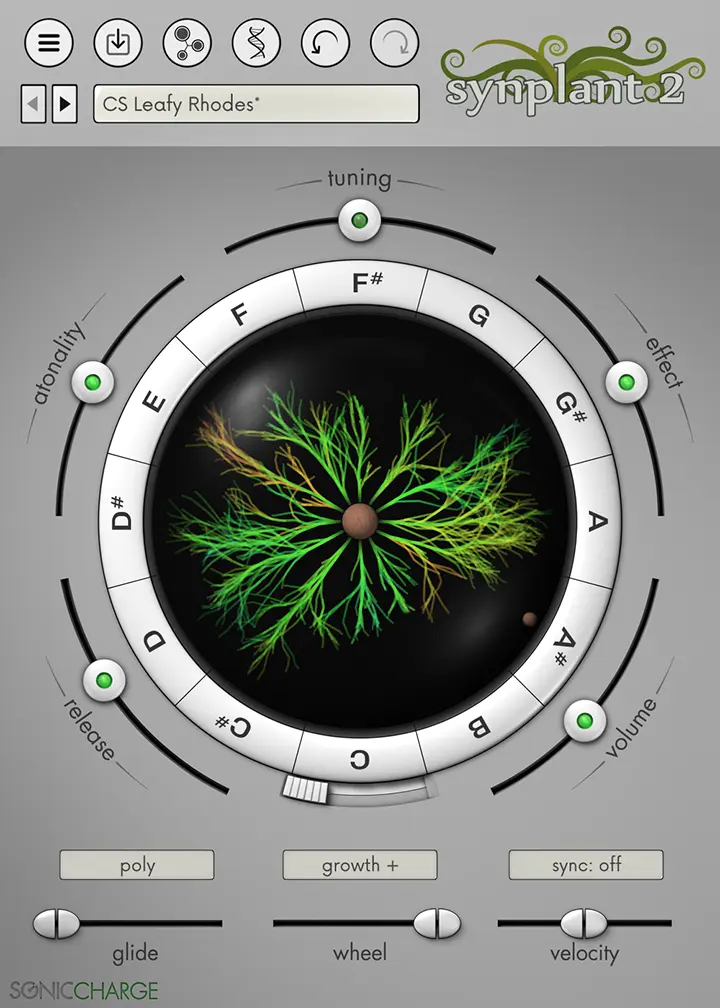
- Product: Synplant 2
- Developer: Sonic Charge
- Version: 2.0.2
- Format: Standalone, VST2, VST3, AU
- Requirements: Windows 10 or later, macOS 10.13 or later
- Source: soniccharge.com/synplant
Synplant 2 is a twin-oscillator FM synthesizer with a non-standard interface built around spatial branch exploration rather than parameter adjustment. The synthesis engine covers oscillators, FM, envelopes, LFO, filter, reverb, saturation, EQ, and panning — a complete architecture underneath, accessed through a circular Bulb display where 12 branches radiate outward from a central seed, each branch representing a parametric variation of the planted sound. Dragging a branch away from center increases its divergence from the seed’s parameter set; the sound changes in real time as the branch grows. Genopatch, the headline addition in v2, analyzes up to two seconds of imported audio and runs a local machine-learning process that grows four strands of iterative patch approximations, each strand generating multiple candidate matches. The DNA Editor exposes all 48 synth parameters as a gene strand graphic with optional conventional rotary controls alongside it. PhenoType — a free text-to-patch script extension — generates native Synplant 2 patches from typed descriptions, extending the entry points without adding a new synthesis layer.
Key Takeaway
Synplant 2 runs sessions where the starting point is discovery rather than specification — a producer who knows they want a textured lead but not which oscillator blend gets there faster through branch exploration than through parameter dialing. The Atonality control determines whether branch growth produces pitched playable sounds or abstract textures, separating conventional instrument sound design from noise and effect work at the parameter level. Engineers building sounds toward a known target — a specific brass stab, a resampled analog bass, a precisely defined pad — find conventional parameter access in the DNA Editor but still navigate it through Synplant’s non-standard interface. Producers looking for a primary workhouse synth covering a broad preset range across genres get a narrower result set than a general-purpose instrument like Serum or Massive X.
Bulb Display — Branch Growth, Atonality, Replanting
The Bulb display maps 12 MIDI notes around the circumference of a circle with the current patch seed at center. Dragging a branch outward from the seed diverges its parameters from the seed state; dragging it back toward center reduces the divergence. The audible change occurs during the drag — parameter evolution is continuous rather than stepped. Every branch diverges differently from the same seed: two branches dragged to equal distance from center land on different points in the parameter space, which is why adjacent branches on the same seed produce distinct sounds rather than near-identical variations.
The Atonality control determines the directional bias of branch generation. At low Atonality settings, the growth algorithm prioritizes parameter combinations that produce pitched, tonally centered sounds; at high settings it favors inharmonic, noise-heavy, or atonal combinations. A single seed at low Atonality produces 12 branches covering a range of pitched tonal variations; the same seed at high Atonality produces abstract textures and effects. This is a generation-time control — it biases what the randomization produces rather than filtering existing results.
A selected branch can be replanted as the new seed, resetting the center and generating new branches that diverge from the replanted sound rather than the original. Repeated replanting follows a chain of sound evolution where each generation is a starting condition for the next divergence pass. Alt-clicking the central seed clones the selected branch sound to every other branch, mapping the same sound across the full MIDI range for playable patch access.
Genopatch — Four-Strand AI Patch Approximation, Local Processing Only
Genopatch imports up to two seconds of audio — a drag-and-drop of a sample file or a recorded capture — and runs a local machine-learning process to find Synplant 2 parameter combinations that approximate the source audio’s sonic character. Four strands grow in the interface, each representing an independent search path through the parameter space. Within each strand, multiple colored dots appear as the process runs; each dot is a candidate match at a different iteration depth. Clicking a dot auditions that specific parameter combination against the source.
The process runs entirely on the local machine with no internet connection — the same local-only architecture as PhenoType. CPU load during the Genopatch generation phase is notably high; Sound On Sound’s review described it as requiring a substantial amount of CPU during the active generation process. The analysis period is finite and ends when each strand has completed its search iterations, after which the machine returns to normal CPU usage.
Match quality is source-dependent in a specific way: short percussive or transient-heavy sounds — kick drums, plucked notes, short bass hits, claps — produce closer approximations than sustained or spectrally complex sources. A two-second guitar chord contains more timbral variation across its duration than the Synplant 2 engine can represent in a static patch, so the match captures a moment in that character rather than the full dynamic arc. The output is a Synplant 2 patch — every Genopatch result opens directly into the branch system for further evolution from whatever parameter state the approximation landed on.
48-Gene DNA Editor — Dual-Mode Parameter Access
The DNA Editor presents all 48 synth parameters as horizontal lines within a double-helix strand graphic, organized top to bottom into three sections: envelope and LFO, oscillators, and filter and effects. Each gene line adjusts its corresponding parameter by click-and-drag. In v2, selecting one of the three sections reveals conventional rotary controls on the right side of the display, providing labeled standard controls for the selected section without leaving the DNA Editor view.
The envelope section includes time, loop, and tilt controls beyond standard ADSR. Tilt shifts the balance of attack and decay phase energy, a parameter with no direct conventional equivalent. Loop mode enables cyclic envelope behavior without connecting an LFO. The oscillator section carries the FM relationship between the two oscillators and oscillator type selection. The filter section includes type, cutoff, resonance, and the standard effects parameters for reverb, saturation, EQ, and pan.
MusicTech’s review noted that the DNA Editor’s non-standard interface makes it more suitable for tweaking existing patches than building from a blank init state — the parameter labels and relationships are less immediately readable than a conventional synth GUI, and the gene controls require familiarity with which horizontal line corresponds to which function. The conventional rotary view addresses this partially but still operates within Synplant’s organizational layout rather than adopting a standard instrument interface structure.
Four Bulb Modes, Layer Mode, MPE, Tempo Sync
Four bulb modes control how branches respond to MIDI input. The default mode maps each branch to a specific note around the MIDI range. Additional modes trigger branches by velocity range, note range, or a layered configuration that stacks multiple branches simultaneously on a single note, producing composite sounds from branch combinations on every key press. The layer mode is the mechanism for building multi-branch patches with internal harmonic complexity beyond what any single branch produces alone.
MPE support covers per-channel modulation wheel, pitch-bend, and pressure, which routes expressive controller data independently per voice. Portamento and glide operate in both polyphonic and monophonic modes. Tempo sync locks rhythmic components of a patch — LFO rates, envelope timing if cyclically configured — to the host DAW’s tempo, which keeps time-dependent elements of complex patches locked across tempo changes without manual recalibration. The mod wheel’s default branch-growth behavior can be reassigned to conventional synthesis destinations: filter cutoff, LFO amount, and envelope time are documented targets.
The complete Sonic Charge plugin bundle pairs Synplant 2 with Echobode, Permut8, Bitspeek, and Microtonic for $279 — a crossgrade price is available to existing owners of any Sonic Charge plugin via account sign-in.
Genopatch’s Two-Second Ceiling and Non-Standard Editor Navigation
Genopatch analyzes a maximum of two seconds of source audio — material with important timbral changes across a longer duration gets analyzed only at its first two seconds, which may not represent the sound’s full character. Multiple Genopatch runs on the same source produce different output patches due to the generative search process; a specific result cannot be exactly reproduced on demand. The DNA Editor’s 48-gene interface remains non-standard even with the v2 rotary control addition: parameter labels require learning Synplant 2’s organizational vocabulary rather than mapping to conventional synthesis nomenclature. Producers expecting to navigate the synth architecture the way they navigate Massive, Serum, or Vital encounter an onboarding period before the DNA Editor’s layout becomes legible at speed. Standalone operation is macOS-only; Windows users require a VST 2.4 or VST3 host.
FAQs
-
Does Genopatch sample the audio and play it back, or does it generate a synthesized approximation?
Genopatch analyzes the source audio and searches for Synplant 2 parameter settings that produce a similar-sounding synthesized result — it does not sample, loop, or replay the original audio at any point. The output is a native Synplant 2 patch that plays back through the synthesis engine entirely. The match quality depends on how well the source audio’s character fits within what the twin-oscillator FM engine can generate; short transient sounds typically produce closer matches than long, spectrally evolving sources. All processing occurs locally with no network connection required.
-
Can Synplant 2 produce standard synthesis timbres — sawtooth leads, sub basses, basic pads — or is it limited to experimental sounds?
The underlying engine is a twin-oscillator FM synth with standard synthesis components, and the DNA Editor exposes oscillator type, FM ratio, filter, and effects in direct parameter form. At low Atonality settings, branch generation produces pitched tonal sounds across the pad, lead, and bass categories. The interface is not optimized for rapid programmatic targeting of specific conventional timbres — reaching a precise sawtooth-through-filter lead patch takes more navigation steps than in a standard synthesis environment. Sound On Sound’s review noted it is not an obvious choice for conventional bread-and-butter synthesis tones.
-
What is the Atonality control’s effect on branch exploration?
Atonality biases the random generation toward pitched or inharmonic parameter combinations at branch-growth time. Low Atonality settings weight oscillator type, FM ratio, and filter choices toward values that produce audible pitch; high settings weight them toward noise, inharmonic FM ratios, and resonant filter behavior without a fixed fundamental. The control operates on the generation of new branches from a seed — it does not filter or retune existing branches already grown. Replanting a branch at a different Atonality setting and growing new branches produces a different generation character from the same source sound.
-
How does the replanting workflow differ from simply saving a patch and opening a new session?
Replanting takes a grown branch and sets its parameter state as the new center seed inside the current Bulb display, then generates fresh divergence branches from that position. The patch history of how that branch was reached — what seed it grew from, what Atonality setting was used, how far it was dragged — is no longer visible after replanting; the replanted state becomes the new starting condition. Saving a patch saves the current seed state independently. Replanting is a generative continuation of the same exploration session rather than a new session start.
-
Does PhenoType text input affect Genopatch results, or do the two tools operate independently?
PhenoType and Genopatch are separate entry points that both produce native Synplant 2 patches, but neither influences the other’s operation. A PhenoType text prompt generates a patch directly without audio analysis; Genopatch analyzes audio without text input. Both outputs land in Synplant 2 as plantable seeds. Using Genopatch on audio that was itself created from a PhenoType patch treats the PhenoType output’s sonic character as a new audio source to approximate — the connection between the two is only the shared patch format, not a shared algorithm.

Sonic Charge Synplant 2

Synplant 2 is a twin-oscillator FM synthesizer with a non-standard interface built around spatial branch exploration rather than parameter adjustment. The synthesis engine covers oscillators, FM, envelopes, LFO, filter, reverb, saturation, EQ, and panning — a complete architecture underneath, accessed through a circular Bulb display where 12 branches radiate outward from a central seed, each branch representing a parametric variation of the planted sound. Dragging a branch away from center increases its divergence from the seed's parameter set; the sound changes in real time as the branch grows. Genopatch, the headline addition in v2, analyzes up to two seconds of imported audio and runs a local machine-learning process that grows four strands of iterative patch approximations, each strand generating multiple candidate matches. The DNA Editor exposes all 48 synth parameters as a gene strand graphic with optional conventional rotary controls alongside it. PhenoType — a free text-to-patch script extension — generates native Synplant 2 patches from typed descriptions, extending the entry points without adding a new synthesis layer.
Price: 149
Price Currency: USD
Operating System: Windows 10, macOS 10.13
Application Category: Multimedia
4.3