


- Product: ABLM2
- Developer: TBProAudio
- Version: 2.2.13
- Format: VST, VST3, AAX
- Requirements: Windows 10 or later
- Source: tbproaudio.de/products/ablm
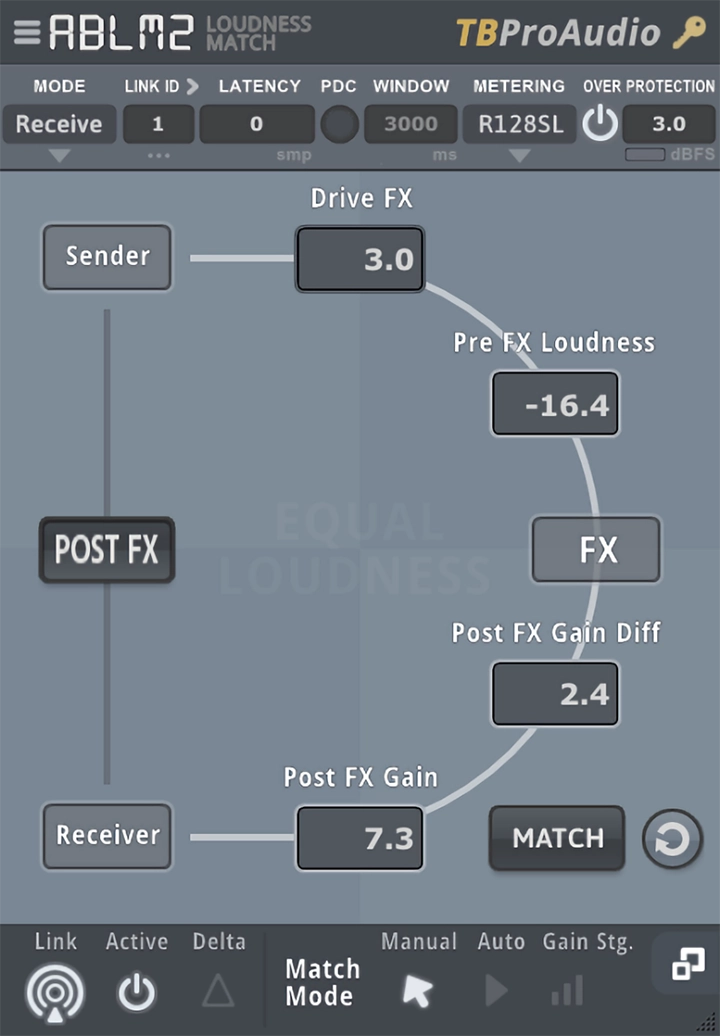
ABLM2 is a loudness-matched AB comparison utility that operates as a Sender/Receiver plugin pair: the Sender inserts before a plugin chain and measures pre-FX loudness; the Receiver inserts after and applies a compensating gain so that bypassing the chain and hearing it active occur at matched loudness levels. Three match modes — Manual, Auto, and Gain Stage — cover static snapshot matching, continuous automated correction, and pure gain staging without loudness matching respectively. Six measurement modes span RMS Sum, RMS Avg, EBU R128 SL, EBU R128 ML, VU, and Max Peak. Up to 256 Sender/Receiver pairs run simultaneously with automatic latency compensation up to 176,000 samples. It answers the query: how do I compare a plugin or FX chain against bypass at identical loudness to remove the louder-is-better bias from the comparison.
Key Takeaway
Mix and mastering engineers who make plugin decisions by ear — adding an EQ or compressor, then toggling it to judge its contribution — are the activation context for ABLM2. The plugin removes the loudness offset that makes a processed signal seem better than bypass simply because it’s louder, putting the comparison on equal perceptual footing. Auto match mode introduces continuous gain adjustments that can produce audible gain movement if the RMS window is set too short on dynamic material; static sessions with consistent level benefit from auto, while heavily dynamic sources may require manual match or an adjusted measurement window. Engineers who work exclusively in a DAW with built-in loudness-compensated bypass won’t find a problem here that ABLM2 solves differently.
Sender/Receiver Architecture and Three-Stage Signal Flow
ABLM2 operates as a plugin pair placed around the FX chain being evaluated: Sender before, Receiver after, linked by a shared ID from 1 to 256. The Sender measures the pre-FX signal loudness; the Receiver measures the post-FX loudness and applies the compensating gain. The three internal gain stages are: an optional reference level correction at the Sender (to calibrate the incoming signal to a target level like -18 dBFS before it hits the chain), an FX Drive stage that increases or decreases the gain fed into the chain, and the post-FX match gain applied by the Receiver.
The AB switch at the Receiver toggles seamlessly between the pre-FX and post-FX signal at matched loudness. In Inverse Match mode, the behavior flips: switching to Pre-FX listening triggers the Sender to match its output loudness to the last-measured Post-FX level, allowing the comparison to start from the processed signal and cut to the dry signal at equal loudness rather than the reverse. Both directions of the comparison remove the loudness variable.
Automatic Latency Compensation and the PDC Button
Plugins that introduce latency — linear phase EQs, look-ahead limiters, convolution reverbs — offset the timing between the pre-FX and post-FX signals at the comparison point. Without timing correction, the AB switch comparison includes the timing offset, which produces comb filtering artifacts when switching rather than a clean on/off comparison. ABLM2’s PDC button triggers automatic latency measurement: the Sender emits a test signal, the Receiver measures the round-trip delay, and the compensation value is set automatically within approximately one to two seconds.
Manual latency entry accepts values up to 176,000 samples for hosts that don’t support automatic PDC measurement reliably. The manual recommends starting and stopping the DAW before initiating the PDC measurement to synchronize audio buffers and improve measurement accuracy. Latency compensation must be set correctly before the AB switch produces a sample-exact comparison — an incorrectly set value produces a comparison with timing artifacts that can be mistaken for the plugin’s own character.
Six Measurement Modes and Matching Strategy
The six measurement modes determine how pre-FX and post-FX loudness are compared and how the match gain is calculated. RMS Sum and RMS Avg operate over a user-adjustable window — too short a window on dynamic material causes the auto match gain to chase the loudness continuously, producing audible gain pumping. EBU R128 SL (3,000 ms short-term) and EBU R128 ML (400 ms momentary) apply the standard K-weighting and pre-filtering from the EBU R128-2014 specification, producing loudness values that correspond to perceived loudness as defined by broadcast standards.
VU metering applies a 300 ms rise and fall time with 0 VU calibrated at -18 dBFS — appropriate for sessions that use VU-calibrated gain staging workflows. Max Peak mode uses the current maximum peak level as the loudness reference, which is useful for matching peak-normalized material but can produce match values that don’t reflect perceived loudness on compressed sources. The measurement mode selection changes what the match gain is calculated from, which changes what “loudness matched” means in the comparison — selecting the mode that reflects how the target material should be perceived is the primary calibration decision per session.
Snapshot Slots, Global Controls, and Multi-Instance Workflow
Four snapshot slots store FX Drive and Post-FX gain settings, allowing the same plugin chain to be evaluated at different drive levels — all loudness-matched — without resetting or rebuilding the comparison setup. A drive setting that pushes a saturator into heavier harmonics at one snapshot and a cleaner drive at another can be compared at equal loudness by cycling through the two slots. Snapshot comparison covers the interaction between drive level and plugin character in the same session without manual reset.
Global controls operate across all ABLM2 instances simultaneously when the Alt key is held: FX Drive, AB switch, Delta Monitoring, and Active/Inactive all apply to every linked instance in the session. On a session with multiple ABLM2 pairs on different channels, Alt+clicking the AB switch toggles all comparisons simultaneously. Delta Monitoring — which outputs only the difference between the pre-FX and post-FX signal — operates per instance or globally, and is the primary tool for hearing exactly what a plugin chain is adding or removing rather than what the full processed signal sounds like.
Gain Stage Mode, Over Protection, and Cross-Format Limits
Gain Stage mode operates differently from Manual and Auto: rather than matching pre and post-FX loudness, it strips the pre-FX drive gain added by ABLM2’s own Drive stage from the output after the chain. This leaves the plugin chain at its calibrated operating level in the session without the drive boost reaching the output — useful for gain-staging saturation and compression plugins to a specific input level without the added drive escaping downstream. It is not a loudness matching mode and does not produce an equal-loudness AB comparison.
Over Protection prevents channel muting during large auto-match gain jumps — an LED indicator lights when the output signal exceeds the over level threshold. The plugin communication between Sender and Receiver requires both instances to use the same plugin format: a VST3 Sender cannot link to an AAX Receiver. The manual flags this explicitly — mixing formats breaks the inter-plugin communication link regardless of the Link ID matching. Up to 256 Sender/Receiver pairs can run simultaneously in the same session, with auto-link handling the ID assignment for the first new instance as Sender and the second as Receiver automatically.
FAQs
-
How does ABLM2 actually remove the louder-is-better bias from a plugin comparison?
The Receiver measures the loudness difference between the pre-FX signal (from the Sender) and the post-FX signal, then applies an equal and opposite gain correction to the post-FX output. When the AB switch toggles between bypass and active, both states arrive at the output at the same measured loudness level. The perceptual difference between the two states reflects only the plugin’s character — not the loudness increase most processing introduces.
-
Why does the AB comparison sound smeared or comb-filtered when I switch?
A smeared or comb-filtered AB switch result indicates that latency compensation is not set correctly. Plugins that introduce processing delay shift the post-FX signal in time relative to the Sender’s reference — the PDC button triggers automatic measurement and correction, which should be run before the first comparison in each session. The manual recommends stopping and restarting the DAW before pressing PDC to synchronize audio buffers before measurement begins.
-
Can ABLM2 Sender and Receiver instances be on different tracks?
The manual states that ABLM2 pairs should be placed on the same track and notes that cross-track connections may not work. The Sender-Receiver communication operates within the same plugin chain on one track for reliable operation; routing both instances through the same channel in series is the supported configuration. Up to 256 pairs can run simultaneously, each on their own track using unique Link IDs.
-
What does Gain Stage mode do that Manual or Auto mode doesn’t?
Gain Stage mode strips the pre-FX drive gain added by ABLM2’s Drive control from the output after the FX chain, removing the drive boost without matching pre and post-FX loudness as a comparison metric. It is a pure gain staging tool — calibrating the input level to a plugin chain and removing the drive boost from the output — rather than a comparison tool. The AB switch in Gain Stage mode does not produce a loudness-matched comparison between bypass and active states.

TBProAudio ABLM2
ABLM2 is a loudness-matched AB comparison utility that operates as a Sender/Receiver plugin pair: the Sender inserts before a plugin chain and measures pre-FX loudness; the Receiver inserts after and applies a compensating gain so that bypassing the chain and hearing it active occur at matched loudness levels. Three match modes — Manual, Auto, and Gain Stage — cover static snapshot matching, continuous automated correction, and pure gain staging without loudness matching respectively. Six measurement modes span RMS Sum, RMS Avg, EBU R128 SL, EBU R128 ML, VU, and Max Peak. Up to 256 Sender/Receiver pairs run simultaneously with automatic latency compensation up to 176,000 samples. It answers the query: how do I compare a plugin or FX chain against bypass at identical loudness to remove the louder-is-better bias from the comparison.
Price: 49
Price Currency: EUR
Operating System: Windows 10
Application Category: Multimedia
4.5