


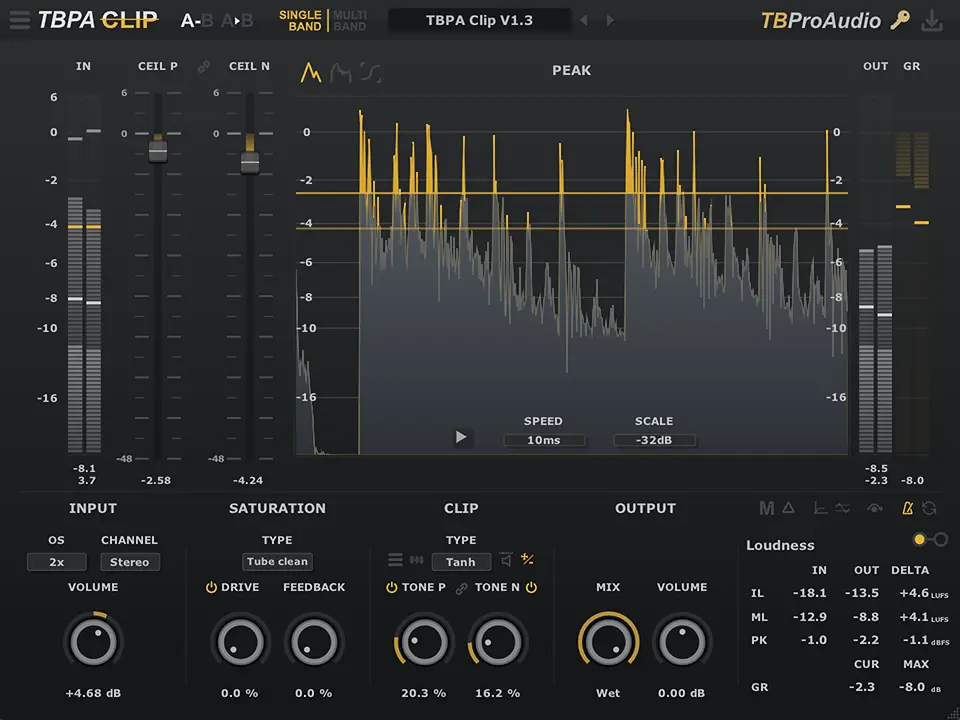
- Product: TBPAClip
- Developer: TBProAudio
- Version: 1.3.3
- Format: VST, VST3, AAX, CLAP
- Requirements: Windows 10 or later
- Source: tbproaudio.de/products/tbpaclip
TBPAClip is a single-band and multiband clipper and saturator with a fixed signal flow: saturation stage first, clip stage second, each independently switchable. Six clip types cover the range from tanh soft-saturation through sinusoidal and exponential curves to Clip Pro (low aliasing), Clip Advanced (user-editable response curve), and two new Pro2 and Exp2 modes added in v1.3.2. Six saturation types split between tube (even and odd harmonics) and tape (odd harmonics only) variants with feedback control. Dual clip mode applies independent ceiling and Tone controls to positive and negative signal halves separately. Stochastic clipping injects colored noise into clipped signal to reduce digital distortion artifacts from hard clipping. Up to x256 oversampling reduces aliasing across all processing modes. It answers the query: how do I clip and saturate a signal with precise independent control over the ceiling, response shape, harmonic content, and asymmetric waveform behavior in one plugin.
Key Takeaway
Mix engineers and mastering engineers who need explicit, parameter-level control over where a clip ceiling sits, what shape the clipping function follows, and whether the positive and negative halves of the waveform receive identical or asymmetric treatment find TBPAClip’s architecture more surgical than preset-driven clippers. The saturation-before-clip signal flow means harmonic content is shaped before the ceiling is applied, which changes the interaction between the two stages. The x256 oversampling ceiling removes aliasing as a practical concern at normal drive levels, but switching oversampling mode while the multiband linear phase filter is active can cause latency and audio dropouts during the filter’s impulse response recalculation. Engineers who need a set-and-forget loudness maximizer with automatic gain compensation and no required parameter configuration don’t need the depth this plugin exposes.
Saturation Stage: Tube vs. Tape and the Feedback Loop
The saturation section runs six types split between tube and tape circuit models. Tube variants generate both even and odd harmonics — the asymmetric harmonic profile associated with amplifier triode behavior. Tape variants generate odd harmonics only, the symmetric saturation character associated with magnetic recording. The Feedback knob routes a portion of the post-saturation signal back into the saturation input, increasing harmonic density and compression at the saturation stage before the clip ceiling is applied.
Drive set to Off bypasses the saturation stage entirely while keeping the stage in the signal path — the clip stage then operates on the dry signal without any pre-clip harmonic shaping. The saturation score in the info section provides an integrated and momentary quantitative measure of the saturation amount, which gives a consistent reference point for comparing different drive and type settings without relying on loudness perception alone.
Six Clip Types and the Clip Advanced Response
Clip 1, 2, and 3 are classic clipping functions based on tanh, sin, and exp mathematical curves respectively — each with a distinct knee shape from soft-saturation rounding at moderate levels to firm ceiling contact near the ceil value. Clip Pro is designed specifically for low-aliasing operation, trading some harmonic density in the knee region for reduced distortion artifacts at the clipping point. Pro2 and Exp2, added in v1.3.2, extend the upper end of the type set with further variations on the pro and exponential curve profiles.
Clip Advanced exposes a user-editable clip response curve in the display, with shape handles that allow the knee and ceiling region to be drawn to any arbitrary form. This mode removes the constraint of the six fixed mathematical curves and lets the engineer define the transition from unsaturated signal to ceiling contact — matching a target harmonic character rather than selecting the nearest mathematical approximation to it. The Tone knob, active across all clip types, adjusts the response character within the selected clip function rather than acting as a simple drive or ceiling offset.
Dual Clip Mode: Asymmetric Waveform Processing
Dual clip mode splits the audio signal into its positive and negative halves and applies individual Ceil and Tone controls to each independently. A waveform with asymmetric peaks — common in speech, vocals, and some synthesizer outputs — can receive a lower ceiling on the positive half than the negative, or different knee shapes per polarity. The Link button couples the Tone P and Tone N controls for symmetric operation when asymmetric control isn’t needed, returning to single-knob behavior without disabling dual mode.
The Peak display shows incoming and outgoing signal with both the positive ceiling (Ceil P) and negative ceiling (Ceil N) visualized simultaneously, making the asymmetric clip relationship visible throughout processing. This is the key monitoring tool for dual mode — without it, the interaction between two independent ceilings on a complex waveform is difficult to evaluate by ear alone.
Stochastic Clipping: Noise Injection Against Digital Distortion
Hard clipping produces flat-topped waveforms whose sharp transitions generate high-frequency distortion that oversampling reduces but doesn’t eliminate across all harmonic content. Stochastic clipping injects colored noise into the clipped portion of the signal — specifically into the parts of the waveform above the ceiling — replacing the deterministic flat-top distortion artifacts with a noise-modulated approximation. The subjective effect is a softening of the digital edge associated with hard clipping at or near the ceiling, shifting the character toward something closer to analog tape saturation overload.
Strength and noise color are both adjustable — color determines the spectral profile of the injected noise, and strength controls how much noise is mixed into the clipped region. At high strength values with bright noise color, the stochastic contribution becomes audible as a texture rather than a softening agent, which is a usable creative setting on drum transients but potentially problematic on sustained tonal material at high clip amounts.
Multiband Mode: Three Bands, IIR or Linear Phase
Multiband mode splits the signal into three frequency bands — crossover frequencies adjustable from the spectrum display via drag — and applies an independent saturation and clip chain per band. Each band carries its own input volume, input level meter, saturation and clip stage, mix control, and output volume. Band crossover frequency and output level are adjustable from the spectrum display with direct click-drag interaction, with double-click resetting to default values.
Filter slope switches between 24 dB/oct and 48 dB/oct Linkwitz-Riley IIR designs, with a linear phase FIR mode (LP button) available for mastering contexts where phase coherence across bands is required. Linear phase mode adds latency that the DAW compensates automatically via PDC. Switching oversampling rate while linear phase is active triggers impulse response recalculation — the manual flags this as a potential source of audio dropouts and lag, and recommends completing OS selection before starting a session rather than changing it during playback.
Clip and Sat Score, EBU R128, and the Metering Stack
The info section provides three distinct measurement views switchable per session. The Loudness view shows EBU R128 Integrated and Momentary Max values at input, output, and delta — the delta value shows how much the loudness is changing through the plugin, which directly exposes the loudness-adds-up effect that makes clipped signals seem louder without being metered as such. The Clip Score shows the proportion of signal that was clipped — both integrated and momentary max — which is a direct measure of how aggressively the ceiling is being contacted across a session.
The Saturation Score provides the equivalent measure for the saturation stage. Running both scores simultaneously gives a session-level picture of where harmonic content is being generated versus where the ceiling is being hit — a clip score rising faster than the saturation score indicates the ceiling is being reached before the harmonic shaping stage has had significant effect. This pairing is the primary tool for calibrating drive and ceiling relationships without relying on loudness perception.
FAQs
-
What is the difference between the six clip types in terms of harmonic character?
Clip 1, 2, and 3 apply tanh, sinusoidal, and exponential mathematical clipping curves respectively — each produces a different knee softness and harmonic profile at the ceiling. Clip Pro targets low aliasing at the expense of some knee harmonic density. Clip Advanced removes the fixed mathematical curve entirely and lets the response shape be drawn manually. Pro2 and Exp2, added in v1.3.2, extend the type set with additional curve variations above the original six.
-
What does dual clip mode do that standard single clip mode doesn’t?
Single clip mode applies one Ceil and one Tone setting across the full waveform symmetrically. Dual clip mode splits the signal at zero and applies independent Ceil and Tone controls to the positive and negative halves separately — allowing asymmetric ceiling placement and different knee shapes per polarity. This matters on waveforms with naturally asymmetric peak distribution, where symmetric clipping clips one polarity harder than necessary to protect the other.
-
Does the stochastic clipping add noise to the full signal or only to the clipped portion?
Stochastic clipping injects colored noise specifically into the portions of the signal that exceed the clip ceiling — the noise is applied at the clipped region only, not to the full signal. The effect softens the flat-top distortion character of hard clipping rather than adding broadband noise to the output. At high Strength values the contribution becomes audible as texture rather than softening, which changes its character on sustained tonal material compared to transient-heavy sources.
-
What causes the dropout risk when changing oversampling in multiband linear phase mode?
The multiband linear phase filter uses a FIR design whose impulse response is computed from the current oversampling rate. Changing the oversampling setting while linear phase mode is active forces the plugin to recalculate the impulse response for the new rate — this recalculation takes a finite amount of time during which audio processing is interrupted. The manual recommends selecting the oversampling rate before starting session playback rather than changing it during active processing to avoid dropouts.
-
What is the Final Ceil function and when is it needed?
Final Ceil is an additional hard clipping stage applied after the main saturation and clip stages. It exists to catch overshoot peaks introduced by the downsampling filter of the oversampling module, which can generate brief peaks above the clip ceiling during the anti-aliasing filter’s ringing on hard-clipped transients. In multiband mode it also catches recombination peaks where the three bands sum to a value slightly above the individual band ceilings. It can be switched off on sessions where overshoots are not occurring.

TBProAudio TBPAClip
TBPAClip is a single-band and multiband clipper and saturator with a fixed signal flow: saturation stage first, clip stage second, each independently switchable. Six clip types cover the range from tanh soft-saturation through sinusoidal and exponential curves to Clip Pro (low aliasing), Clip Advanced (user-editable response curve), and two new Pro2 and Exp2 modes added in v1.3.2. Six saturation types split between tube (even and odd harmonics) and tape (odd harmonics only) variants with feedback control. Dual clip mode applies independent ceiling and Tone controls to positive and negative signal halves separately. Stochastic clipping injects colored noise into clipped signal to reduce digital distortion artifacts from hard clipping. Up to x256 oversampling reduces aliasing across all processing modes. It answers the query: how do I clip and saturate a signal with precise independent control over the ceiling, response shape, harmonic content, and asymmetric waveform behavior in one plugin.
Price: 39
Price Currency: EUR
Operating System: Windows 10
Application Category: Multimedia
4.2