


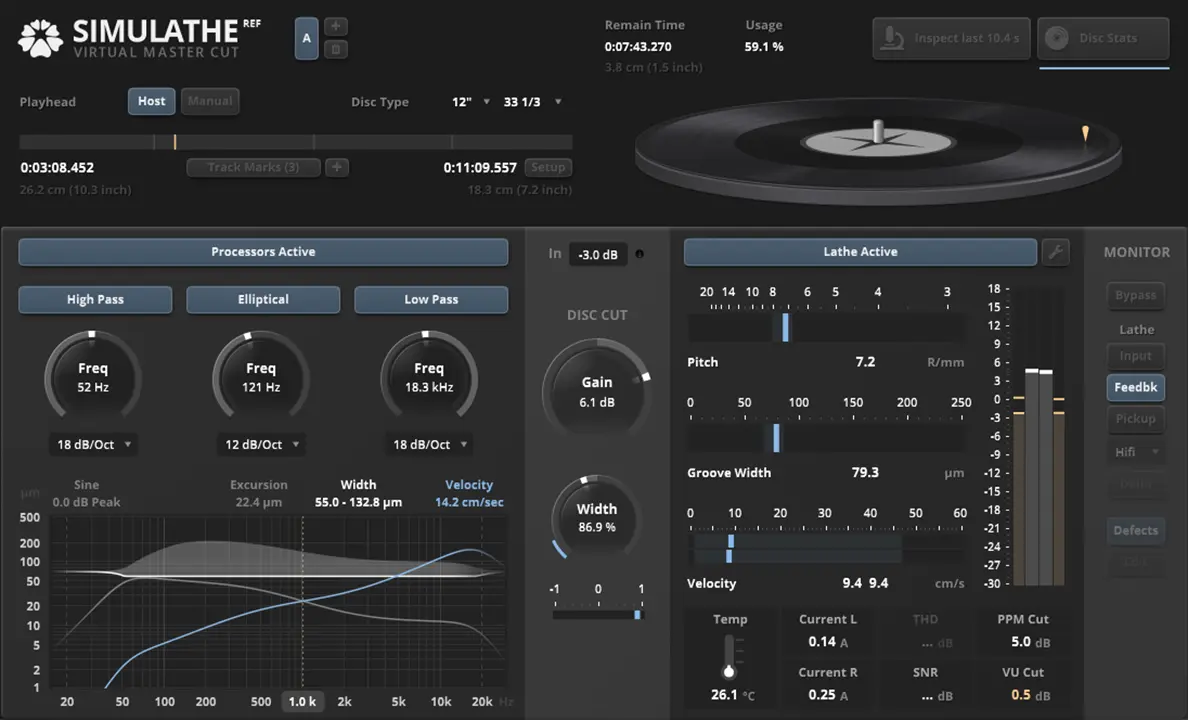
- Product: TDR SimuLathe REF
- Developer: Tokyo Dawn Records
- Version: 1.1.1
- Format: VST2, VST3, AAX, AU
- Requirements: Mac OS X 10.9 or later
- Source: tokyodawn.net/tdr-simulathe-ref
TDR SimuLathe REF is a physical-modeling plugin that simulates the vinyl disk mastering process — cutting lathe behavior, groove geometry, and turntable pickup playback — rather than processing audio for direct release. It sits at the end of a mastering chain as a diagnostic and educational reference, showing how a mix would translate to a physical groove before any lacquer gets cut. Its differentiator is scope: REF models the cutting and inspection stage specifically, with four lathe configurations and three pickup models, rather than the full reproduction-and-distribution chain a finished pressed record goes through. For anyone trying to understand how a mix will actually behave on vinyl before committing to a cutting session, this is that understanding.
Key Takeaway
Activates during mastering when a mix is vinyl-bound and needs format-specific risk identification — excessive groove excursion, stereo width that won’t track, side lengths that exceed safe playing time — before a real lathe session. Displaces guesswork and rule-of-thumb vinyl-prep habits with direct visual and audio feedback on the specific mix being prepared. Doesn’t model what happens to a disc after it leaves the cutting lab — pressing, distribution, storage wear beyond the cutting stage itself; engineers needing to predict the sound of an already-pressed, well-worn retail copy will need a different reference than REF’s lab-side simulation provides.
Four Lathe Configurations and What They Actually Constrain
SimuLathe REF offers four representative lathe configurations, each imposing different physical constraints on groove excursion, width, and velocity rather than functioning as cosmetic presets. Selecting a configuration changes what the plugin’s metering considers safe or risky for a given mix, since the constraints come from the physical geometry each lathe type represents rather than from an adjustable, arbitrary threshold. This means the same mix can read as within-bounds on one lathe configuration and flagged as risky on another, which mirrors the real-world situation where different cutting facilities and lathe models have genuinely different physical limits.
The classic disk mastering filter section — highpass, lowpass, and elliptical filtering — works alongside the lathe model rather than independently of it, since the filtering choices a real cutting engineer makes exist specifically to keep a mix’s low-frequency and stereo content within what a given lathe can physically cut. Running a mix through REF’s filter section before checking the heatmap pages shows whether a specific filtering choice resolves a flagged risk or simply moves it elsewhere on the disc, which is closer to how an actual pre-mastering decision gets evaluated than adjusting a filter by ear alone.
Groove Microscope and Heatmap Inspection
The groove microscope renders the simulated physical groove in three-dimensional detail, letting a user inspect excursion, width, and depth at a specific point on the disc rather than relying on summary statistics alone. This matters because problems in vinyl cutting are often localized — a single loud transient or a stretch of hard-panned low end can create a risk that an averaged loudness or stereo-width reading across the whole side would miss entirely.
Heatmaps for excursion, width, velocity, and land extend this same localized inspection across the full disc surface, with adjustable threshold settings letting an operator define what counts as risky for their specific use case rather than accepting one fixed sensitivity. Combined, the microscope and heatmaps shift vinyl-prep from a single pass/fail check at final loudness to an investigative process — find where on the disc a risk occurs, then trace it back to the specific moment in the mix causing it.
Turntable Pickup Modeling and Monitoring Limits
Three physically modeled turntable pickups let a user audition how the simulated cut would sound on playback, including the option to introduce wear and damage artifacts to approximate a used or aging copy rather than a pristine first playback. This pickup-based monitoring is the plugin’s only route to hearing the cutting decision’s actual sonic consequence, since the lathe and filter sections by themselves only show geometric and level-based risk without translating that risk into an audible result.
The pickup models simulate cartridge playback specifically, not the additional degradation a record accumulates through pressing, shipping, and shelf storage — a distinction the developer states directly rather than implying broader accuracy than the simulation covers. A mix that monitors cleanly through REF’s pickup models has cleared the cutting-stage risks the plugin can detect, but hasn’t been evaluated against the separate, harder-to-model wear a commercially pressed and distributed copy picks up afterward.
Playhead Sync and Workflow Position in a Mastering Chain
SimuLathe REF requires a playback-position reference to function as intended, offered through three options: automatic host sync where the plugin format and host support it, sync via an automated parameter when native sync doesn’t work cleanly, or fully manual positioning. Manual mode works in any host regardless of automation support, but it doesn’t support Disk Statistics inspection or meaningful space-consumption prediction, which are the features that depend on knowing exactly where in a side’s runtime the plugin currently sits.
This makes host choice a real factor in how much of REF’s analysis a session can actually use — a host with reliable playhead sync gets full access to space-consumption prediction and disc statistics, while a host requiring manual positioning is limited to point-in-time groove and level inspection without the full-side runtime context. Multi-side and multi-disc project support extends the same statistics and prediction across a full album sequence, but only where playhead sync is functioning, since space-consumption prediction depends on the same positional data manual mode can’t reliably supply.
FAQs
-
Does SimuLathe REF simulate what a vinyl record sounds like after it’s pressed and sold?
No — REF simulates the disk mastering process itself: cutting lathe behavior, groove geometry, and pickup playback at the cutting stage. It doesn’t model the additional degradation a record accumulates through pressing, distribution, and storage after leaving the cutting lab. A mix that monitors cleanly through REF’s pickup models has cleared cutting-stage risk, not the separate wear a retail copy picks up later.
-
What’s the difference between SimuLathe REF and the CUT edition?
REF is built for engineers who don’t operate their own lathe — educational use, pre-mastering risk-checking, and reference work without direct lathe control. CUT adds calibration options for matching specific real-world lathes, geometrically aware limiters, and features aimed at studios actually running cutting sessions. Tokyo Dawn Records positions CUT as likely to overwhelm a workflow that doesn’t need lathe-operation features, recommending REF instead for that case.
-
Why does the same mix sometimes show different risk levels depending on the lathe configuration selected?
Each of the four lathe configurations represents a different physical cutting system with its own real-world constraints on groove excursion, width, and velocity. Selecting a different configuration changes what the plugin’s metering treats as safe, since the limits come from the modeled lathe’s actual physical geometry rather than an adjustable arbitrary setting. This mirrors real cutting facilities, where different lathes genuinely tolerate different mixes differently.
-
Does SimuLathe REF work the same way in every DAW?
Disk statistics and space-consumption prediction depend on accurate playhead position tracking, available through automatic host sync, sync via an automated parameter, or manual positioning. Manual mode works in any host but doesn’t support those two features, since they require knowing exactly where in a side’s runtime the plugin sits. Hosts with reliable native or automation-based sync get full access to every analysis feature; hosts limited to manual mode get point-in-time inspection only.
-
Is SimuLathe REF useful if I’m not planning a vinyl release at all?
Independent coverage and user discussion describe REF as a niche but genuinely educational tool for understanding vinyl cutting constraints, useful even without an active vinyl project. Several users report using it purely to test assumptions about loudness, limiting, and stereo width against a physical format’s real limits rather than as part of a live mastering job. The tradeoff is that the depth of feature set — lathe configurations, pickup modeling, groove microscope — serves that educational use more than it serves someone wanting a quick one-time check.

Tokyo Dawn Records TDR SimuLathe REF
TDR SimuLathe REF is a physical-modeling plugin that simulates the vinyl disk mastering process — cutting lathe behavior, groove geometry, and turntable pickup playback — rather than processing audio for direct release. It sits at the end of a mastering chain as a diagnostic and educational reference, showing how a mix would translate to a physical groove before any lacquer gets cut. Its differentiator is scope: REF models the cutting and inspection stage specifically, with four lathe configurations and three pickup models, rather than the full reproduction-and-distribution chain a finished pressed record goes through. For anyone trying to understand how a mix will actually behave on vinyl before committing to a cutting session, this is that understanding.
Price: 97.50
Price Currency: EUR
Operating System: Mac OS X 10.9
Application Category: Multimedia
4.5