
- Product: FEMTO
- Developer: JPLAY
- Version: 7.0.0
- Format: Standalone
- Requirements: Windows 8 or later
- Source: jplay.eu
JPLAY FEMTO is a high-end Windows-based network audio player designed for audiophile-grade playback using a dual-component system: a UPnP media server (femtoServer) and a renderer. It focuses on ultra-optimized, bit-perfect playback with support for high-resolution formats including DSD256, and integrates with services like TIDAL and Qobuz. Built to run as a background service, it prioritizes low latency, minimal system interference, and direct DAC communication for maximum audio fidelity in dedicated listening setups.
Key Takeaway
This is not a typical music player—it’s a playback engine for squeezing maximum performance out of a DAC-based system. It’s most useful in dedicated hi-fi setups where sound quality matters more than convenience or interface.
UPnP server and renderer architecture separating playback and control
JPLAY FEMTO splits its functionality into a media server and a playback renderer, both running on the system as background services.
This removes the need for a traditional interface. Music is controlled remotely via apps on a phone or tablet, which changes the workflow from “using a player” to managing playback externally while the PC focuses purely on audio processing.
Bit-perfect playback engines with ultra-low buffer and priority scheduling
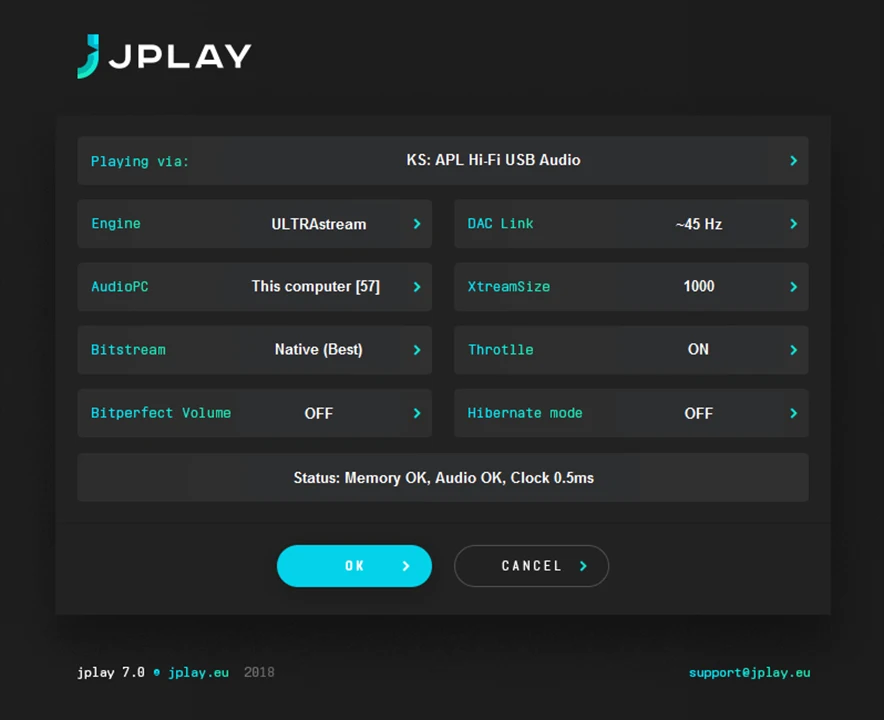
The software includes multiple playback engines and extremely small buffer settings (DAC Link up to 1000Hz), combined with high-priority scheduling.
This is aimed at reducing latency and system interference. Audio data is delivered to the DAC with minimal interruption, which is the core principle behind its perceived sound quality improvements.
Kernel Streaming, WASAPI, and ASIO output bypassing Windows mixer
JPLAY supports direct output methods like Kernel Streaming, WASAPI, and ASIO, allowing playback to bypass the Windows audio mixer.
This avoids resampling and system-level processing. In practice, it ensures the audio signal reaches the DAC unchanged, which is essential in audiophile workflows focused on “bit-perfect” playback.
Hibernate mode disabling system processes during playback
A dedicated Hibernate mode shuts down non-essential Windows processes while music is playing.
This reduces CPU activity and background noise from the operating system. The goal is to minimize timing inconsistencies (jitter) and resource contention that could affect audio delivery.
Dual-PC configuration separating control and audio processing environments
The software supports a dual-PC setup, where one machine handles control and library management while another handles audio playback.
This isolates audio processing from general computing tasks. It’s a niche setup, but in high-end systems it can reduce electrical and computational interference affecting playback.
High-resolution and streaming support including DSD256, TIDAL, and Qobuz
JPLAY FEMTO supports a wide range of formats—FLAC, WAV, AIFF, ALAC, and native DSD up to 256—as well as integration with lossless streaming platforms.
This makes it usable as both a local library player and a streaming endpoint, without switching software. The focus remains on maintaining high-resolution signal integrity across both sources.
When playback becomes a system optimization problem rather than a media experience
JPLAY FEMTO shifts the focus away from UI and features toward system-level performance. Playback is treated as a technical process—minimizing interference, controlling data flow, and optimizing hardware interaction.
That makes it powerful in the right setup, but also less intuitive. It’s built for users willing to configure their system around audio performance rather than convenience.
FAQs
-
Is JPLAY FEMTO a normal music player like Foobar or iTunes?
No. It doesn’t have a traditional interface. Playback is controlled through external apps using UPnP, while the software runs in the background as a playback engine.
-
Does it really improve sound quality?
It’s designed to minimize system interference and deliver bit-perfect audio. Whether the improvement is audible depends on your DAC, system, and listening setup.
-
Can it stream from services like TIDAL or Qobuz?
Yes. It integrates with both platforms through compatible control apps, allowing high-resolution streaming within the same playback system.
-
Do I need special hardware to use it?
At minimum, a compatible DAC is required. For best results, it’s often used in optimized systems or even dual-PC setups.
-
Is it beginner-friendly?
Not really. Setup and workflow are more complex than standard players, especially if using advanced configurations like dual-PC mode or network control.
JPLAY FEMTO
JPLAY FEMTO is a high-end Windows-based network audio player designed for audiophile-grade playback using a dual-component system: a UPnP media server (femtoServer) and a renderer. It focuses on ultra-optimized, bit-perfect playback with support for high-resolution formats including DSD256, and integrates with services like TIDAL and Qobuz. Built to run as a background service, it prioritizes low latency, minimal system interference, and direct DAC communication for maximum audio fidelity in dedicated listening setups.
Price: 149
Price Currency: EUR
Operating System: Windows 8
Application Category: Multimedia
4.2