- Developer: S1gns Of L1fe
- Version: 1.2
- File Size: 59 MB
- Formats: Standalone, VST3, AU
- System Requirements: Windows 10/11 (64-bit), macOS 11+ (Apple Silicon or Intel)
Airglow is a high-end atmosphere instrument by S1gns Of L1fe, designed for creating luminous melodic particles, glassy overtones, cinematic shimmer, moving air, textured dust, and evolving ambient motion.
Play or hold MIDI notes, choose a key and scale, then let Airglow generate musical sprays, resonant textures, drifting noise layers, and deep spatial glow. It is built for ambient music, cinematic sound design, meditation beds, generative textures, dreamlike accents, and slow-burning harmonic movement that feels alive without becoming crowded.
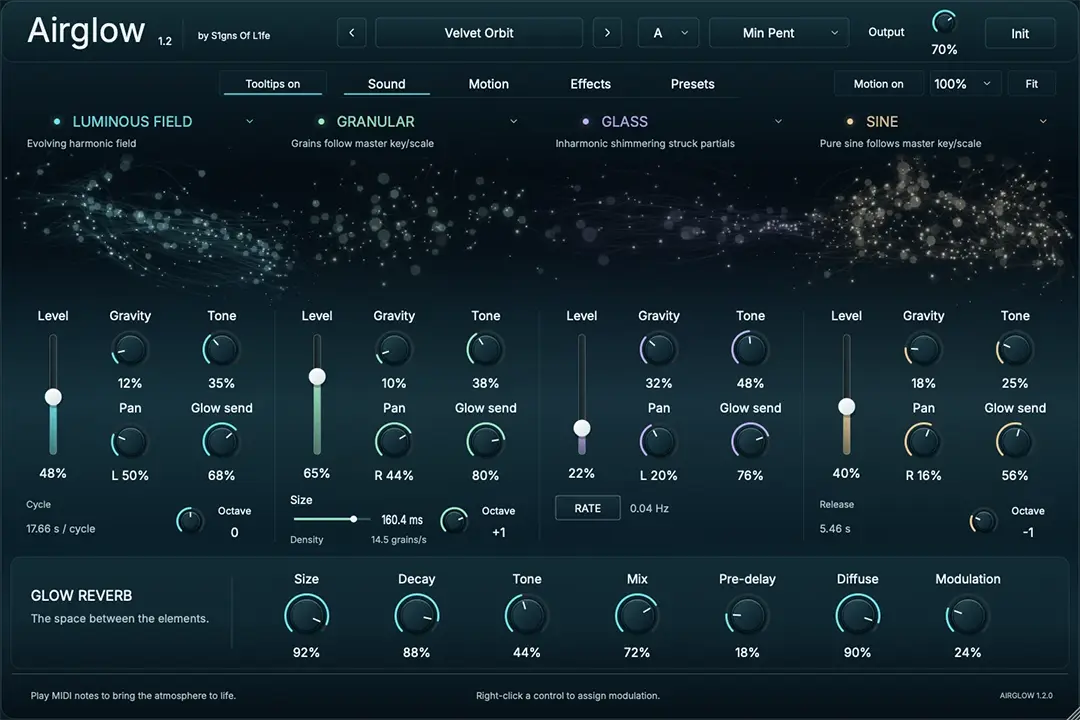
Airglow combines four interchangeable atmospheric source slots, four assignable LFOs, scale-locked musical behavior, pitch-locked noise resonance, animated particle displays, and an onboard Glow Reverb section into one focused instrument for creating polished atmospheric layers quickly.
What It Does
- Spray creates scale-locked melodic particles and shimmering musical strikes. Glass adds bright sparkle, bell-like overtones and icy definition.
- Air creates soft atmospheric noise, breath and haze. Dust adds fine granular shimmer and textured high-end motion. Both offer Pitch Lock for resonant filtering that follows the musical material.
- Sine, Granular, Particle and Luminous Field extend the palette with pure tones, grains, tonal particles and evolving harmonic fields.
- Key and Scale keep generated notes in your musical world, with 20 scale options.
- Gravity and timing controls shape how each engine moves or strikes, with free-running and tempo-synchronized options where supported.
- Source controls shape level, tone, stereo placement and the amount sent into Glow.
- Glow Reverb adds space with Size, Decay, Tone, Mix, Pre-Delay, Diffusion and Modulation.
- The preset library includes search, categories, save, update, delete, import and export. Share individual .airglowpreset files or back up your user library as an .airglowbank.
- A resizable interface and Motion Off let you choose a comfortable workspace or a calm, static display. Preset selection, window size and Motion settings are restored with your project.
Good For
- Ambient pads and atmospheres
- Cinematic shimmer and underscore beds
- Meditation and yoga music beds
- Generative melodic textures and scale-locked movement
- Glassy tonal accents and soft harmonic particle clouds
- Deep suspended reverb tails, textured air and dust layers
- Adding motion, glow and atmosphere around chords, drones and MIDI performances
New in Airglow 1.2
Airglow 1.2 expands the original atmosphere instrument with four new sound engines, deeper modulation and a redesigned interface, while keeping your existing presets and projects compatible.
- Four new engines: Sine, Granular, Particle and Luminous Field join Spray, Glass, Air and Dust. Choose any of the eight engines in each of four source slots, including duplicates.
- More musical control: the new engines follow the master key and scale, with independent octave controls. Granular adds adjustable grain size and longer tails at lower Gravity.
- Expanded modulation: four LFOs and ten routes, with right-click assignment, unipolar/bipolar routing, curves, smoothing and colored feedback around the controls.
- Ten new factory presets: 22 in total, exploring combinations of the classic and new engines.
- A redesigned interface: dark teal styling, engine-specific particle animation, a Glow visualization and a full-size preset library.
- Clearer text and optional tooltips: embedded Inter on Mac and Windows, 100%/125% text sizing, and a tooltip toggle that remembers your choice in saved sessions and across preset changes.
- Recall and reverb fixes: improved preset-name refresh, long reverb tails, and migration of older sessions and presets.
Important
Airglow is an instrument, not an audio effect. Load it on an instrument track or software instrument channel, or use the standalone application.
Airglow responds to MIDI notes. Use the Key and Scale controls to keep the generated movement locked to the musical world of your track. Use Glow, Reverb Mix, and the source-level Glow controls to place the sound deeper into space.