
- Product: Vovious
- Publisher: DoublePi Technologies
- Version: 1.0.13
- Format: Standalone, VST3, AU, AAX, ARA
- Requirements: Windows 10 or later, macOS 10.13 or later
- Source: vovious.com
Vovious is a pitch correction and vocal tuning plugin claiming a proprietary algorithm that separates overtones from fundamental pitch, enabling more natural-sounding corrections than traditional pitch shifters. It features neural network pitch detection (on-device, no-cloud), automatic pitch correction with manual per-note refinement (left/right slope, vibrato, amplitude, formants, sibilants), formant-preservation controls to prevent “chipmunk effect,” timing editor with visual beat indicators, MIDI reference import, ARA2 integration, automatic scale detection, and pitch drawing mode. Designed for vocal engineers, producers, and anyone pursuing transparent pitch correction without the artifacts of traditional tools, it addresses the need for surgical vocal tuning that sounds performed rather than processed.
Key Takeaway
Vovious enters a market dominated by Melodyne and Auto-Tune with a radical claim: its new algorithm separates vocal overtones from pitch, enabling corrections that sound “very natural” without the artificial quality of traditional pitch shifting. For vocal engineers tired of the “chipmunk effect,” it’s a genuine alternative worth the €229 investment and 30-day trial.
Why Traditional Pitch Shift Sounds “Wrong”
Traditional pitch correction plugins shift the entire vocal signal—fundamental pitch plus all harmonic content—together. This works fine for small shifts. But shift a vocal up two semitones, and listeners hear an unnaturally high-pitched version of the original voice. The voice doesn’t belong to a person who actually sounds that high—it sounds like a processed vocal.
Vovious claims to solve this by separating overtones (harmonics) from the fundamental pitch, allowing independent control. In theory, you can shift the pitch up two semitones while keeping the harmonic content proportional to the original voice, resulting in a vocal that sounds like a higher-pitched person, not a processed lower-pitched person.
The YouTube review (“Let’s Talk About Reaper,” Dec 2025) confirms: “Very natural-sounding correction” with formant control that prevents the classic “chipmunk effect.” This is not marketing hype; it’s genuine technical differentiation from Melodyne and Auto-Tune’s approaches.
Neural Network Pitch Detection: No Cloud, All Computer
Vovious uses state-of-the-art neural networks for pitch detection, running entirely on your computer—no cloud service, no internet requirement. This is important: pitch detection quality directly affects correction quality. Neural networks outperform traditional algorithms at detecting pitch in complex, polyphonic, or noisy recordings.
The on-device approach also ensures privacy and session independence—your vocal data never leaves your computer, and you’re not dependent on external services.
Automatic Pitch Correction with Manual Refinement
Vovious doesn’t ask you to draw pitch corrections by hand. Select notes, click “Automatic Pitch Correction,” and the plugin corrects them based on the detected key and scale. For ~80–90% of notes, this works perfectly. The remaining 10–20% of problem areas (wrong note detection, vibrato interference, complex transitions) require manual adjustment.
This balance—automatic for the common case, manual for edge cases—is more practical than pure manual drawing or pure automatic processing. You get speed without sacrificing precision.
Per-Note Micro-Control
Each note has individual controls for:
Left Slope and Right Slope: These control the attack and release characteristics—how the note enters and exits. Adjusting slope can smooth transitions or add intentional character without touching pitch.
Vibrato: Independent control of vibrato rate, width, and shape per note. This is crucial for natural-sounding singing—genuine vocalists don’t vibrato uniformly. Fine-tuning vibrato per note adds believability.
Amplitude: Note loudness adjustment without pitch change. This is often overlooked in pitch correction but essential—a vocal that’s perfectly in-tune but with odd dynamics sounds artificial.
Formants: This is the differentiator. Formants are the resonant frequencies that define vowel sound (“ah” vs. “oh” vs. “ee”). Independent formant control means you can adjust a vocal’s timbre—making it brighter, darker, or shifting the perceived vowel—without changing pitch. This is how you prevent the “chipmunk effect”: the pitch shifts, but the formants stay proportional to the original voice, so it sounds like a different person, not a processed version of the original.
Sibilants: Reduce harshness of “s” sounds or breathiness independently from pitch/formants.
The Formant Control: The Real Innovation
Traditional pitch correction tools (Melodyne, Auto-Tune) offer formant preservation—keeping formants fixed while pitch shifts—to prevent chipmunk sound. Vovious goes further: it lets you adjust formants independently.
This is subtle but powerful. If you need to shift a vocal up three semitones, Melodyne’s formant preservation keeps the formants at the original frequencies (preventing chipmunk, but sounding like a processed vocal). Vovious lets you shift the formants slightly to match what a naturally higher-pitched person would sound like, resulting in greater believability.
ARA2 Integration
Vovious supports ARA2 (Advanced Recording Architecture), meaning it receives vocal track data directly from your DAW without requiring export/import. Changes to the clip in your DAW automatically sync with Vovious.
This is workflow gold: you can edit the vocal in your DAW, and Vovious follows the clip changes automatically. You don’t need to manually re-export and re-import every time you adjust the source.
Timing Editor
Beyond pitch, Vovious includes a timing editor showing how notes fit the beat/grid. Visual indicators (colored lines) show which notes are on-beat (green) or off-beat (red). This is crucial for modern music where rhythmic precision matters. You can correct pitch and timing in one tool rather than switching between Melodyne and manual timing correction.
The Interface
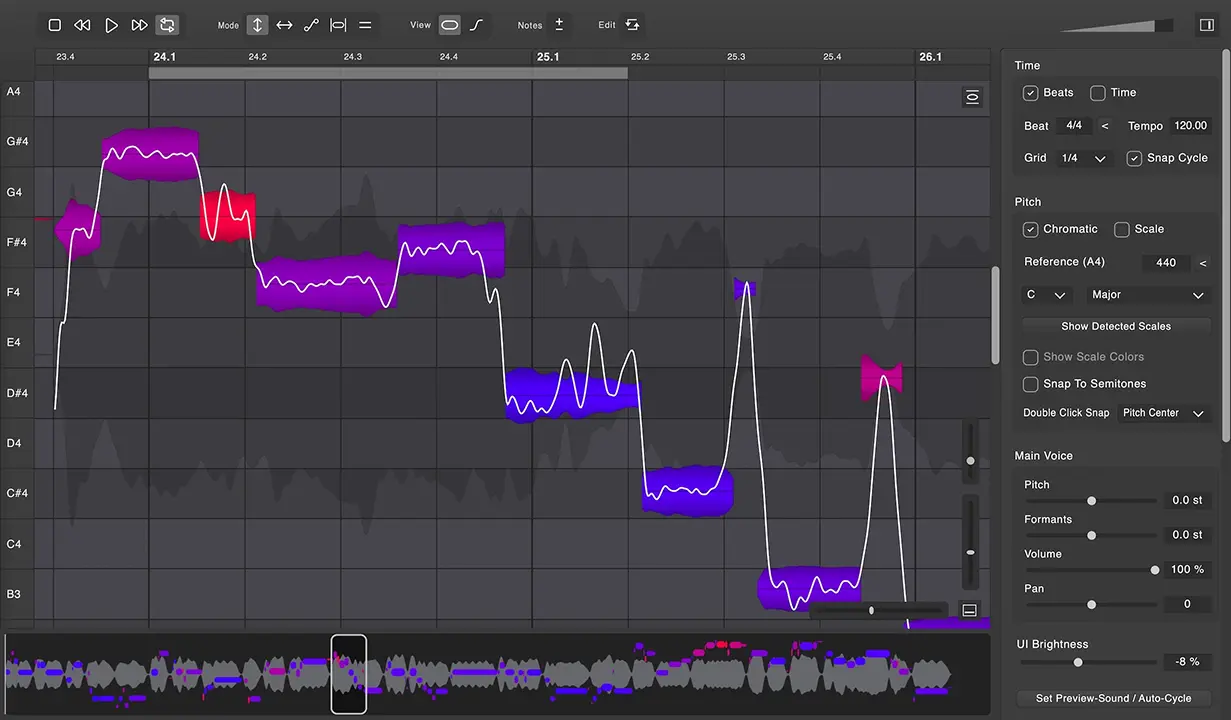
The interface uses color-coded notes (deviation from correct pitch = color intensity) and visual waveform display of overtones, making the abstract concept of “pitch correction” tangible. The pitch drawing mode lets you manually draw custom pitch curves if automatic correction isn’t sufficient.
Preview-on-hover is essential: hover over a note to hear how it sounds corrected before applying the change. This prevents surprises and speeds up decision-making.
The Price-to-Competition Ratio
At €229 (roughly $245–250), Vovious is:
- Cheaper than Melodyne Editor (~€400): Melodyne is more established; Vovious is newer but claims better natural sound.
- Comparable to Melodyne Essential: Same price range, but Vovious is full-featured (not Essential version).
- More expensive than Auto-Tune Standard: Auto-Tune Standard is ~$99, but focuses on rhythmic tuning as a feature; Vovious focuses on transparent correction.
For the feature set and claimed naturalness, the pricing is justified—premium but not excessive.
Moderate, Rewarding
The interface is intuitive (visual color-coded notes, clear controls), but understanding when to use automatic vs. manual correction and how per-note parameters interact requires 2–3 hours of experimentation. The manual is essential reading before heavy use.
This is steeper than “load and forget,” but gentler than traditional pitch drawing (Melodyne’s learning curve is equally steep).
| Pros | Cons |
| Overtone separation produces genuinely natural-sounding corrections. | Brand new company/plugin (December 2025); limited long-term user history. |
| Neural network pitch detection (on-device) surpasses traditional algorithms. | Formant control adds complexity vs. simpler tools (Auto-Tune, Waves Tune). |
| Per-note micro-control (slope, vibrato, formants, amplitude) enables precision. | Moderate learning curve; requires manual refinement for ~10–20% of notes. |
| Automatic correction handles 80–90% of notes; manual for problem areas. | Price (~€229) is premium; requires 30-day trial to justify investment. |
| ARA2 integration enables seamless DAW synchronization. | No offline processing mode mentioned (ARA integration implies real-time only). |
| Formant independence prevents chipmunk effect without sounding “processed.” | Unknown long-term support/updates (new developer). |
| 30-day fully-featured trial enables risk-free evaluation. | Comparison to Melodyne difficult without direct A/B testing. |
| Timing editor with visual beat indicators handles rhythm alongside pitch. | Extreme pitch shifts (octaves+) untested in available documentation. |
FAQs
-
How does Vovious compare to Melodyne?
Both are professional pitch correction tools. Melodyne is more established with deeper feature sets and decades of user base. Vovious claims superior natural sound through overtone separation and is cheaper (€229 vs. ~€400 for Melodyne Editor). Melodyne may have more advanced features for edge cases. Vovious is optimized for transparency. The 30-day trial is essential for direct comparison.
-
Is the “overtone separation” technology really different from Melodyne’s formant preservation?
Yes, meaningfully. Melodyne preserves formants (keeps them fixed during pitch shift). Vovious separates overtones and allows formant adjustment independent of pitch. Theoretically, Vovious sounds more natural because formants can shift proportionally to mimic how a higher/lower-pitched person would sound naturally.
-
Can I use Vovious without ARA2 support in my DAW?
Yes—it works as a standard plugin. ARA2 is optional integration; without it, you manually import/export like traditional plugins. ARA makes the workflow seamless, but the plugin functions without it.
-
How does automatic pitch correction work, and when do I need manual adjustment?
Automatic selection: select notes → press “Auto Pitch Correction” → plugin corrects based on detected key/scale. Works for ~80–90% of notes. Problem areas (note detection errors, vibrato confusion, complex transitions) require manual per-note adjustment. YouTube review shows this workflow in practice.
-
Is the 30-day trial enough to evaluate it?
Yes—load it on a few vocal tracks, compare automatic vs. manual corrections, try the formant controls, and test ARA integration (if your DAW supports it). 30 days is generous for comprehensive evaluation.
Final Verdict
Vovious enters a crowded market with a genuine innovation: overtone separation that produces more natural-sounding pitch correction than Melodyne or Auto-Tune’s approaches. The neural network pitch detection, formant independence, and per-note micro-control show thoughtful design.
The brand newness (December 2025) is a risk—long-term support is unknown. But the 30-day trial enables zero-risk evaluation, and the €229 price is justifiable for a professional tool.
For vocal engineers pursuing transparent pitch correction without processed artifacts, Vovious is essential. For casual users or those satisfied with Melodyne, it’s an optional alternative worth the trial before committing.
The development team’s honesty (acknowledging that automatic correction isn’t 100%, requiring manual refinement) suggests confidence in the product without hype.
Rating: 4.3 / 5
Natural-sounding pitch correction with overtone separation and independent formant control. Neural network pitch detection, automatic + manual correction, ARA2 integration, timing editor. Brand new company; moderate learning curve for per-note micro-control. Formant complexity vs. simpler tools. For vocal engineers seeking transparent correction, essential; for casual use, Melodyne remains the standard.
DoublePi Technologies Vovious
A pitch correction and vocal tuning plugin with claimed overtone separation technology, neural network pitch detection, automatic and manual correction modes, per-note micro-control (slope, vibrato, formants, amplitude, sibilants), formant-preservation controls, timing editor, ARA2 integration, scale detection, and MIDI reference import.
Price: 229
Price Currency: EUR
Operating System: Windows 10, macOS 10.13
Application Category: Multimedia
4.3