
- Product: Playmod
- Developer: Karanyi Sounds
- Version: 1.0.0
- Format: VST3, AU, AAX
- Requirements: Windows 10 or later, macOS 10.15 or later
- Source: karanyisounds.com/products/playmod
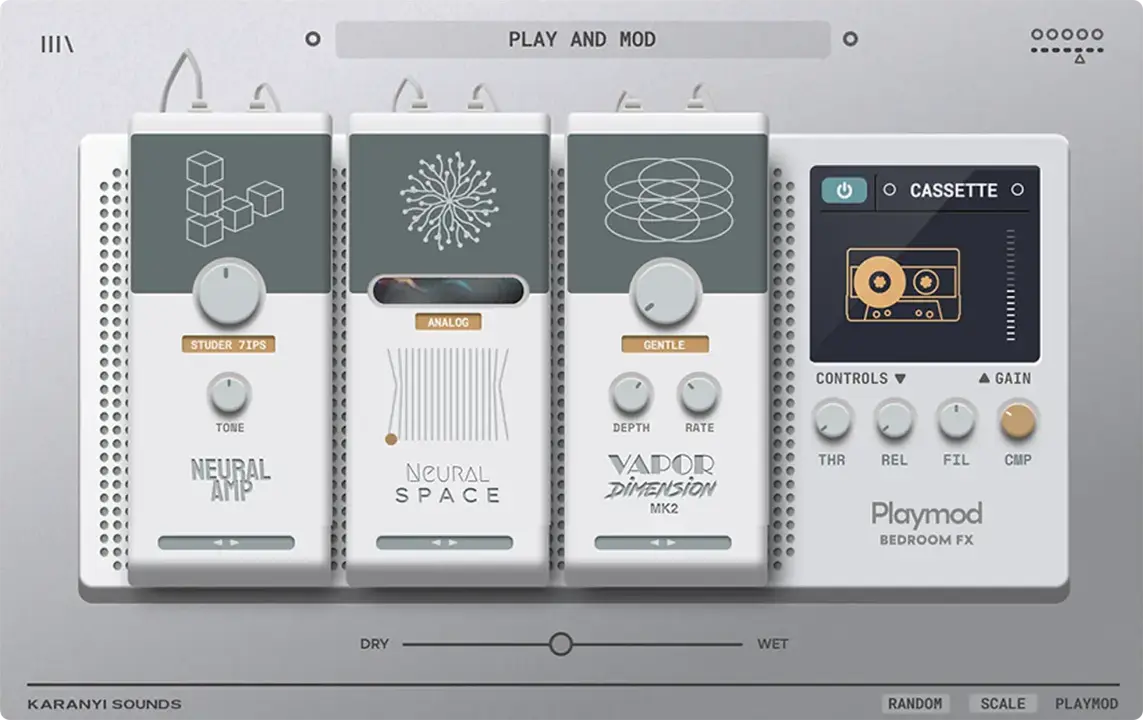
Playmod is a modular creative FX plugin built on Lofi Keys 2’s effect engine, offering four module types — Neural Amp, Neural Space, Vapor Dimension mk2, and a Player playback section — inside a 3-slot rack that can be reordered but not filled with all four at once. Neural Amp models 6 analog saturation circuits; Neural Space runs AI-assisted Analog and Digital reverb modes; Player emulates 6 vintage playback formats including vinyl, tape, and cassette. It answers the search for one FX chain covering saturation, reverb, modulation, and lo-fi playback together.
Key Takeaway
Activates when a track needs vintage character and saturation applied together in one reorderable chain, rather than stacking separate amp-sim, reverb, and lo-fi plugins across a session. It displaces a multi-plugin FX chain built from separate tools, not surgical corrective processing. Only 3 of the 4 module types run at once; a chain wanting all four simultaneously can’t fit them.
Any Slot Can Hold Any Module
Playmod’s signal chain runs through a 3-slot modular rack, with each slot able to hold any one of four module types — Neural Amp, Neural Space, Vapor Dimension mk2, or Player — in any order. Reordering two slots changes whether, say, saturation happens before or after the reverb tail, changing the character of that tail rather than just its loudness.
Because the rack has three slots and four module types exist, a chain can’t run all four simultaneously — building a signal path that wants saturation, reverb, modulation, and playback emulation all active at once means dropping one of the four or running a second instance of the plugin in series on the same track. Which module gets left out becomes a deliberate choice rather than something the rack accommodates automatically.
Swapping a slot’s module type doesn’t require rebuilding the rest of the chain — the other two slots and their settings stay in place while only the swapped slot’s own parameters change. Producers auditioning which combination of three modules suits a specific track get to test that combination quickly without starting the whole chain over each time.
Placement Decides What Gets Distorted
Neural Amp models six specific analog saturation circuits rather than one generic drive algorithm with a tone-shaping knob layered on top. Each of the six carries its own distinct harmonic character, so switching models changes which harmonics get added to a signal, not just how much distortion is applied.
Running Neural Amp in an earlier rack slot versus a later one changes what it actually distorts — placed before Neural Space, it saturates the dry signal that then gets reverberated; placed after, it saturates the reverb tail itself along with the dry signal, adding grit to the space rather than to the source.
Six fixed circuit models means the saturation character is chosen from that set rather than continuously dialed between arbitrary circuit types the way a single flexible saturation algorithm with several parameters might allow. Guitarists and instrumentalists chasing one of these six specific characters get an accurate, dedicated model; producers wanting to blend between two circuit types don’t have a crossfade between models built in.
Analog and Digital, Nothing Else
Neural Space runs two AI-assisted reverb modes, Analog and Digital, rather than one generic algorithmic reverb with a single character. Both modes are described as adaptive, meaning the reverb’s behavior responds to the input material rather than applying one fixed impulse or algorithm regardless of what’s feeding it.
As with Neural Amp, Neural Space’s position in the 3-slot rack changes what it processes — placed after Vapor Dimension mk2, it reverberates an already-widened, modulated signal; placed before, the reverb tail itself gets pushed through modulation afterward. Both reverb modes respond to how loud or sparse the input signal already is, not just to which mode is selected.
Only two reverb characters are available inside Neural Space itself — Analog and Digital — so a producer wanting a third distinct reverb algorithm, like a specific convolution-based space, reaches for a separate reverb plugin in another slot or another point in the chain entirely, since Player and Vapor Dimension mk2 don’t add reverb character of their own.
Chorus and Phaser Share One Slot
Vapor Dimension mk2 covers chorus, phaser, and stereo widening inside one module rather than three separate effect types requiring three separate slots. Presets within this module lean toward stereo enhancement specifically, positioning it as the modulation and width-shaping stage of the rack rather than a pitch- or time-based effect on its own.
Because chorus, phaser, and widening share one module and one slot, using this module means picking a starting point among its presets and adjusting from there, rather than running a dedicated chorus and a dedicated phaser as two separate rack slots at the same time. That trade-off frees a slot for one of the other three module types instead.
The “mk2” naming implies this module has a prior version, suggesting its chorus, phaser, and widener algorithms have already been revised at least once rather than being untouched since the plugin’s original release. Producers wanting modulation and stereo width together in one slot get that combination directly; producers who need chorus and phaser running as fully independent, simultaneously-tweakable stages use two separate slots with other plugins instead of relying on this one module for both.
Four Module Types, Three Rack Slots
Player emulates six playback formats — Vinyl, Old Vinyl, Digital, Bitcrush, Tape, and Cassette — each carrying its own distinct degradation character rather than one generic “lo-fi” effect with a single intensity knob. Vinyl and Old Vinyl exist as two separate models rather than one vinyl mode with an age parameter, implying each targets a specifically different point in vinyl’s own degradation character.
Each playback mode carries its own noise envelope, letting hiss or crackle fade in and out synced to the input signal rather than running as a constant background layer, alongside filter, noise gain, and compressor controls specific to that mode. Pitch modulation and noise type are also adjustable per mode, so a Cassette model’s wow-and-flutter character and a Tape model’s own pitch instability get tuned independently of each other.
Running Neural Amp, Neural Space, and Player together to cover saturation, reverb, and vintage playback character in one chain leaves Vapor Dimension mk2’s modulation and stereo widening out of that particular combination — a different priority, like keeping modulation and dropping Player instead, is just as valid a choice inside the same 3-slot constraint. Whichever module gets left out has to run from a separate plugin elsewhere in the DAW, since nothing outside Playmod’s own rack substitutes for a module that didn’t get a slot.
FAQs
-
Can all four Playmod module types run at the same time?
The rack has three slots, and four module types exist — Neural Amp, Neural Space, Vapor Dimension mk2, and Player — so only three can be active at once. Running all four means leaving one out, or adding a second instance of Playmod later in the chain. Which module gets left out is a choice made per chain, not fixed by the plugin.
-
How many saturation and reverb options does Playmod include?
Neural Amp models six distinct analog saturation circuits, and Neural Space runs two adaptive reverb modes, Analog and Digital. These sit alongside Vapor Dimension mk2’s chorus, phaser, and widening presets, and Player’s six playback-emulation models. All four module types draw from the same rack architecture rather than running as four completely separate plugins bundled together.
-
What does each Player playback mode let me customize?
Each of the six playback modes — Vinyl, Old Vinyl, Digital, Bitcrush, Tape, and Cassette — has its own noise envelope, filter, noise gain, compressor, pitch modulation, and noise type controls. A noise envelope lets hiss or crackle fade in and out synced to the input signal rather than sitting as a constant background layer. These controls are set independently per mode, not shared across all six.
-
Does Playmod include any bonus presets right now?
Playmod ships with 50 factory presets covering synths, guitars, drums, vocals, and sound-design starting points. A separate 40-preset Guitar Studio DLC, built specifically for guitar-based production, was listed as a free bonus for a limited time alongside the base purchase. Whether that DLC remains free depends on when the plugin is purchased, since the listing describes it as a time-limited offer.
-
What DAWs and systems does Playmod run on?
Playmod runs as AU, VST, VST3, and AAX on macOS 10.15 or later (Intel and Apple Silicon) and Windows 10 or later, 64-bit only. It’s listed as compatible with FL Studio, Ableton Live, Pro Tools, Logic Pro, GarageBand, Studio One, and Cubase, among other 64-bit-capable hosts. The install itself needs 500MB of free disk space and a minimum of 4GB of RAM.
Karanyi Sounds Playmod
Playmod is a modular creative FX plugin built on Lofi Keys 2's effect engine, offering four module types — Neural Amp, Neural Space, Vapor Dimension mk2, and a Player playback section — inside a 3-slot rack that can be reordered but not filled with all four at once. Neural Amp models 6 analog saturation circuits; Neural Space runs AI-assisted Analog and Digital reverb modes; Player emulates 6 vintage playback formats including vinyl, tape, and cassette. It answers the search for one FX chain covering saturation, reverb, modulation, and lo-fi playback together.
Price: 49
Price Currency: USD
Operating System: Windows 10, macOS 10.15
Application Category: Multimedia
3.9