
- Product: Predictor
- Developer: Sampleson
- Version: 1.0.3
- Format: Standalone, VST3
- Requirements: Windows 7 or later
- Source: sampleson.com/predictor
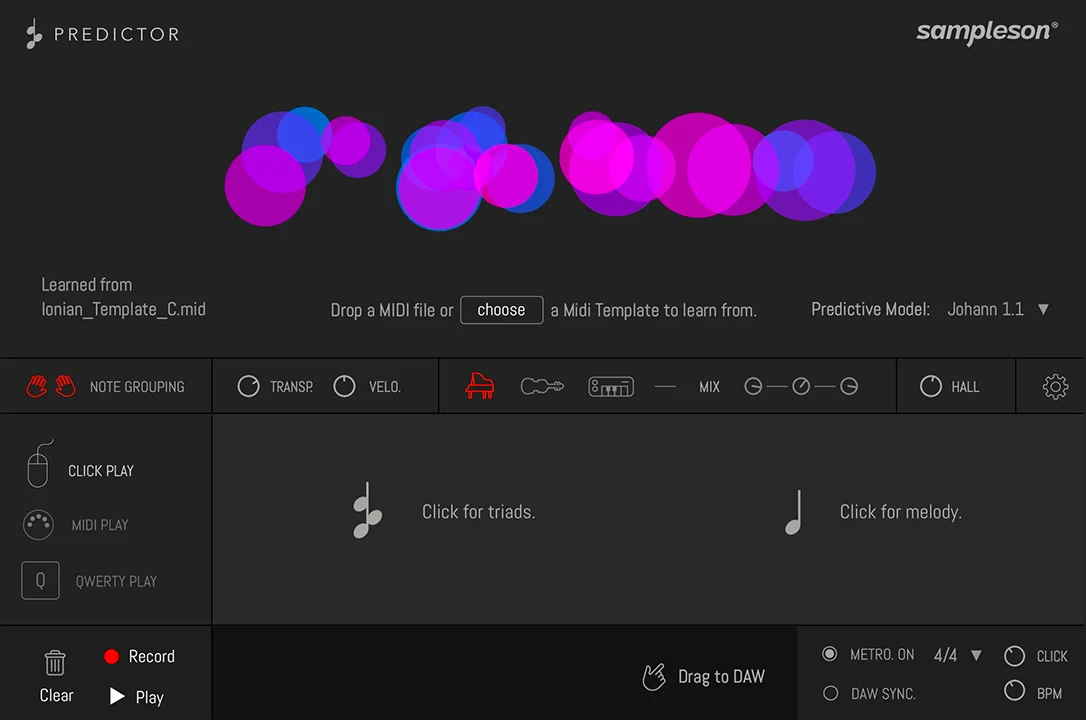
Predictor is a generative MIDI composition tool that learns the statistical relationships between notes, velocities, cadences, and structural position from any loaded MIDI file, then generates new notes and voicings in real time as a player triggers them. It operates as a VST3/AU plugin or standalone application, outputting MIDI that can be dragged directly to any DAW track or recorded in real time. Its differentiator is control model: the player governs only rhythm and register zone — when to trigger and in which octave range — while Predictor determines all pitch content from its learned model, reversing the usual composition workflow where pitch decisions are explicit and rhythm emerges from playing. For anyone searching for a composition tool that generates melodically coherent MIDI by learning from specific MIDI files rather than using a fixed generative algorithm, this is that tool.
Key Takeaway
Activates during composition and ideation when a producer needs melodic and harmonic suggestions that respond to the rhythmic feel of a performance rather than simply cycling through a preset pattern. Displaces blank-page composition blocks and generic arpeggiator patterns when the goal is finding a phrase direction quickly from an external musical reference rather than building one note by note. Doesn’t give direct control over which specific notes are generated — the output is probabilistic, drawn from the loaded MIDI file’s learned relationships, and producers who need to specify exact pitch content or work from a defined harmonic framework with predictable output can’t override Predictor’s generation model to force those results.
The Learned Model: What Predictor Analyzes and What It Ignores
Predictor’s generation model analyzes cadences, note relationships, velocity patterns, structural position within a piece, and modulations from the loaded MIDI file — building a probabilistic map of which note or chord is likely to follow any given state based on what the training MIDI file contained. This model is context-aware: the same trigger later in a performance may produce a different output than the same trigger at the beginning, because structural position within the phrase is one of the variables the model tracks and uses to inform its prediction.
What the model ignores at the trigger stage is the specific pitch of the input signal itself. Whether a player presses C, D, or E on a MIDI controller, Predictor outputs a note determined by its internal state and learned model rather than harmonically related to the input pitch. The only meaningful inputs are which keyboard zone the trigger falls in — low, mid, or high — and when the trigger arrives. This makes Predictor’s output feel compositionally autonomous rather than pitch-responsive, which is the design’s explicit intent: the player contributes timing and register, Predictor contributes pitch decisions.
Three Keyboard Zones and How Register Shapes Output
Predictor divides the keyboard into three fixed ranges — low (up to F2), mid (F2 to F4), and high (F4 and above) — and generates different categories of content depending on which zone a trigger falls in. The low zone produces bass-register content drawn from the model’s learned low-frequency relationships; the mid zone is where full chord voicings and triads generate, including polyphonic chord triggering that mimics a pianist’s left-hand range; the high zone generates melodic single-note content focused on upper register material. The Circles Zone on the interface represents these same three registers visually, letting mouse-click triggers target each zone by position rather than by specific key.
On a MIDI controller, the zone boundaries are determined by the note being played, which gives a player physical control over which register category is active at any moment by moving up or down the keyboard. Without a MIDI controller, the QWERTY keyboard interface maps specific letter keys to each zone, and the mouse-click interface allows direct zone selection by clicking within the appropriate Circles Zone region. The zone model means a producer building a phrase can shape whether Predictor is generating bass, chords, or melody by register choice alone — the only pitched decision the performance control model directly exposes.
Rhythm as the Primary Compositional Input
Because Predictor handles all pitch decisions, the player’s primary expressive contribution is timing — when each trigger arrives, how evenly or unevenly those triggers are spaced, and whether the rhythm follows a strict grid or a loose, feel-based pattern. A steady, metronomic tap produces an even-pulse phrase from the generated material; an uneven, performance-style tap with slight rushes and drags produces a rhythmically animated phrase from the same generation model. The generated notes themselves don’t change based on timing, but the phrase they form does, since the same sequence of pitches sounds structurally different when its rhythmic placement shifts.
This means Predictor’s output is partly determined by performance rather than only by the MIDI file it learned from — the same model can produce a stiff, mechanical phrase or a fluid, expressive one depending entirely on how the player triggers it. Independent testing noted that the experience feels “more expressive and connected” than listening to a pattern play back automatically, because the timing input directly shapes how the generated content unfolds. The absence of a memory-recall function means previously generated sequences that weren’t recorded to a DAW track can’t be retrieved — triggering again produces a new prediction from the same model, not a replay of an earlier result.
MIDI Library, User Files, and Output Routing
Predictor ships with a library of 600 MIDI files covering a range of styles and musical contexts, each serving as a potential training source for the generation model — loading a Bach prelude produces different generative behavior than loading an EDM loop because the learned statistical relationships are drawn from different source material. Loading a user-supplied MIDI file replaces the loaded model with one built from that file, with no restriction on file source, style, or complexity. An experiment confirmed in independent testing — training on a MIDI loop and then loading that same loop back as a Predictor track — produces output shaped by the loop’s own internal note relationships rather than generating a literal repeat of the loop itself.
Generated MIDI can be dragged directly from Predictor’s interface to any DAW track, or recorded in real time using the plugin’s own recording function and then dragged to a track after capture. The three included sketch sounds — piano, strings, and synthesizer with Hall reverb — let a producer hear the generated output through Predictor’s own audio engine before routing it to an external instrument, without requiring a separate instrument plugin to be instantiated and monitored alongside. Pro Tools is not supported in the current version; AAX format is absent from the format list, confining Predictor to VST3, AU, and standalone contexts.
Rhythm In, Pitch Out — With No Undo on the Notes It Chose
Predictor takes trigger timing and zone selection as its only inputs and handles all pitch decisions itself, drawn from whatever MIDI file it last learned from — which also means any phrase it generated and you didn’t record is simply gone.
FAQs
-
Does pressing a specific note on a MIDI controller affect which pitch Predictor outputs?
No — Predictor’s output is determined by its internal model state and the keyboard zone the trigger falls in, not by the specific pitch of the input note. Pressing C, D, or E in the same zone produces output drawn from the same learned relationships; the input pitch itself is not used as a harmonic reference for the generated result. The meaningful input dimensions are zone selection (low, mid, or high) and trigger timing — those are the only performance variables that shape what Predictor generates.
-
Can I retrieve a melody Predictor generated earlier if I didn’t record it?
No — Predictor has no memory-recall function, so a previously generated sequence that wasn’t captured to a DAW track can’t be replayed or retrieved. Triggering again produces a new prediction from the same model rather than a replay of an earlier result. The practical workflow is to record continuously during any performance session and select usable material afterward, rather than relying on the ability to recall specific sequences on demand.
-
What does loading a different MIDI file change about Predictor’s output?
Each MIDI file teaches Predictor a different statistical model of note relationships, velocities, cadences, and structural position — loading a Bach prelude versus an EDM loop versus a jazz standard produces different generative behavior because the learned relationships differ across those source materials. The model built from a user-supplied file has no restriction on style or complexity. Loading a new file replaces the previous model entirely; there’s no blending of multiple learned models in the same session.
-
How does the QWERTY keyboard mode work without a MIDI controller?
The QWERTY interface maps specific letter keys to the three zone regions, with the left-hand key area covering the lower chord zone and the right-hand area covering the higher melodic zone — an intentional layout that loosely mirrors a pianist’s hand separation on a full keyboard. Predictor detects note-on and note-off events from key presses and learns velocity patterns from the loaded MIDI file to simulate velocity response that a physical keyboard would otherwise provide. Multiple keys can be held simultaneously to trigger polyphonic output, mirroring the multi-note chord mode available to MIDI controller users.
-
Does Predictor work in Pro Tools?
No — the current version supports VST3 and AU formats only, without an AAX format for Pro Tools compatibility. It works as a standalone application outside any DAW, and in any VST3 or AU host. Producers working primarily in Pro Tools can use the standalone version to generate and record MIDI, then import the output file to a Pro Tools session rather than running Predictor as an in-session plugin.
Sampleson Predictor
Predictor is a generative MIDI composition tool that learns the statistical relationships between notes, velocities, cadences, and structural position from any loaded MIDI file, then generates new notes and voicings in real time as a player triggers them. It operates as a VST3/AU plugin or standalone application, outputting MIDI that can be dragged directly to any DAW track or recorded in real time. Its differentiator is control model: the player governs only rhythm and register zone — when to trigger and in which octave range — while Predictor determines all pitch content from its learned model, reversing the usual composition workflow where pitch decisions are explicit and rhythm emerges from playing. For anyone searching for a composition tool that generates melodically coherent MIDI by learning from specific MIDI files rather than using a fixed generative algorithm, this is that tool.
Price: 19
Price Currency: USD
Operating System: Windows 7
Application Category: Multimedia
4.2
![Read more about the article Tree DSP NN76 v1.1.3 [WiN]](https://plugincrack.com/wp-content/uploads/2026/04/tree-dsp-nn76.webp "Tree DSP NN76 v1.1.3 [WiN] 3 | Plugin Crack")
![Read more about the article Producer Loops 3AM [WAV-MIDI]](https://plugincrack.com/wp-content/uploads/2023/11/Producer-Loops-3AM-300x300.webp "Producer Loops 3AM [WAV-MIDI] 4 | Plugin Crack")